
Stay connected during the transition - Join our Discord community today.
Software Development Kit (SDK) and API Discussions
- Home
- :
- Developer Network
- :
- Software Development Kit (SDK) and API Discussions
- :
- Re: 'lag-time' units in the snapmirror-get-status API ?
Software Development Kit (SDK) and API Discussions
- Subscribe to RSS Feed
- Mark Topic as New
- Mark Topic as Read
- Float this Topic for Current User
- Bookmark
- Subscribe
- Mute
- Printer Friendly Page

- Mark as New
- Bookmark
- Subscribe
- Mute
- Subscribe to RSS Feed
- Permalink
- Report Inappropriate Content
Hi,
I had this result when i tested the 'snapmirror-get-status' function over zexplore, i would like to know if the lag-time that is returned is in milliseconds or just in seconds -
<results status="passed">
<is-available>false</is-available>
<snapmirror-status>
<snapmirror-status-info>
<source-location>-</source-location>
<destination-location>netappa:DestVol</destination-location>
<last-transfer-from>-</last-transfer-from>
<last-transfer-size>0</last-transfer-size>
<last-transfer-duration>0</last-transfer-duration>
<transfer-progress>0</transfer-progress>
<lag-time>4111865</lag-time>
<mirror-timestamp>1329338701</mirror-timestamp>
<contents>Replica</contents>
<status>idle</status>
<state>snapmirrored</state>
<base-snapshot>netappa(0050407061)_DestVol.16725</base-snapshot>
</snapmirror-status-info>
</snapmirror-status>
</results>
By the way, this is my first post here, apologies if there's been any mistakes in posting the question!
Solved! See The Solution


- Mark as New
- Bookmark
- Subscribe
- Mute
- Subscribe to RSS Feed
- Permalink
- Report Inappropriate Content
lag-time is returned in seconds.
- Mark as New
- Bookmark
- Subscribe
- Mute
- Subscribe to RSS Feed
- Permalink
- Report Inappropriate Content
lag-time is returned in seconds.
- Mark as New
- Bookmark
- Subscribe
- Mute
- Subscribe to RSS Feed
- Permalink
- Report Inappropriate Content
Thanks Kiran! Is there a document in place where i could refer the description for all the APIs ?
- Mark as New
- Bookmark
- Subscribe
- Mute
- Subscribe to RSS Feed
- Permalink
- Report Inappropriate Content
In SDK bundle, navigate to doc/ontapi/ontapi_<version> folder to find the Data ONTAP API documentation.

- Mark as New
- Bookmark
- Subscribe
- Mute
- Subscribe to RSS Feed
- Permalink
- Report Inappropriate Content
Kiran is right.
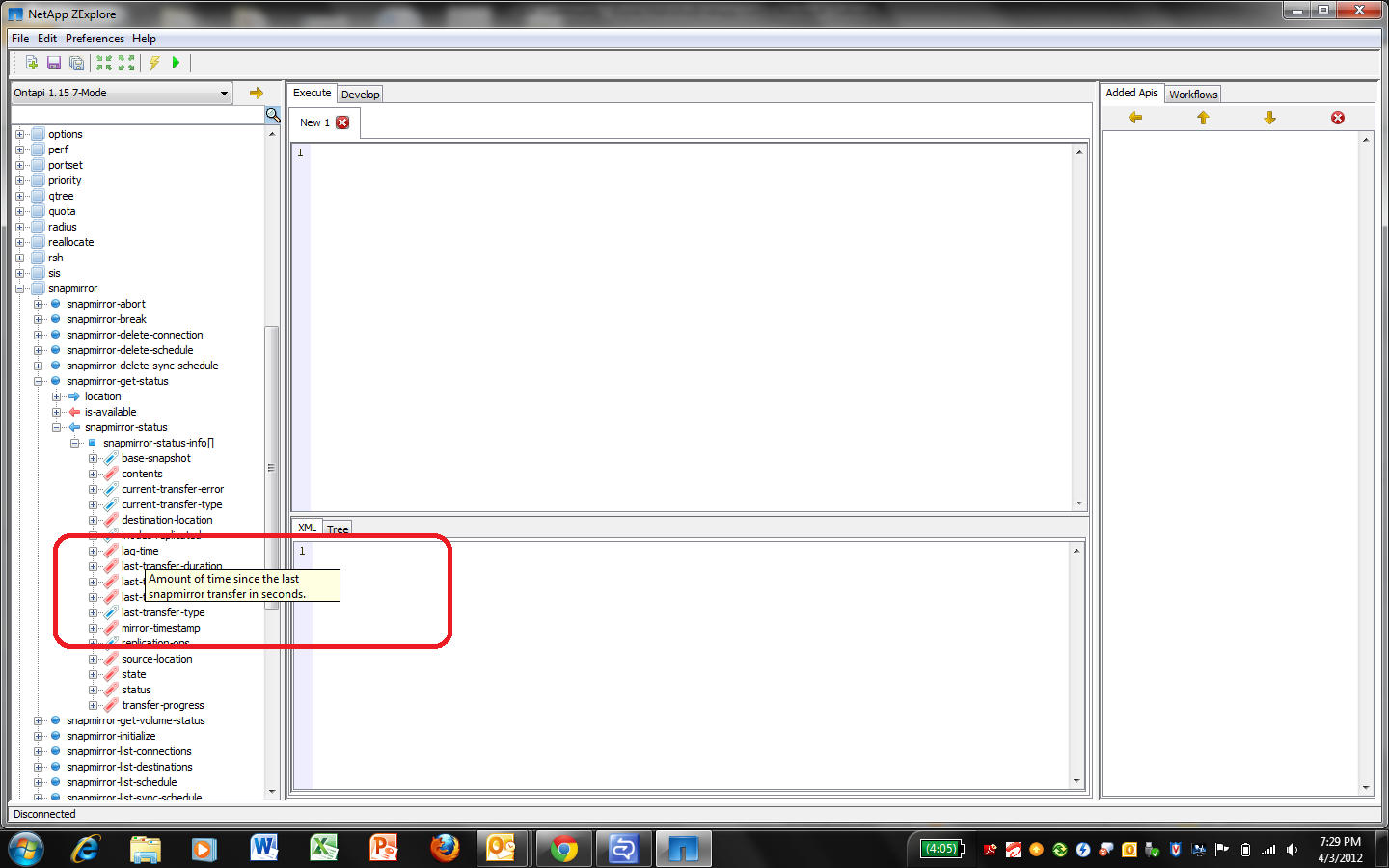
You can also know such details in ZExplore itself. Just keep your cursor over the parameter for its detail , see the screenshot below -

- Mark as New
- Bookmark
- Subscribe
- Mute
- Subscribe to RSS Feed
- Permalink
- Report Inappropriate Content
Hello Kunalm,
Were can we download Netapp Zexplorer?
Many thanks
Yves

- Mark as New
- Bookmark
- Subscribe
- Mute
- Subscribe to RSS Feed
- Permalink
- Report Inappropriate Content
You can find the zexplore.exe under <nmsdk_root>\bin\nt\ folder.
Regards,
Sen.
- Mark as New
- Bookmark
- Subscribe
- Mute
- Subscribe to RSS Feed
- Permalink
- Report Inappropriate Content
Sens,
I have the last version of the NMSDK for Windows (netapp-manageability-sdk-4.1-dotnet-bindings), and I don't have this .exe file in it. Is there a way to download it alone somewhere else?
Thanks.
- Mark as New
- Bookmark
- Subscribe
- Mute
- Subscribe to RSS Feed
- Permalink
- Report Inappropriate Content
Forgot my last message, I found it... I downloaded the All system package instead of the Windows one and I found it.
Many thanks!

