What happens when your critical Virtual Machine (VM) workloads vanish in a blink? In a hybrid cloud world, protecting OpenShift VMs isn’t just a best practice - it’s a necessity.
Red Hat OpenShift Virtualization brings together the power of VMs and containers, allowing VMs to function as native Kubernetes objects. An OpenShift VM isn’t just a disk - it’s a tightly woven fabric of components: VirtualMachine definitions, persistent volume claims (PVCs), Secrets, ConfigMaps, RBAC rules, and more. If you only back up the disks, you lose the orchestration logic. If you only save the manifests, you risk data inconsistency.
NetApp Backup and Recovery bridges this gap. It captures both the VM’s data and its orchestration metadata, enabling reliable recovery and smooth migration - without compromise.
Protection options
Imagine your primary OpenShift cluster experiences a catastrophic failure—due to a data center outage, hardware failure, or a ransomware attack. With the 3-2-1 protection policy in place, you’re equipped to recover without relying on the compromised primary site.
In addition to recover your VM workload from local snapshots, the 3-2-1 protection policy allows you to restore from a secondary copy of the VM data on a separate NetApp ONTAP system, or to restore from object storage.
NetApp Backup and Recovery’s concept of 3-2-1 protection
Backup and Recovery’s 3-2-1 fan-out protection strategy ensures recoverability even in worst-case scenarios. It does this by combining redundancy, media diversity, and geographic separation—something a single backup simply cannot guarantee.
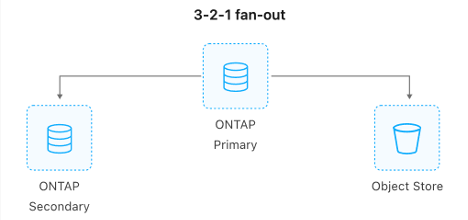
In detail, the 3-2-1 fan out protection policy provides:
- 3 copies for resilient VM/data protection
- 1 local protected copy: An incremental snapshot stored on local storage enables fast recovery with minimal data transfer, optimizing both Recovery Point Objective (RPO) and Recovery Time Objective (RTO).
- 1 secondary copy: A replicated snapshot copy built over tried and proved ONTAP SnapMirror replication.
- 1 off-site copy: A replicated version stored remotely—either on a secondary ONTAP instance using ONTAP S3 or in cloud-based object storage—ensures geographic redundancy.
- 2 distinct storage media
- Local and secondary ONTAP Snapshots: Utilizes CSI volume snapshots to efficiently capture point-in-time block and file states and replicate them to the secondary site as well.
- Third copy in object store: Provides enhanced durability, lifecycle management, and geographic independence for long-term retention and compliance.
- 1 off-site copy
- Object storage: Finally, the object storage copy is stored off-site. This ensures data integrity by preventing modification or deletion during the retention window, protecting against ransomware and accidental tampering as well as major disasters affecting the production site.
Recovering from the local snapshot copy is straightforward, but let’s have a closer look at the two other options below.
Recovery of OpenShift VMs using secondary ONTAP copy
In this scenario:
- The primary copy is lost or inaccessible.
- You initiate the recovery using the secondary copy, which resides on a separate ONTAP system.
This scenario demonstrates how the 3-2-1 strategy ensures business continuity even in the face of a complete site loss, leveraging SnapMirror replication, and flexible recovery workflows to minimize downtime and data loss.
Restoring OpenShift VMs from the third (off-site) copy in object storage
In the event of a complete failure of your primary site and/or secondary site - whether due to a data center outage, hardware malfunction, or a ransomware attack - NetApp’s 3-2-1 protection strategy ensures your VM-based workloads remain recoverable.
With the third copy securely stored in cloud object storage (such as ONTAP S3, AWS S3 or Azure Blob Storage, or NetApp StorageGRID), you can initiate recovery directly into a new OpenShift cluster. NetApp Backup and Recovery enables you to selectively restore critical Kubernetes resources - like PVCs, Secrets, and ConfigMaps - associated with your VMs, preserving both data and orchestration metadata.
This recovery workflow ensures:
- Geographic redundancy and long-term retention through object storage.
- Granular restore capabilities, allowing you to recover only the necessary components.
- Operational continuity, even when the original cluster is completely unavailable.
By leveraging cloud-native resilience and cross-cluster restore capabilities, NetApp empowers organizations to bounce back quickly and securely from catastrophic failures - without restoring unnecessary components or compromising consistency.
NetApp Backup and Recovery preparation
Now let’s try it out ourselves.
If you have already added your OpenShift cluster to the NetApp Console and manage your VM in the Console as an application, you can skip this section and move on to Creating a 3-2-1 protection policy for the VM.
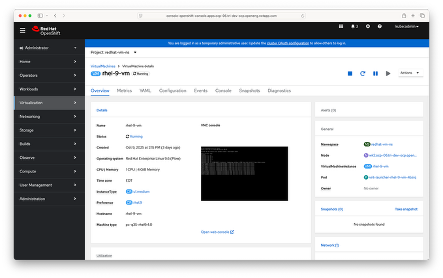
Your OpenShift VM should be up and running:
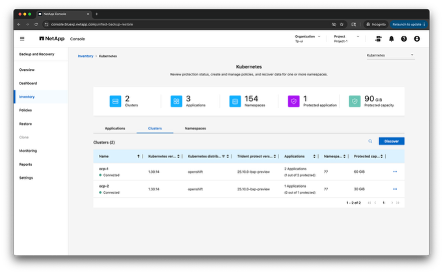
In the NetApp Console, navigate to the NetApp Backup and Recovery Kubernetes Inventory page and use the Discover option:
Specify your OpenShift cluster name and select the appropriate Console agent:
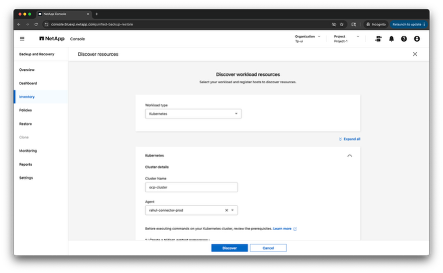
Complete the steps to discover and add your OpenShift cluster in the Console:
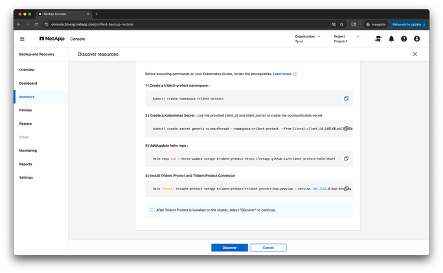
Now your OpenShift cluster should be fully discovered and show up in the Console’s inventory of clusters:
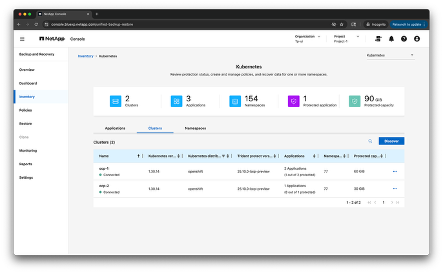
With the OpenShift cluster now managed in Backup and Recovery, we can start protecting applications on the cluster. Let’s first look at Backup and Recovery’s concept of an application.
Understanding application scope in NetApp Backup and Recovery for K8s
In Backup and Recovery service, an "application" is not limited to a single namespace or resource type. NetApp Backup and Recovery embraces this flexibility by allowing users to define applications that span:
- Multiple namespaces: You can group resources across different namespaces under a single application definition. This is particularly useful for microservices architectures where components of a single application or VMs are deployed in separate namespaces for isolation or organizational purposes.
- Multiple resource types: An application can include a wide variety of Kubernetes resources—such as Deployments, StatefulSets, PVCs, Secrets, ConfigMaps, Services, and more. This ensures that both data and orchestration logic are captured during backup and recovery.
- Cluster-scoped resources: Beyond namespace-scoped objects, Backup and Recovery also supports the inclusion of cluster-scoped resources like Custom Resource Definitions (CRDs), ClusterRoles, and ClusterRoleBindings. These are essential for restoring the full operational context of an application, especially in environments with custom controllers or role-based access (RBAC) configurations.
- Label-based selection: NetApp Backup and Recovery also supports defining applications using Kubernetes labels. This enables dynamic grouping of resources based on shared labels, allowing for flexible and scalable protection strategies. For example, all resources labeled with app=frontend or app=vm_org1 across multiple namespaces can be grouped into a single application definition, simplifying management and ensuring consistent backup policies across related components.
This holistic approach ensures that when you protect an application or VMs, you’re not just backing up its data—you’re preserving its entire operational footprint. During recovery, this enables seamless rehydration of the application or VM in the same or a different cluster, with minimal manual intervention.
Creating an application in Backup and Recovery
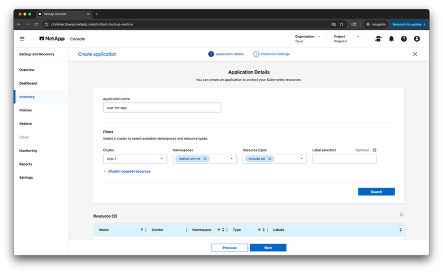
Now let’s create an application – in the example below we define an application ocp-vm-app consisting of all the resources in the namespace redhat-vm-ns. From the Backup and Recovery Inventory, click Create application and add the details:
We will create the protection policy in a separate step later, so click Create in the next screen:
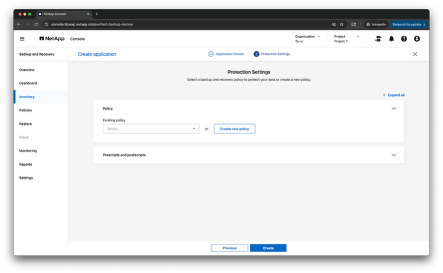
With the application ocp-vm-app configured, let’s explore how to build a resilient protection strategy.
Creating a 3-2-1 protection policy
To create the protection policy for the VM, got to Policies -> Create policy in the Console:
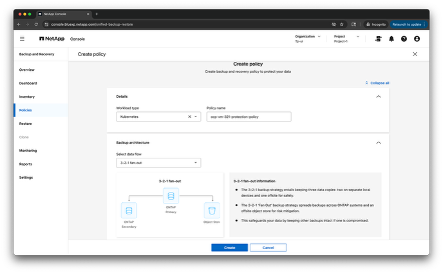
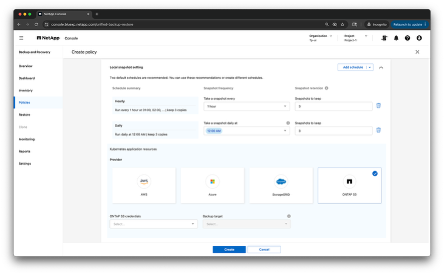
First, we configure the local snapshot settings, including the bucket for storing the application/VM metadata. Configuring local snapshot schedules involves setting up automated, point-in-time copies of your VM data stored on ONTAP volumes. These snapshots are created at defined intervals—commonly hourly and daily—to ensure frequent data protection.
Each snapshot schedule can be customized to meet specific recovery objectives:
- Frequency: You can define how often snapshots are taken (e.g., every hour for high-change workloads, daily for less volatile environments).
- Retention policy: You can specify how many snapshots to retain. This helps balance recovery granularity and storage utilization.
- Snapshot granularity: Hourly snapshots provide fine-grained recovery points, ideal for minimizing Recovery Point Objective (RPO). Daily snapshots offer broader coverage with reduced storage overhead.
These snapshots are space-efficient, leveraging ONTAP’s proven block-level change tracking to store only incremental differences. This enables low-latency recovery, allowing administrators to quickly revert to a previous state without transferring large volumes of data.
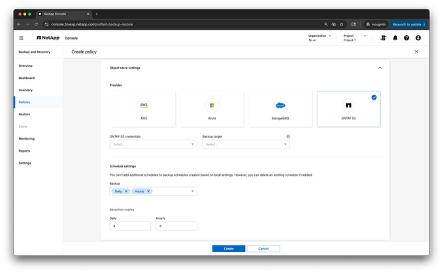
After configuring the local snapshot settings, we set up the secondary replication ONTAP target and define the corresponding bucket for storing the VM metadata. In the NetApp Backup and Recovery 3-2-1 protection strategy, the secondary copy is built over NetApp SnapMirror which plays a critical role in ensuring data redundancy and availability within the same region or across geographically distributed data centers.
The advantages of using SnapMirror for secondary replication include
- Efficient data transfer: Replicates only changed blocks between snapshots, minimizing bandwidth usage, and accelerating replication cycles.
- Low RPO/RTO: Supports frequent replication intervals, enabling very low Recovery Point Objectives (RPO) and fast Recovery Time Objectives (RTO) for critical workloads.
- Security and compliance: Encrypts data in transit and supports policy-based replication to meet regulatory and data protection requirements.
To configure secondary replication, we setup:
- Secondary ONTAP target: This refers to a separate ONTAP system (or cluster) designated to receive replicated data from the primary ONTAP storage. It acts as a recovery site in case the primary site becomes unavailable due to hardware failure, disaster, or other disruptions. Backup and Recovery will take care of the necessary SVM peering between the ONTAP clusters for you when setting up the replication target.
- Associated bucket: This is where application or VM metadata related to the secondary copy is stored.
- Retention copies: The secondary backup frequency and number of retention copies are pre-set with the values from the local snapshots. You can’t add additional schedules, but you can delete existing schedules if desired.
In the last step, we configure the off-site backup settings. For this third copy, Backup and Recovery also supports - in addition to ONTAP S3 and StorageGrid - integration with cloud object storage platforms like AWS S3 and Azure Blob Storage. These platforms offer:
- Geographic separation for disaster recovery
- Lifecycle management for cost-effective long-term retention
The schedule settings are again pre-set with the values from the local snapshots. You can’t add additional schedules, but you can delete existing schedules if desired.
With the protection policy configured now, we can attach it to the application. Select your application from the Application tab in the Inventory and click Protect in the associated Actions menu. In the Policy area, choose the protection policy to protect the application. In the Prescripts and Postscripts area, you can enable and configure any prescript or postscript execution hooks that you want to run before or after backup operations. You can configure the type of execution hook, the template it uses, arguments, and label selectors. In the case of protecting virtual machines, Backup & Recovery automatically freezes the VM filesystems before taking a snapshot of backup, without needing to add an execution hook.
Then select Done. Backup and Recovery now enables protection for the application based on your settings, and you can monitor the progress in the Monitoring area of Backup and Recovery. As soon as you enable protection for an application, the Console creates an initial full backup of the application. Any future incremental backups are created based on the schedule that you defined in the protection policy associated with the application.
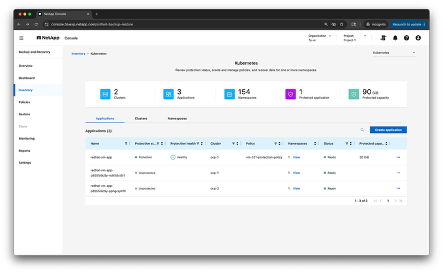
Once the initial snapshots and backups are complete, your application protection will show a Healthy state:
Restore a virtual machine
With the application being protected now, let’s look at how recovery works.
To restore an application (virtual machine in our case), an application needs to have at least one restore point available. A restore point consists of either the local or remote snapshot or the backup to the object store. You can restore an application using the local, secondary, or object store archive.
To restore, select Inventory in the Console, select the Applications tab and search for your application/VM in the list of applications. In the associated Actions menu, select View and restore, which will show you the list of available restore points.
To restore, open the Actions menu for the restore point you want to use, and select Restore. Choose the source to restore from (local or secondary snapshot, or object store). From the cluster list, choose the destination cluster, and then the destination namespace (you can restore to the original namespace or restore to a new namespace).
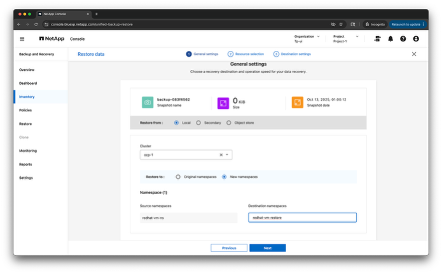
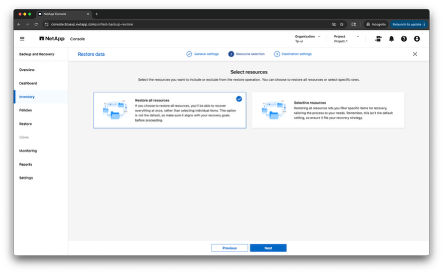
Select Next to choose whether you want to restore all resources associated with the application or use a filter to select specific resources to restore.
Finally, choose to restore either to the default storage class or to a different storage class. Select Restore and the restore will begin.
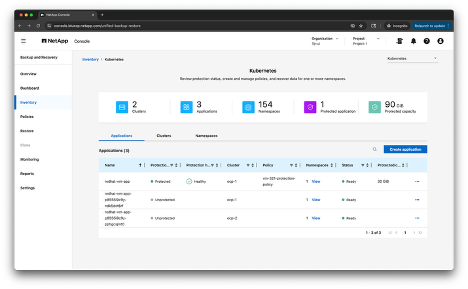
In the last example, you can see the list of applications after restoring the VM once to a different namespace on the same cluster ocp-1 and to a different cluster ocp-2:
Conclusion
Protecting OpenShift VMs is a critical aspect of maintaining business continuity in hybrid cloud environments. NetApp’s Backup and Recovery solution, with its 3-2-1 protection policy, provides a robust framework for ensuring data integrity and availability. By maintaining three copies of data across different media and locations, organizations can recover quickly from various failure scenarios, including data center outages, hardware failures, and ransomware attacks. This approach not only safeguards data but also preserves the orchestration metadata essential for seamless VM recovery. Implementing this strategy empowers organizations to minimize downtime, reduce data loss, and maintain operational resilience, ensuring that critical workloads remain protected and recoverable under any circumstances.
