Hey all. I'm having some trouble getting a new ONTAP datastore mounted in vmware.
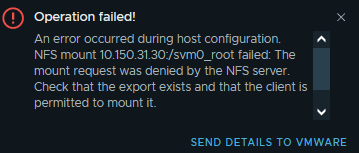
I'm running into this error and have tried this KB. I don't see anything glaring that's wrong however this is my first NetApp appliance.
https://kb.netapp.com/Advice_and_Troubleshooting/Data_Storage_Systems/FlexPod_with_Infrastructure_Automation/VMware_vSphere%3A_The_mount_request_was_denied_by_the_NFS_server
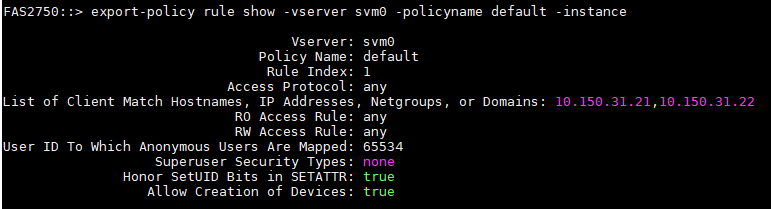
FAS2750::> volume show -vserver svm0 -volume svm0_root -instance

                                   Vserver Name: svm0
                                    Volume Name: svm0_root
                                 Aggregate Name: FAS2750_01_SSD_1
  List of Aggregates for FlexGroup Constituents: FAS2750_01_SSD_1
                                Encryption Type: none
               List of Nodes Hosting the Volume: FAS2750-01
                                    Volume Size: 2TB
                             Volume Data Set ID: 1025
                      Volume Master Data Set ID: 2153755296
                                   Volume State: online
                                   Volume Style: flex
                          Extended Volume Style: flexvol
                        FlexCache Endpoint Type: none
                         Is Cluster-Mode Volume: true
                          Is Constituent Volume: false
                  Number of Constituent Volumes: -
                                  Export Policy: default
                                        User ID: 0
                                       Group ID: 0
                                 Security Style: unix
                               UNIX Permissions: ---rwxrwxrwx
                                  Junction Path: /
                           Junction Path Source: -
                                Junction Active: true
                         Junction Parent Volume: -
                                        Comment:
                                 Available Size: 1.90TB
                                Filesystem Size: 2TB
                        Total User-Visible Size: 1.90TB
                                      Used Size: 596KB
                                Used Percentage: 0%
           Volume Nearly Full Threshold Percent: 95%
                  Volume Full Threshold Percent: 98%
                               Maximum Autosize: 2.40TB
                               Minimum Autosize: 2TB
             Autosize Grow Threshold Percentage: 85%
           Autosize Shrink Threshold Percentage: 50%
                                  Autosize Mode: off
            Total Files (for user-visible data): 21251126
             Files Used (for user-visible data): 102
                      Space Guarantee in Effect: true
                            Space SLO in Effect: true
                                      Space SLO: none
                          Space Guarantee Style: volume
                             Fractional Reserve: 100%
                                    Volume Type: RW
              Snapshot Directory Access Enabled: true
             Space Reserved for Snapshot Copies: 5%
                          Snapshot Reserve Used: 0%
                                Snapshot Policy: none
                                  Creation Time: Mon Oct 24 18:06:06 2022
                                       Language: C.UTF-8
                                   Clone Volume: false
                                      Node name: FAS2750-01
                      Clone Parent Vserver Name: -
                        FlexClone Parent Volume: -
                                  NVFAIL Option: off
                          Volume's NVFAIL State: false
        Force NVFAIL on MetroCluster Switchover: off
                      Is File System Size Fixed: false
                     (DEPRECATED)-Extent Option: off
                  Reserved Space for Overwrites: 0B
              Primary Space Management Strategy: volume_grow
                       Read Reallocation Option: off
    Naming Scheme for Automatic Snapshot Copies: create_time
               Inconsistency in the File System: false
                   Is Volume Quiesced (On-Disk): false
                 Is Volume Quiesced (In-Memory): false
      Volume Contains Shared or Compressed Data: false
              Space Saved by Storage Efficiency: 0B
         Percentage Saved by Storage Efficiency: 0%
                   Space Saved by Deduplication: 0B
              Percentage Saved by Deduplication: 0%
                  Space Shared by Deduplication: 0B
                     Space Saved by Compression: 0B
          Percentage Space Saved by Compression: 0%
            Volume Size Used by Snapshot Copies: 716KB
                                     Block Type: 64-bit
                               Is Volume Moving: false
                 Flash Pool Caching Eligibility: read-write
  Flash Pool Write Caching Ineligibility Reason: -
                        Constituent Volume Role: -
                          QoS Policy Group Name: -
                 QoS Adaptive Policy Group Name: -
                            Caching Policy Name: -
                Is Volume Move in Cutover Phase: false
        Number of Snapshot Copies in the Volume: 5
VBN_BAD may be present in the active filesystem: false
                Is Volume on a hybrid aggregate: false
                       Total Physical Used Size: 1.28MB
                       Physical Used Percentage: 0%
                                 FlexGroup Name: -
                          Is Volume a FlexGroup: false
                                  SnapLock Type: non-snaplock
                          Vserver DR Protection: -
                   Enable or Disable Encryption: false
                            Is Volume Encrypted: false
                               Encryption State: none
                              Encryption Key ID:
                                    Application: -
                  Is Fenced for Protocol Access: false
                    Protocol Access Fence Owner: -
                                Is SIDL enabled: off
                          Over Provisioned Size: 0B
                Available Snapshot Reserve Size: 102.4GB
                              Logical Used Size: 596KB
                        Logical Used Percentage: 0%
                         Logical Available Size: -
         Logical Size Used by Active Filesystem: 596KB
             Logical Size Used by All Snapshots: 0B
                        Logical Space Reporting: false
                      Logical Space Enforcement: false
                          Volume Tiering Policy: none
            Performance Tier Inactive User Data: -
    Performance Tier Inactive User Data Percent: -
Tags to be Associated with Objects Stored on a FabricPool: -
Does the Object Tagging Scanner Need to Run on This Volume: -
             Is File System Analytics Supported: true
  Reason File System Analytics is not Supported: -
                    File System Analytics State: off
            File System Analytics Scan Progress: -
                                 Is SMBC Master: false
                       Is SMBC Failover Capable: false
                                 SMBC Consensus: -