What is NetApp Trident?
NetApp Trident is a storage orchestrator developed by NetApp that adheres to the CSI specification, providing persistent storage solutions for Kubernetes environments. It integrates seamlessly with NetApp storage systems and is fully compatible with Amazon EKS, a managed Kubernetes service.
Trident operates by automatically handling persistent volume claims (PVCs) within Kubernetes. When a PVC is made, Trident communicates with the relevant NetApp storage service to provision the necessary volumes. In AWS environments, Trident integrates effortlessly with Amazon EKS deployments, using the robust capabilities of NetApp ONTAP to deliver reliable persistent storage.
What are Amazon EKS add-ons?
Add-on software gives an application more capabilities, and the same is true with Amazon EKS add-ons. The AWS Marketplace hosts numerous verified and compatible third-party add-ons that can provide operational capabilities for Amazon EKS that aren’t available out of the box.
When you install these add-ons through the AWS Marketplace, you can be sure that they’re all AWS compliant, have up-to-date security patches, and have been tested to work properly with your underlying Amazon EKS deployment.
NetApp Trident as an Amazon EKS add-on
With this new functionality, you can now download NetApp Trident directly from the AWS Marketplace through the Amazon EKS console.
This enhancement simplifies the deployment and integration of Trident within the Amazon EKS deployment wizard. Whether you use UI or CLI tools like eksctl, the Trident add-on provides the same capabilities, a consistent and seamless experience across different interfaces. As a result, Trident is now seamlessly incorporated into the Amazon EKS deployment workflow, eliminating the need for manual installation on your part.
In summary, this update significantly streamlines the process of using Amazon EKS with NetApp ONTAP, making it much more convenient and efficient for you.
What is auto-configuration of back ends on Amazon FSx for NetApp ONTAP?
Previously, users had to manually configure numerous prerequisites—like the Trident back end, storage classes, before deploying their applications. Starting with the 25.02 release, Trident now supports automatic back-end configuration after you install it, which sets up Trident related configurations automatically, providing a seamless experience. Here is a list of resources that are created as part of this process:
- Trident back end
- Storage class
- containing SVM credentials
- SVM for each FSx for ONTAP file system
Currently, automatic back-end configuration on Amazon FSx for NetApp ONTAP is supported only for the NFS and iSCSI protocols.
Prerequisites
Following are the prerequisites for automatic Trident back-end configuration for FSx for ONTAP:
- Find the file system ID for the FSx for ONTAP instance. You can obtain it from the AWS portal in the Amazon FSx service. This portal displays all the available file systems along with their IDs.
- Ensure that you have an IAM role with the necessary permissions so that this feature functions properly. To confirm that all the permissions are in place for the newly created role, review the documentation on how to create an IAM role.
- Make sure that you have Custom Resource Definitions (CRDs) for the VolumeSnapshotClass, VolumeSnapshotContent, and VolumeSnapshot installed on your cluster before you enable the automatic back-end configuration feature.
kubectl apply -f https://raw.githubusercontent.com/kubernetes-csi/external-snapshotter/release-5.0/client/config/crd/snapshot.storage.k8s.io_volumesnapshotclasses.yaml

kubectl apply -f https://raw.githubusercontent.com/kubernetes-csi/external-snapshotter/release-5.0/client/config/crd/snapshot.storage.k8s.io_volumesnapshotcontents.yaml

kubectl apply -f https://raw.githubusercontent.com/kubernetes-csi/external-snapshotter/release-5.0/client/config/crd/snapshot.storage.k8s.io_volumesnapshots.yaml
How to install and to enable back-end auto-configuration for the NetApp Trident add-on
Let’s take a high-level look at how to deploy and to auto-configure Trident through the Amazon EKS console:
- Select the Amazon EKS cluster on which NetApp Trident needs to be installed.
- Navigate to the Add-Ons section. Here, you see a list of any add-ons that you currently have installed.
- Click the Get More Add-Ons button.
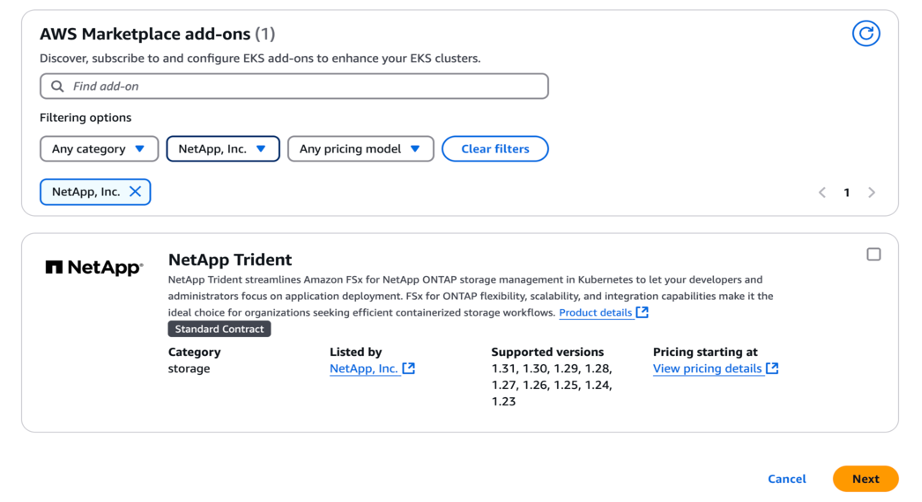
- From the Select Add-Ons window, scroll down to the AWS Marketplace Add-Ons section.
- You can search for “NetApp” or “NetApp Trident” in the search field, or you can use the filtering option to select NetApp from the list of vendors.
- NetApp Trident appears in the search results by using either method. Select it by checking the box at the top right.
- Click Next to continue with the installation process.
- Select the 25.02 version from the drop-down menu, because automatic back-end configuration is supported starting with this version.
- To enable auto-configuration, you need to pass a few details as part of the JSON schema (shown in the following “Optional configurations”), which includes the file system ID, the authentication method for SVMs, and protocols for which auto-configuration needs to be performed. Next, in the cloudIdentity field, provide the IAM role that you created during the prerequisite phase. Click Next to continue with the installation process.
 {
    "cloudIdentity": "'eks.amazonaws.com/role-arn: arn:aws:iam::<accountID>:role/<AWSEKS_FSxN_CSI_DriverRole>'"
    "ontapConfigurator": {
        "enabled": true,
        "svms": [
            {
                "authType": "awsarn",
                "fsxnID": "fs-0dfeaa884a68b1cab",
                "protocols": [
                    "nfs",
                    "iscsi"
                ]
            },
			{
                "authType": "awsarn",
                "fsxnID": "fs-5dclba491a31c2cdc",
                "protocols": [
                    "nfs",
                ]
            }
        ]
    }
}
- Let’s briefly try to understand the newly added ontapConfigurator section:
- ontapConfigurator: The root object for the ONTAP configuration-related user input:
- enabled: Set to true to enable automatic back-end configuration.
- svms: Contains the list of file system IDs for which automatic back-end configuration will be created:
- authType: Set the authentication type for SVM authentication. For AWS, arn-based authentication ("awsarn") is currently supported.
- fsxnID: Set the file system ID of the FSx for ONTAP instance; for example, "fs-0dfeaa884a68b1cab".
- protocols: Specify the list of supported protocols for automatic back-end configuration; "nfs", "iscsi", or both.
- On the final window, review all the details to ensure that they are correct, and then click Create
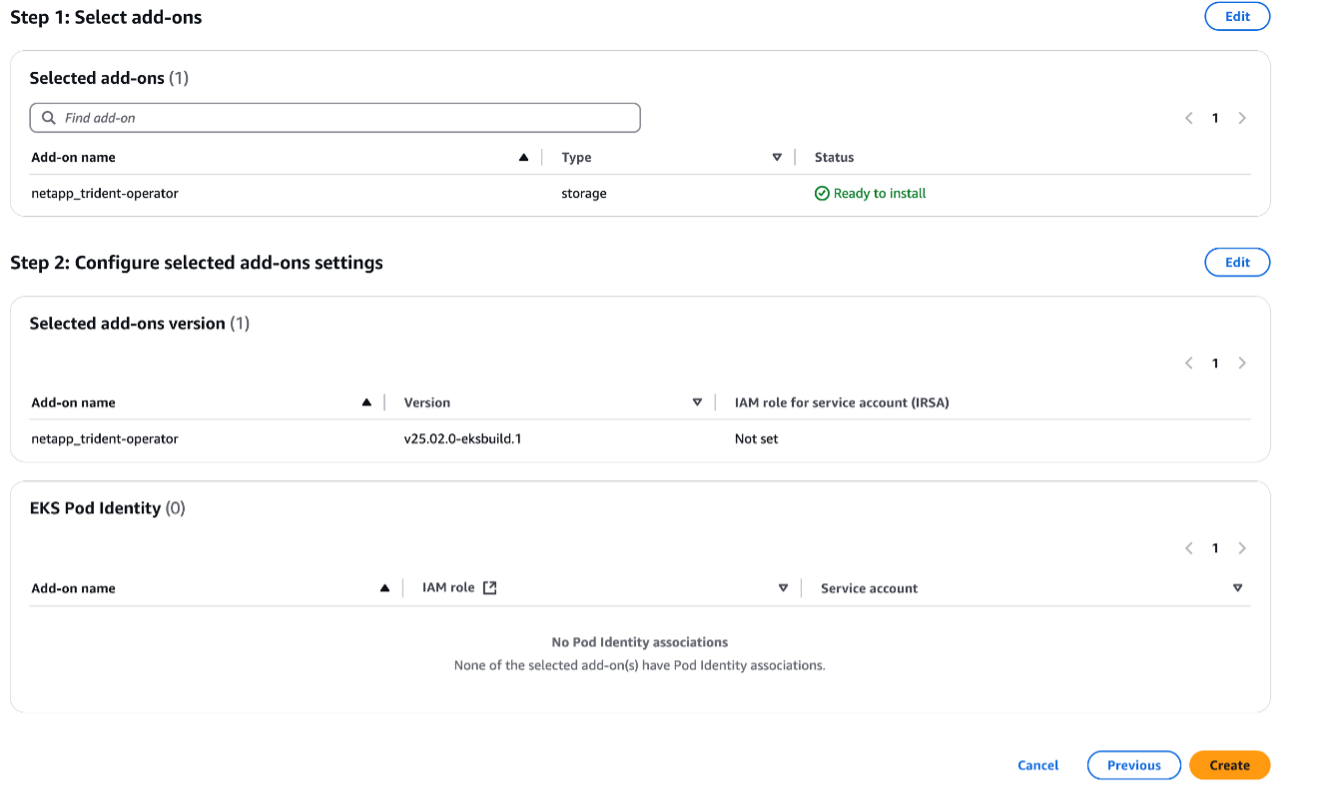
- Now you can move on to your cluster and verify that Trident was successfully installed.
kubectl get pod -n trident
NAME                                  READY   STATUS    RESTARTS   AGE
trident-controller-6fcb4d9c8d-2hrw6   6/6     Running   0          9m51s
trident-node-linux-bxmvn              2/2     Running   0          9m50s
trident-node-linux-gldkc              2/2     Running   0          9m50s
trident-node-linux-w47w6              2/2     Running   0          9m50s
trident-node-linux-wq6sm              2/2     Running   0          9m50s
trident-operat​
- Now that Trident is set up, you can also verify that the Trident configurators (responsible for the lifecycle of auto-configuration), Trident back ends, storage classes, and AWS Secret Manager secrets have been created successfully.
- The tconfs, which hold user-entered inputs such as file system ID, protocols, and authentication type, should also have been created.
kubectl get tconf -n trident
NAME                              PHASE   STATUS    CLOUD PROVIDER
netapp-nas-backend-configurator   Done    Success   AWS
netapp-san-backend-configurator   Done    Success   AWS

---------------------------------------------------------------------------------------

kubectl describe tconf netapp-nas-backend-configurator -n trident
Name:         netapp-nas-backend-configurator
Namespace:
Labels:       app.kubernetes.io/managed-by=Helm
Annotations:  meta.helm.sh/release-name: trident
              meta.helm.sh/release-namespace: trident
API Version:  trident.netapp.io/v1
Kind:         TridentConfigurator
Metadata:
  Creation Timestamp:  2025-03-13T12:44:53Z
  Generation:          1
  Resource Version:    1008274
  UID:                 18d9311f-931c-4f37-b4ee-5adb5d163039
Spec:
  Storage Driver Name:  ontap-nas
  Svms:
    - Auth Type:  awsarn
      Fsxn Id:    fs-0dfeaa884a68b1cab
      Protocols:
        - nfs
        - iscsi
      Svm Name:  trident-fs-0dfeaa884a68b1cab
    - Auth Type:  awsarn
      Fsxn Id:    fs-5dclba491a31c2cdc
      Protocols:
        - nfs
      Svm Name:  trident-fs-5dclba491a31c2cdc
Status:
  Backend Names:
    - trident-fs-04f8f55e27350a9c1-nfs
    - trident-fs-04f8f55e27350a9c2-nfs
  Cloud Provider:         AWS
  Deletion Policy:
  Last Operation Status:  Success
  Message:                Completed Trident backend configuration
  Phase:                  Done
Events:
  Type    Reason      Age                  From                        Message
  ----    ------      ----                 ----                        -------
  Normal  Processing  119s                 trident-operator.netapp.io  Provided backend configuration is correct
  Normal  Processing  118s (x2 over 2m1s)  trident-operator.netapp.io  Validating backend configuration
  Normal  Processing  118s                 trident-operator.netapp.io  Creating backend with the provided configuration
  Normal  Processing  118s                 trident-operator.netapp.io  Backend creation successful
  Normal  Processing  118s                 trident-operator.netapp.io  Creating storage classes for the backend
  Normal  Processing  118s                 trident-operator.netapp.io  Storage class creation successful
Normal Success 118s trident-operator.netapp.io Completed Trident backend configuration - You can also verify whether the Trident back ends have been created.
kubectl get tbc -n trident
NAME                                 BACKEND NAME                         BACKEND UUID                           PHASE   STATUS
trident-fs-0dfeaa884a68b1cab-iscsi   trident-fs-0dfeaa884a68b1cab-iscsi   86018ab1-5dfe-4292-9efb-7a143fa43fa1   Bound   Success
trident-fs-0dfeaa884a68b1cab-nfs     trident-fs-0dfeaa884a68b1cab-nfs     18c35c18-29c4-40fc-84b3-dd0c05bee7bb   Bound   Success
trident-fs-5dclba491a31c2cdc-iscsi   trident-fs-5dclba491a31c2cdc-iscsi   13f2c4e5-9b8d-4f1e-bc3a-7a9f6d8e7c2b   Bound   Success
trident-fs-5dclba491a31c2cdc-nfs     trident-fs-5dclba491a31c2cdc-nfs     91e2d3c4-5b6a-7d8e-9f0a-1b2c3d4e5f6a   Bound   Success

------------------------------------------------------------------------------------------------------------------------------------------------------

kubectl describe tbc trident-fs-0dfeaa884a68b1cab-iscsi -n trident
Name:         trident-fs-0dfeaa884a68b1cab-iscsi
Namespace:    trident
Labels:       <none>
Annotations:  <none>
API Version:  trident.netapp.io/v1
Kind:         TridentBackendConfig
Metadata:
  Creation Timestamp:  2024-11-14T12:46:01Z
  Finalizers:
    trident.netapp.io
  Generation:        1
  Resource Version:  1008310
  UID:               44f2e0c0-e842-41f5-a8e3-b94b485107eb
Spec:
  Aws:
    Fsx File System ID:  fs-0dfeaa884a68b1cab
  Credentials:
    Name:               arn:aws:secretsmanager:us-west-2:186785786363:secret:trident-fs-0dfeaa884a68b1cab-iNA9nP
    Type:               awsarn
  Management LIF:       10.0.255.230
  Storage Driver Name:  ontap-san
  Svm:                  trident-fs-0dfeaa884a68b1cab
  Version:              1
Status:
  Backend Info:
    Backend Name:         trident-fs-0dfeaa884a68b1cab-iscsi
    Backend UUID:         86018ab1-5dfe-4292-9efb-7a143fa43fa1
  Deletion Policy:        delete
  Last Operation Status:  Success
  Message:                Backend 'trident-fs-0dfeaa884a68b1cab-iscsi' created
  Phase:                  Bound
Events:
  Type    Reason   Age   From                    Message
  ----    ------   ----  ----                    -------
  Normal  Success  33s   trident-crd-controller  Backend 'trident-fs-0dfeaa884a68b1cab-iscsi' created
- Next, you can verify whether the storage classes have been created.
kubectl get sc
NAME                                 PROVISIONER             RECLAIMPOLICY   VOLUMEBINDINGMODE      ALLOWVOLUMEEXPANSION   AGE
gp2                                  kubernetes.io/aws-ebs   Delete          WaitForFirstConsumer   false                  3d17h
trident-fs-0dfeaa884a68b1cab-iscsi   csi.trident.netapp.io   Delete          Immediate              true                   3m40s
trident-fs-0dfeaa884a68b1cab-nfs     csi.trident.netapp.io   Delete          Immediate              true                   3m44s
trident-fs-5dclba491a31c2cdc-iscsi   csi.trident.netapp.io   Delete          Immediate              true                   2m10s
trident-fs-5dclba491a31c2cdc-nfs     csi.trident.netapp.io   Delete          Immediate              true                   2m14s

-------------------------------------------------------------------------------------------------------------------------------------------

kubectl describe sc trident-fs-0dfeaa884a68b1cab-iscsi
Name:                  trident-fs-0dfeaa884a68b1cab-iscsi
IsDefaultClass:        No
Annotations:           <none>
Provisioner:           csi.trident.netapp.io
Parameters:            backendType=ontap-san
AllowVolumeExpansion:  True
MountOptions:          <none>
ReclaimPolicy:         Delete
VolumeBindingMode:     Immediate
Events:                <none>
root@scspa3026497001:~/trident# kubectl describe sc trident-fs-0dfeaa884a68b1cab-iscsi
Name:                  trident-fs-0dfeaa884a68b1cab-iscsi
IsDefaultClass:        No
Annotations:           <none>
Provisioner:           csi.trident.netapp.io
Parameters:            backendType=ontap-san
AllowVolumeExpansion:  True
MountOptions:          <none>
ReclaimPolicy:         Delete
VolumeBindingMode:     Immediate
Events:                <none>
- You can visit AWS Secrets Manager to verify that the secret with the Amazon Resource Name (ARN) arn:aws:secretsmanager:us-west-2:186785786363:secret:trident-fs-0dfeaa884a68b1cab-iNA9nP is present and securely holds the SVM-related credentials.
- All the preceding processes are handled as part of the one-click Trident Amazon EKS add-on installation. At this point, you can directly create a PVC by using the provided storage classes, and you can start using the application seamlessly as demonstrated here:
apiVersion: v1
kind: PersistentVolumeClaim
metadata:
  name: test-new-pvc
spec:
  accessModes:
    - ReadWriteOnce
  resources:
    requests:
      storage: 10Gi
  storageClassName: trident-fs-0dfeaa884a68b1cab-iscsi
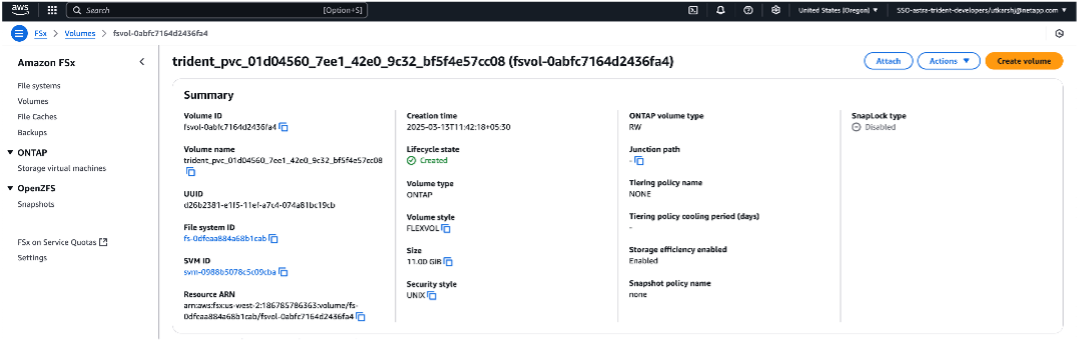
- Verify that the volume is created in the Volume section of the Amazon FSx for NetApp ONTAP management portal.
Conclusion
Auto-configuration offers significant benefits by eliminating the need for manual configuration, enabling you to deploy and to configure Trident seamlessly. This streamlined process enhances the user experience to the level of built-in cloud CSI drivers like Amazon EBS and Amazon EFS, making it easier and faster for you to set up and to manage storage solutions. Another important highlight is the simplicity of the process, which means that Amazon EKS users no longer need to be experts in storage or in FSx for ONTAP. Developers, for example, can use the add-on to effortlessly configure storage back ends for their stateful applications. For more details about this offering, review the official documentation.
Ready to get started? Head over to the Amazon EKS add-on section of the AWS Marketplace to install and to automatically configure the NetApp Trident add-on.
Happy provisioning!
