Whenever you deploy a new Amazon FSx for NetApp ONTAP (FSx for ONTAP) instance, one of the key parameters that needs to be sized is your SSD tier capacity. Accurate sizing is the key to optimizing costs.
How can you determine how much SSD tier capacity you need to deploy? There are multiple elements that play a role in defining your FSx for ONTAP SSD tier capacity. In this post I’ll give you the full picture so you can make informed sizing decisions.
Read on as we cover:
- Initial requirements
- How to perform the sizing
- An example of SSD Sizing
- Understanding ONTAP metadata impact
- Documentation
Initial requirements
Before you can start sizing, you’ll need some information about your current environment and to make a few estimates about how some other elements will influence SSD tier capacity. These details include:
- Required capacity: This is the initial requirement; it could be the nominal size of the total data that needs to be hosted on FSx for ONTAP.
- Capacity pool percentage: This is the percentage of the required capacity that will be hosted on the capacity tier.
- Storage efficiency percentage: This is the projected percentage of data that will be saved by the ONTAP® inline storage efficiencies (deduplication, compression, compaction).
- Average file size: The default range is 1 to 8 KiB.
A note on measurements: SSD capacity is expressed in GiB. That’s not quite the same thing as a GB. Remember that while 1 GB equals 1,000,000,000 bytes, 1 GiB equals 1,073,741,824 bytes, meaning 1 GB equals 0.93 GiB. That’s a considerable difference, so the two measurements aren’t interchangeable.
How to perform the sizing
In this section we will go through all the elements needed to calculate the total SSD tier capacity and the formulas used to make the calculations.
Note: If you plan to decrease your provisioned SSD capacity (an option that is available only for FSx for ONTAP Generation-2), you can follow these steps to determine the new, decreased capacity size before starting the decrease operation.
Step 1. Add the data related to the initial requirements
Start with the initial elements explained above:
ID | Element | Value | Unit |
1 | Nominal capacity required | Enter amount | GiB |
2 | Capacity pool % | (nominal capacity * capacity pool %) / 100 | GiB |
3 | Storage efficiency % | Enter expected saving % | % |
4 | Average file size | Enter average file size | KiB |
If you’re not sure about the values of points 2 and 3, assume that they are 0% for now.
For point 4 there are 3 possible ranges to specify:
- 1 to 8 KiB (default)
- 8 to 31 KiB
- 32 KiB or more
If you’re not sure, go with the defaults. Once you have all the data, you can proceed.
Step 2. Factor the capacity pool and its metadata
Here we will calculate the SSD tier capacity after subtracting the data that will be hosted on the capacity pool, and we will calculate the amount of data required for the capacity pool metadata.
ID | Element | Calculated Value | Unit |
5 | SSD tier capacity after capacity pool | ID 1 value - ID 2 value | GiB |
6 | Capacity pool metadata | 5% of ID 2 value | GiB |
Step 3. Factor your storage efficiency savings
Here we will calculate the SSD tier capacity after subtracting the data capacity that will be saved by storage efficiencies.
ID | Element | Calculated Value | Unit |
7 | SSD tier after storage efficiencies | (ID 5 value * (100 - ID 3 value)) / 100 | GiB |
Step 4. Factor file metadata
Here we will calculate the amount of data required by file metadata:
ID | Element | Calculated Value | Unit |
8 | File metadata | If file size is - - 1 - 8 KiB: 7% of ID 7 value
- 8 - 31 KiB: 3.5% of ID 7 value
- >= 32 KiB: 3% of ID 7 value
| GiB |
Step 5. SSD tier total capacity calculation
Here we will make an initial calculation of the total SSD tier capacity. This will be used to factor the last two elements:
ID | Element | Calculated Value | Unit |
9 | SSD capacity total | ID 7 value + ID 6 value + ID 8 value | GiB |
Step 6. Factor best practices and the final total SSD tier capacity to deploy
In this step we will factor two best practices:
- Keeping the FSx for ONTAP SSD tier at maximum 80% used capacity.
- Including the capacity required by ONTAP metadata and Aggregate Snapshot data:
- 16% if ID 10 value <= 30 TiB
- 11% if ID 10 value > 30 TiB
ID | Element | Calculated Value | Unit |
10 | SSD tier after 80% max capacity | ID 9 value / 0.8 | GiB |
11 | SSD tier after ONTAP metadata and snapshot | - ID 10 value / 0.84
- ID 10 value / 0.89
| GiB |
The last value, Element ID 11, is the final sizing value we were looking for. It represents the total SSD tier capacity that you need to use when deploying your FSx for ONTAP.
An example SSD sizing
Below you can find an example sizing where the parameters are as follows:
ID | Element | Value | Calculated Value |
1 | Nominal capacity required (GiB) | 4096 | |
2 | Capacity pool % | 10% | 4096 * 10 / 100 = 409.6 GiB |
3 | Storage efficiencies % | 10% | |
4 | Average file size | 1-8 KiB | |
Here we’ll factor the capacity pool and its metadata:
ID | Element | Calculated Value | Unit |
5 | SSD tier after capacity pool | 4096 - 409.6 = 3686.4 | GiB |
6 | Capacity pool metadata | 409.6 * 5/ 100 = 20.48 | GiB |
Now the storage efficiencies savings:
ID | Element | Calculated Value | Unit |
7 | SSD tier after storage efficiencies | 3686.4 * 90 / 100 = 3317.76 | GiB |
Here is the file metadata factor:
ID | Element | Calculated Value | Unit |
8 | File metadata | 3317.76 * 0.07 = 232.24 | GiB |
SSD Tier total capacity calculation:
ID | Element | Calculated Value | Unit |
9 | SSD capacity total | 3317.76 + 20.48 + 232.24 = 3570 | GiB |
Factor best practices and total SSD to deploy:
ID | Element | Calculated Value | Unit |
10 | SSD tier after 80% max used capacity | 3570 / 0.8 = 4462.5 | GiB |
11 | SSD tier after ONTAP metadata and snapshot | 4462.5 / 0.84 = 5312.5 | GiB |
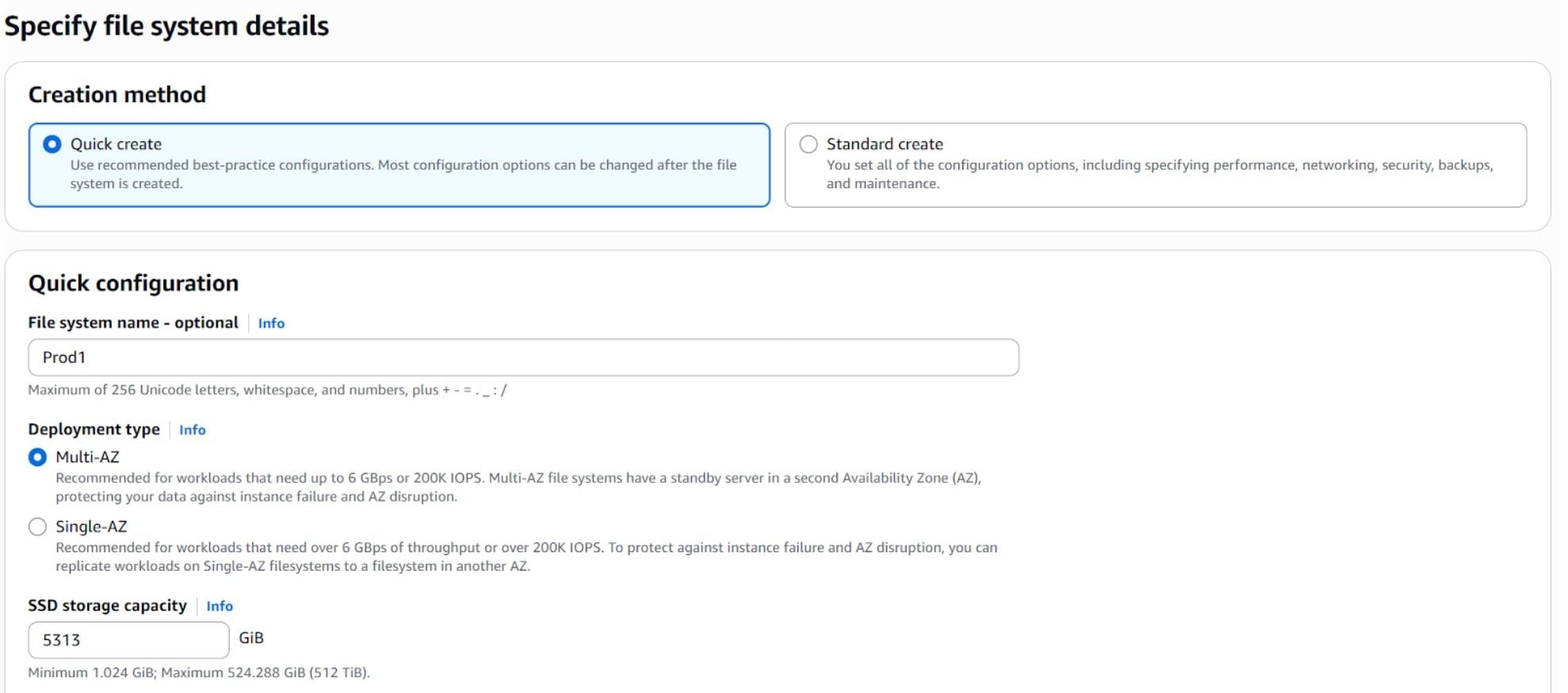
And so, in this example, 5,313 GiB is the amount of SSD capacity we should use when deploying FSx for ONTAP.
In the screenshot below, you can see how to enter that size when using the AWS console:
Understanding ONTAP metadata impact
If you’ve ever wondered what ONTAP metadata is made of, the AWS documentation page has the breakdown:
- 11% is reserved for the NetApp® ONTAP software. If you’re running a file system that has SSD storage capacity of 30 TiB or higher, only 6% of the metadata is reserved.
- 5% is reserved for Aggregate Snapshot data. These copies are used to keep the data between the two FSx for ONTAP high availability nodes in sync with each other.
Hence, we assume that our FSx for ONTAP file system will need 16% of the SSD capacity tier for metadata.
How is this visible? To show you, I deployed a new FSx for ONTAP instance with 4,096 GiB set as SSD storage capacity. Once the deployment was completed, I ran some tests. Then, using Amazon CloudWatch to monitor the FSx for ONTAP file system, I could see the capacity that is available for my applications.
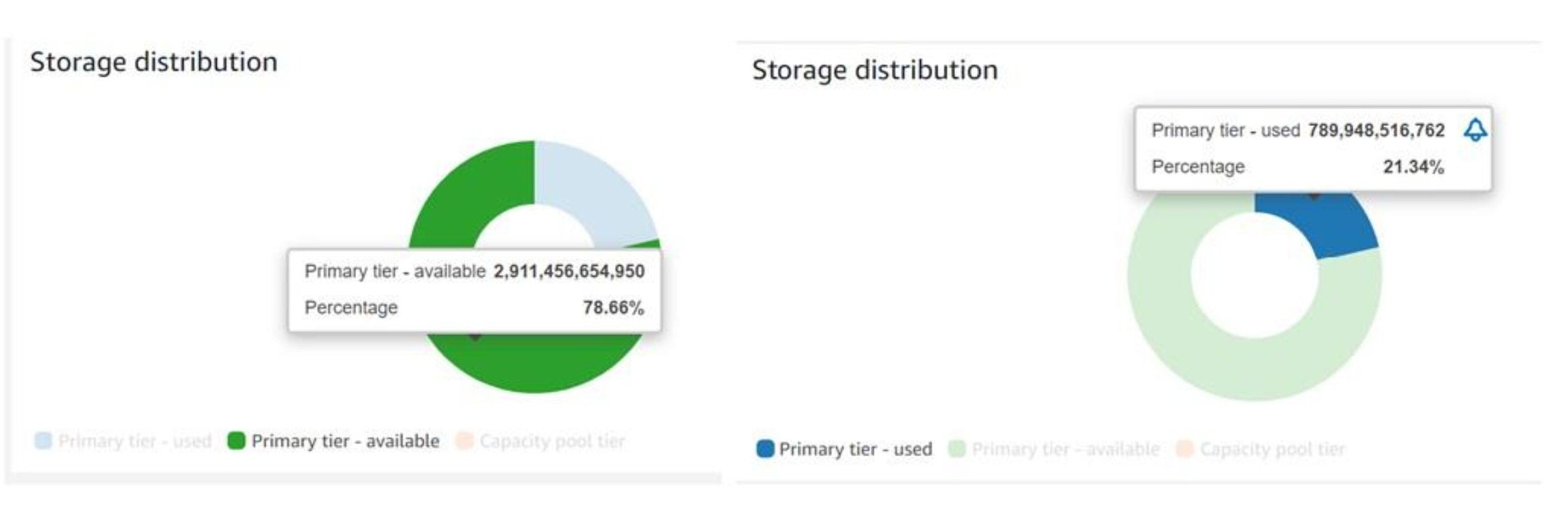
If you add the available storage (2,911,456,654,950 bytes) and used storage (789,948,516,762 bytes) you get 3,701,405,171,712 bytes, which is ~3,447 GiB. This is the actual total SSD tier capacity that is available to end users.
If you divide 3,447 GiB by the 0.84 (which is the 16% we assumed for ONTAP metadata), you’ll get 4,103 GiB, which is close to the 4,096 GiB we deployed.
This is the impact of ONTAP metadata that cannot be disregarded in your SSD tier capacity sizing.
Documentation
For more insight into sizing your FSx for ONTAP SSD capacity, visit the AWS documentation for managing storage capacity.
