This post represents the latest installment in my series on KV cache offloading. In a previous post, I demonstrated the benefits of offloading your KV cache to shared storage and showed that there is virtually no downside to enabling an ONTAP S3 tier. In this post, we explore how ONTAP pNFS over RDMA pushes performance even further, yielding up to a 99% decrease in time to first token (TTFT) when compared to vanilla vLLM with no KV cache offloading, and up to an 86% improvement when compared to a vLLM+LMCache setup that only utilizes the CPU memory (system RAM) for offload.
KV cache offloading refresher
Let's begin with a quick refresher on the KV cache offloading concept. If you read my previous posts and are already familiar with KV cache offloading, you can skip this section.
First off, what is a "KV cache?" Simply put, KV (key-value) caching is a technique that is used to optimize large language model (LLM) inference by storing previously calculated values in a KV cache so that these values don't need to be calculated again for every new token that is generated, which would otherwise be necessary. This article from HuggingFace provides a good overview.
So...what is "KV cache offloading?" The standard behavior for most inference engines is to store their KV cache in GPU memory. This introduces a challenge. The size of the KV cache scales linearly with batch size (the number of prompts being processed simultaneously) and sequence length (the length of each individual generation stream). As model context windows grow ever larger, multi-turn chats become more common, and inference platforms are utilized by more and more users (and agents), the size of the KV cache can quickly outpace the amount of available GPU memory. In certain scenarios, there is a high probability that useful KV cache entries will be evicted from GPU memory. To address this challenge, there has been considerable interest in enabling the offloading of KV cache entries to CPU memory and/or storage so that they can be kept indefinitely (as space permits) and referenced again in the future. You can think of these KV cache offload "targets" as functioning as a "swap space" for GPU memory.
Shared storage
To demonstrate the benefits of a shared S3 tier, you will recall that we tested with two separate vLLM instances behind a load balancer. Each vLLM instance was configured to use LMCache to offload KV cache blocks to the same shared ONTAP S3 bucket. The results showed there is virtually no downside to enabling the S3 tier. Because an S3 tier and CPU tier can be used together, there is no range/scenario where you're better off leaving the S3 tier disabled.
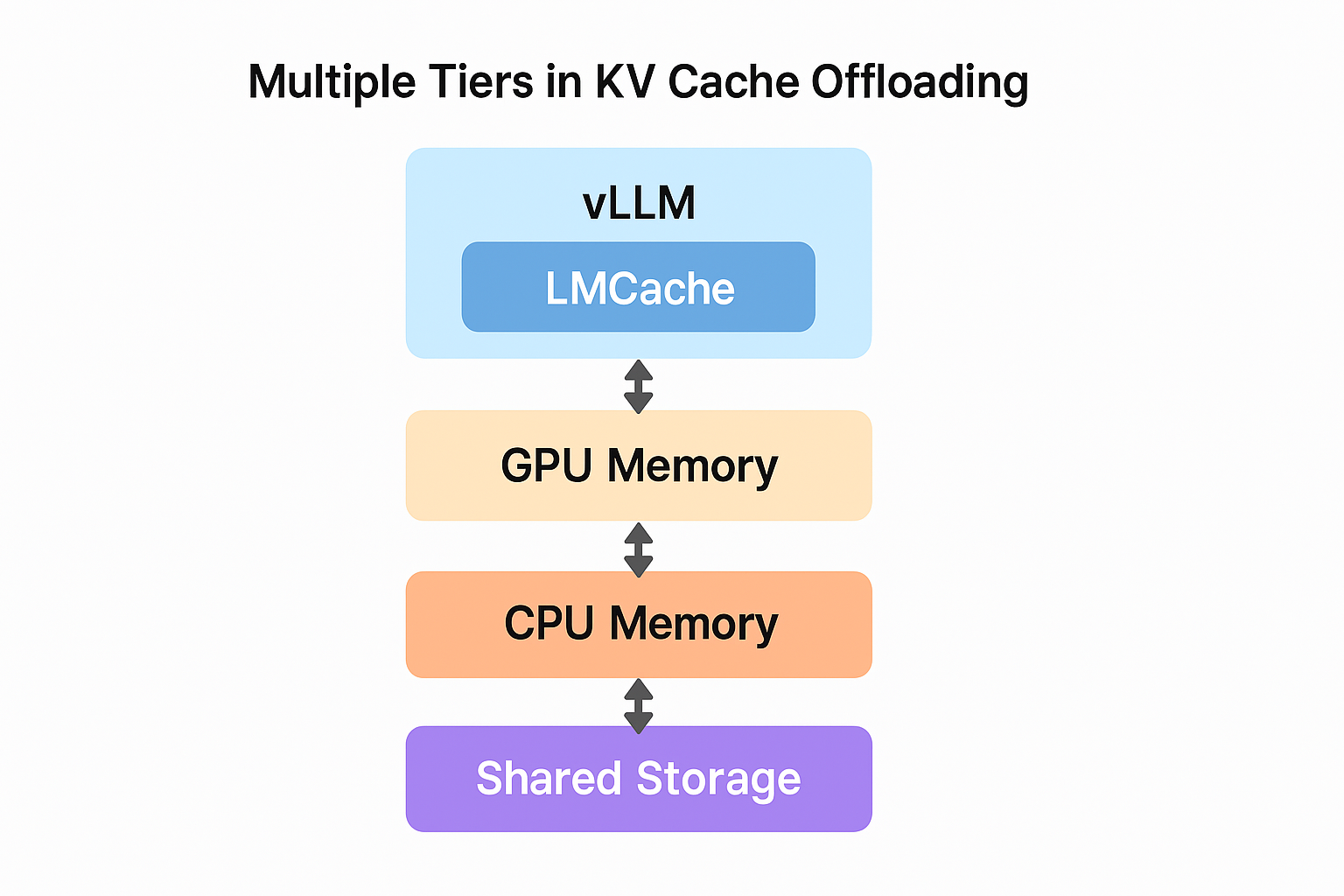
In this post, we repeat the same test, but instead of using ONTAP S3 for our shared storage tier, we use ONTAP pNFS over RDMA. To connect to an ONTAP NAS volume using pNFS over RDMA, we utilize LMCache's Remote FS (Filesystem) plugin. Similar to the S3 backend, the Remote FS plugin enables you to implement a three-tier setup incorporating GPU memory, CPU memory (system RAM), and a shared storage tier.
Empirical results
Benchmark
For this testing, we used the same benchmark that we used in our previous testing, the LMCache project's multi-round QA benchmark. Again, we tested against two separate vLLM instances behind a load balancer. The four scenarios that we tested this time are outlined in the following table.
Scenario | Description |
| Standalone vLLM (no LMCache) | KV cache tiers: - GPU memory (24.14 GB capacity)
|
| vLLM with LMCache's CPU RAM backend | KV cache tiers: - GPU memory (24.14 GB capacity)
- CPU memory (100 GB capacity)
|
| vLLM with LMCache's CPU RAM backend and S3 backend (offloading to an ONTAP S3 bucket) | KV cache tiers: - GPU memory (24.14 GB capacity)
- CPU memory (100 GB capacity)
- ONTAP S3 (10 TB capacity)
|
| vLLM with LMCache's CPU RAM backend and Remote FS plugin (offloading to an ONTAP NAS volume using pNFS over RDMA) | KV cache tiers: - GPU memory (24.14 GB capacity)
- CPU memory (100 GB capacity)
- ONTAP pNFS over RDMA (10 TB capacity)
|
Since it is not a scenario that we have written about before, I have included the LMCache configuration file for our CPU+pNFS setup below, for reference.
local_cpu: True
max_local_cpu_size: 100
save_decode_cache: True
remote_storage_plugins: ["fs"]
extra_config:
  remote_storage_plugin.fs.base_path: /mnt/kvcache
Consistent with our last round of testing, we held the shared system prompt constant at 1,000 tokens, the maximum number of concurrent users constant at 15, the number of rounds per user constant at 20, the benchmark runtime constant at 20 minutes, and the queries per second (QPS) constant at 2. We once again re-ran the benchmark with different values for the length of the user-specific context. This value represents the length of the unique context included in each user's first message. For each vLLM instance, we served the Qwen3-8B model on a single GPU. I've included the exact benchmark command that we used below. You can use this to run the same tests against your own environment.
python3 $LMCACHE_REPO_PATH/benchmarks/multi_round_qa/multi-round-qa.py \
    --num-users 15 \
    --num-rounds 20 \
    --qps 2 \
    --shared-system-prompt 1000 \
    --user-history-prompt $USER_CONTEXT_LENGTH \
    --answer-len 100 \
    --time 1200 \
    --model Qwen/Qwen3-8B \
    --output $WORKING_DIR/${SCENARIO_NAME}_${USER_CONTEXT_LENGTH}.csv \
--base-url http://localhost:8000/v1The benchmark begins by immediately creating 15 user sessions, staggered in simulated time so they appear to have started at evenly spaced offsets in the past (roughly 9.5 seconds apart, given QPS=2). Each user's first request includes the 1,000-token shared system prompt concatenated with their user-specific context, followed by a question. In subsequent rounds, the full accumulated chat history is sent with each request, so prompt length grows with every round. Each user sends one request every 7.5 seconds (15 users / 2 QPS) for up to 20 rounds. New user sessions are added by the manager on a fixed time interval (roughly every 9.5 seconds). When the 20-minute time limit is reached, the simulation loop exits and the benchmark waits for all in-flight requests to complete before writing results and exiting.
Results
The results of our testing are captured in the following chart. This chart shows the aggregate system processing speed across multiple initial prompt lengths for each of the four deployment setups.
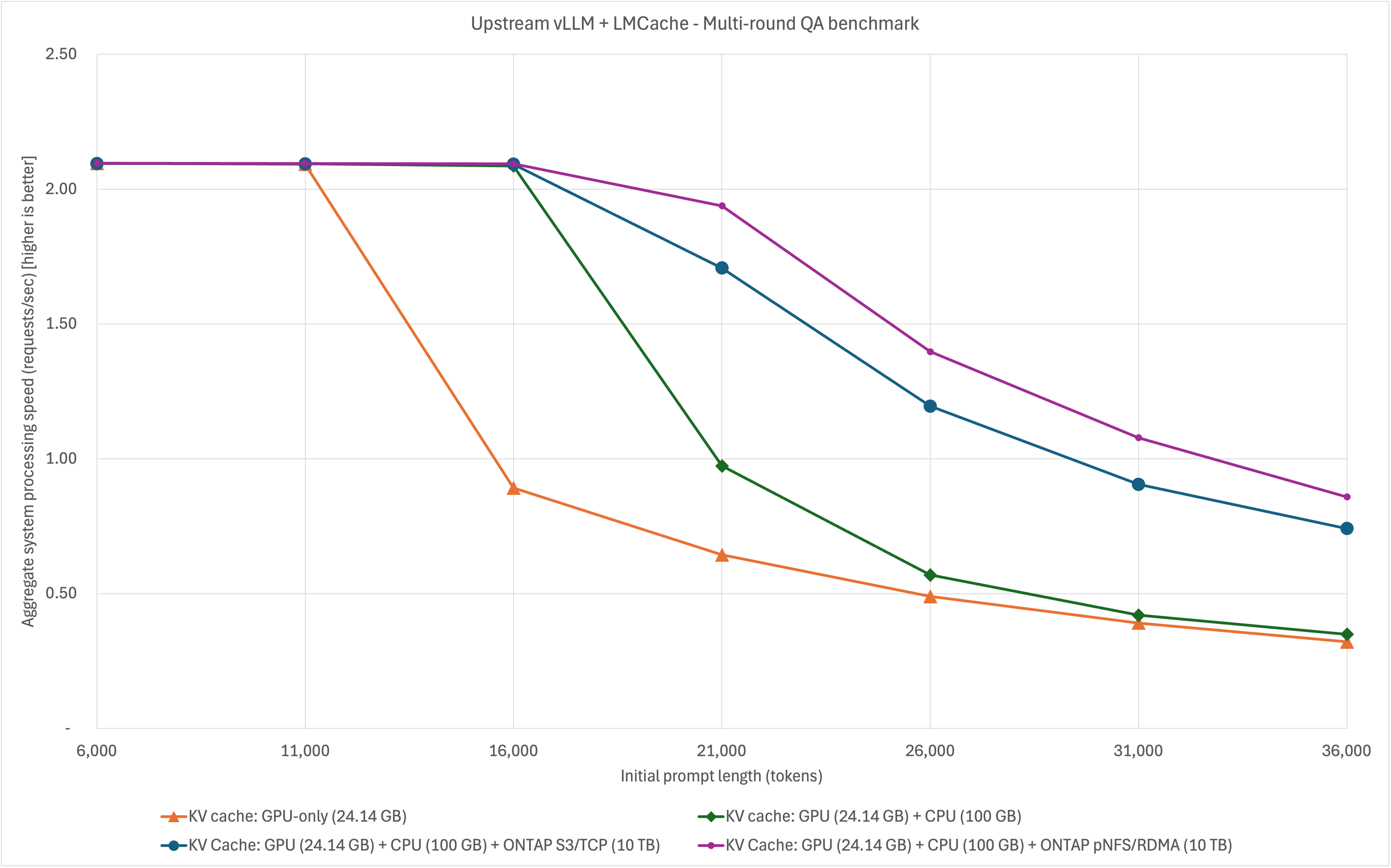
As you can see from the results, pNFS over RDMA outperforms S3, and just as with S3, there is virtually no downside to enabling the pNFS tier. Overall, adding the pNFS over RDMA tier yields impressive system performance gains:
| | When compared to... | |
| KV cache: GPU + CPU + ONTAP pNFS | KV cache: GPU memory only | KV cache: GPU + CPU |
| Aggregate system processing speed | Up to 201% increase | Up to 157% increase |
Average TTFT per request | Up to 99% decrease | Up to 86% decrease |
| Average decode throughput per request | Up to 223% increase | Up to 174% increase |
Conclusion
KV cache offloading is a powerful technique, and the inclusion of a shared storage tier can significantly enhance your inference performance, especially with setups that incorporate multiple serving engine instances. When exploring your options, remember that NetApp supports KV cache offloading using industry-standard protocols and tooling. No custom proprietary clients are required. You can continue to use the same NFS and S3 protocols that you have used for years. If you are utilizing ONTAP for KV cache offloading, your goal is to maximize performance to the greatest extent possible, and your networking setup permits, our current recommendation is to use pNFS over RDMA. If your networking setup does not allow for the use of RDMA, ONTAP S3 and pNFS over TCP are both excellent options. To learn more about NetApp, visit netapp.com.
