We’re thrilled to announce the general availability (GA) of NetApp® Backup and Recovery for Hyper-V. This powerful solution is designed to provide enterprise-grade data protection and rapid recovery capabilities for Hyper-V environments, catering to both NAS and SAN storage. IT practitioners and storage administrators now have the tools they need to ensure the resilience, compliance, and readiness of their Hyper-V workloads with NetApp’s comprehensive and integrated data protection services.
Comprehensive Hyper-V Backup and Recovery
NetApp Backup and Recovery for Hyper-V delivers a wide range of features geared towards optimizing data protection and restoration. This ensures that your critical business applications and data are always safeguarded, whether hosted on NAS or SAN storage. Here’s a look at the key capabilities:
- Unified Support for NAS and SAN Storage
Protect Hyper-V virtual machines on standalone or Failover Cluster Instances (FCI) hosted on both NAS and SAN storage with crash-consistent and VM-consistent backup and recovery. NetApp Backup and Recovery also supports Hyper-V VM’s provisioned by System Center Virtual Machine Manager (SCVMM) and hosted on a CIFS share.
- Multi-Layered Protection Architectures
Employ a variety of backup architectures including fanout, cascade, disk-to-disk, and disk-to-object store configurations. These user-defined protection policies facilitate the implementation of industry-standard 3-2-1 backup models—three copies of data on two different media types with one copy stored offsite.
- Support hybrid storage
Backup Hyper-V workloads to secondary ONTAP storage or leading cloud providers such as Amazon Web Services (AWS) S3, Azure Blob Storage, or use on-premises solutions like StorageGRID® and ONTAP S3. This hybrid approach to data management lowers costs and improves resilience through data tiering and archiving capabilities.
- Granular File Recovery
Recover individual files from snapshots without restoring entire VMs or volumes. This process leverages ONTAP’s space-efficient clone capabilities to minimize downtime, simplify recovery efforts, and enhance operational efficiency during data restoration scenarios.
- Protection Groups
Use Protection Groups to organize workloads and apply bulk data protection configurations, facilitating easier scaling and streamlined operations for storage administrators.
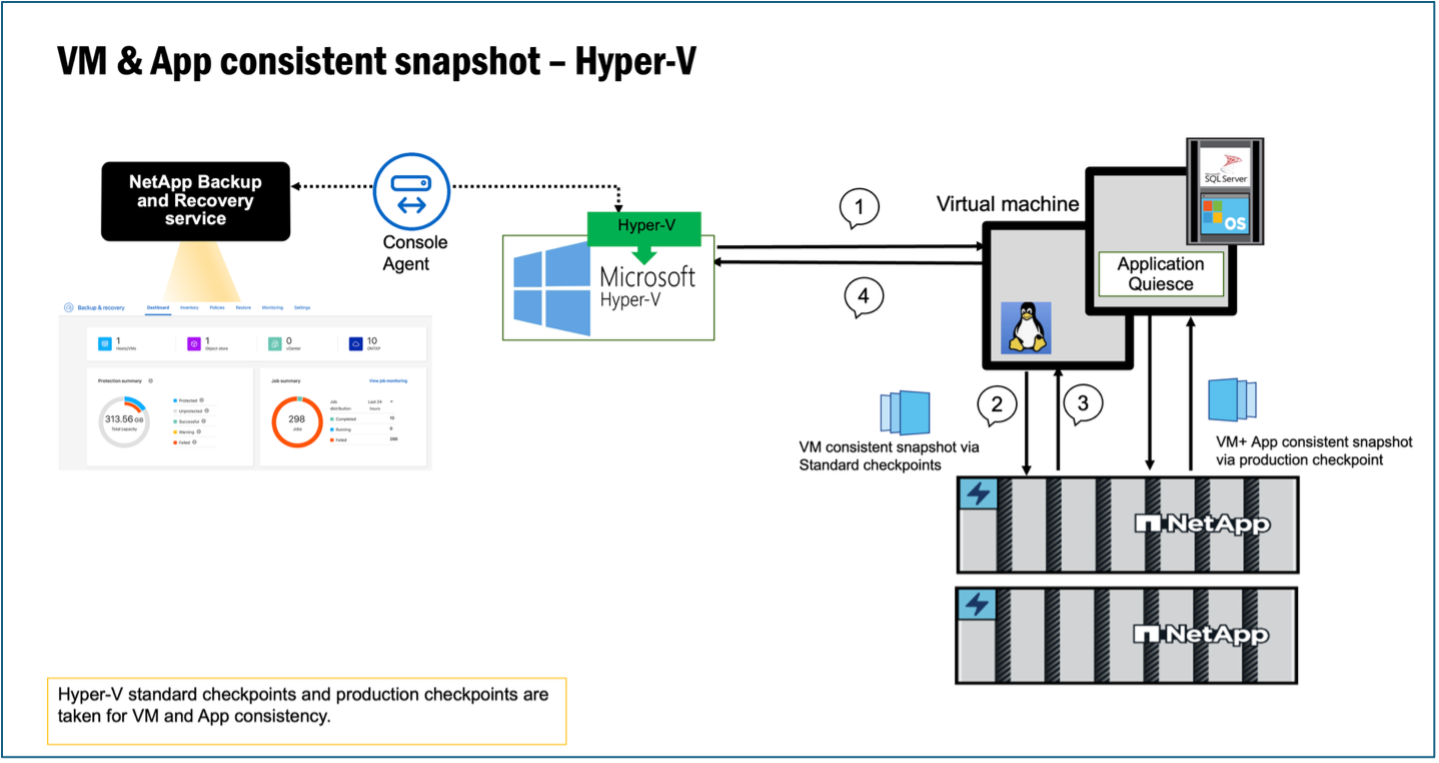
Figure 1- Showing Hyper-V standard checkpoints capture a virtual machine's complete state—including configuration, data, and memory (RAM)—at a specific moment, allowing for quick, "saved state" rollbacks.
How NetApp Backup and Recovery Works for Hyper-V Workloads
NetApp Backup and Recovery simplifies the processes of backup and restoration for Hyper-V workloads using intuitive policies, advanced ransomware protection, and support for flexible 3-2-1 architectures. Below is a detailed look at its operational workflow:
- Discover Hyper-V Workloads
Before protection can commence, NetApp must discover the Hyper-V virtual machines. This involves the following steps:
- Add Hyper-V Hosts: Via the NetApp Console, add hosts using Fully Qualified Domain Names (FQDN), IP addresses, or FCI cluster management IPs.
- Install Plug-Ins: The system automatically installs the NetApp Hyper-V plug-in to streamline resource discovery and protection.
- Populate Inventory: Discovered Hyper-V workloads will be visible under the Inventory page, ready for protection setup.
- Create and Manage Backup Policies
Customized backup policies are crucial for addressing specific needs and ensuring data integrity:
- Define Architectures: Select from local snapshots, disk-to-disk replication, disk-to-object storage, or cascading/fanout strategies.
- Advanced Settings: Enable VM and application-consistent snapshots, ransomware scans, transfer rate controls, and configure notification triggers.
- Manage Retentions: Specify retention policies for local / secondary and object storage backups to ensure compliance and cost-efficiency.
- Backup Management
NetApp Backup and Recovery provides flexibility in how backups are managed:
- On-Demand and Scheduled Backups: Initiate immediate backups or automate them based on predefined schedules.
- Object Storage Support: Backup to cloud (AWS S3, Azure) or private object storage (StorageGRID), with options to tier data to archival storage (e.g., AWS Glacier).
- Ransomware Protection: Enable DataLock for immutable backups to protect against tampering and ensure data security.
- Restoring Workloads
Restoring data is made simple with a user-friendly interface and powerful search capabilities:
- Restore Points and Locations: Restore from local snapshots, secondary storage, or object storage (SAN storage restores from object storage are not supported).
- Search and Filters: Easily find snapshots using filters based on VM names and VM hosts.
- Granular File Recovery: Restore specific files or folders directly without the need to recover entire volumes or backup files.
Advanced Ransomware and Data Integrity Protection
For added security, NetApp enables integrity scans to ensure backups are uncorrupted before restoring data. Workloads protected with DataLock and ransomware scan policies benefit from these additional measures, which, while incurring extra egress costs, provide unparalleled data integrity and peace of mind.
Why Choose NetApp Backup and Recovery?
NetApp Backup and Recovery offers unmatched data protection for Hyper-V environments with features like incremental forever technology, end-to-end security, and scalability without additional infrastructure. These capabilities make it a groundbreaking solution for managing unstructured data growth, hybrid IT complexities, and stringent backup windows.
Learn More
We invite you to explore our solution and discover how NetApp Backup and Recovery can transform your Hyper-V environment.
See how easy it is to create a 3-2-1 protection plan for Hyper-V by taking this guided demo.
You can also learn more at the NetApp Backup and Recovery product page and by checking out our detailed documentation on Protecting Hyper-V Workloads.