How the Console assistant, autonomous agents, and built-in guardrails bring intelligent storage operations to your NetApp data estate
Introduction
NetApp Console local deployment is a locally installed control plane for managing, monitoring, and protecting on-premises NetApp data estates, without requiring a persistent cloud/internet connection. For a full overview of the platform, deployment model, and GA capabilities, see the NetApp Console announcement blog here.
Agentic AI has reshaped how software understands intent and takes action. Where traditional automation followed fixed scripts, agentic systems interpret natural language, plan multi-step workflows, and execute within defined boundaries. In storage management - traditionally a domain of dashboards, wizards, and per-cluster tools, this shift matters. The engineers now spend less time navigating interfaces and more time resolving problems.
NetApp Console local deployment introduces a unified Console agentic layer — one conversational assistant, one shared platform for safety and governance, and specialized agents for provisioning, alert response, and environment guidance. Users describe what they need; the platform applies StorageClass policy, role-based access, and confirmation gates before anything changes in production.
How AI simplifies storage management
Storage operations at scale create a navigation problem. Provisioning a volume is fast; deciding “where” to place it — which cluster, aggregate, and Storage Class, and whether the fleet is already having alerts — requires context from multiple sources.
AI-assisted management in Console local deployment reduces that friction:
- Plain-language requests replace menu hunting — ask for capacity, placement, or alert analysis in one prompt
- Fleet-aware answers combine inventory, observability, and policy context instead of forcing manual correlation
- Guided execution presents proposed actions for review before changes are applied
- Consistent policy application ensures Storage Class and RBAC rules apply whether provisioning is manual or AI-assisted
The result is faster investigation, smarter placement, and fewer context switches — without removing the traditional Console UI for verification and precision control.
Agentic AI and autonomous features in Console local deployment
Console local deployment ships a unified agentic experience built on one shared platform. At a high level, it combines three user-facing surfaces with specialized backend agents.
The three-surface experience
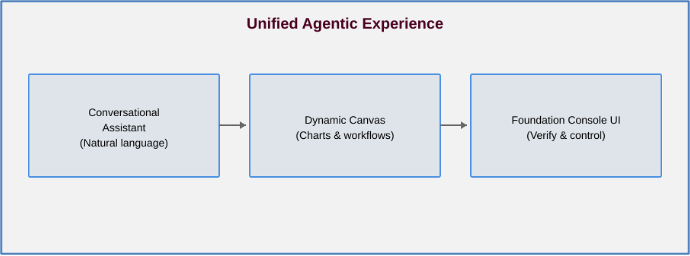
- Conversational Assistant — A persistent chat panel where users express intent: *"Show me volumes over 85% full"*, *"Investigate this alert"*, or *"Create a 10 GiB home directory volume."*
- Dynamic Canvas — Substantive results promote into workspace tabs for comparison, drill-down, and action without losing conversation context
- Foundation UI — The traditional Console interface remains available for verification, high-risk actions, and audit inspection
Console assistant capabilities
When an administrator connects an LLM, the Console assistant provides two core capabilities:
Storage provisioning: Recommends and executes provisioning plans based on Storage Classes — identifying cluster, SVM, and parameters before you confirm.
Search and guidance: Answers questions about your environment and ONTAP administration using live fleet state and NetApp documentation.
Operating modes: Read-only and Read/write
Users choose how much authority the assistant has:
Read-only: Guidance and investigation only — no infrastructure changes
Read/write: Can act on storage after showing proposed changes and requesting confirmation
Connect and enable the Console assistant
An Organisation admin must connect an LLM before users can use the Console assistant on the dashboard.
Prerequisites
- LLM provider choice: OpenAI, OpenAI-compatible endpoint, or Anthropic
- Valid API key, endpoint URL, and network access from Console local deployment to the LLM endpoint
- RBAC configured for the actions you plan to allow
Setup workflow
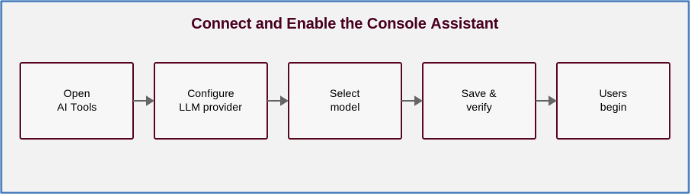
Configuration steps
- Log in to NetApp Console local deployment
- Select Administration > AI Tools → Edit
- Choose provider type and enter endpoint URL, credentials, and API key
- Select a model and Save
- Go to Console assistant icon in the toolbar and test both Read-only and Read/write modes
Data flow in the Console assistant
Understanding how a request moves through the system helps security and operations teams evaluate the integration. At a high level, the flow looks like this:
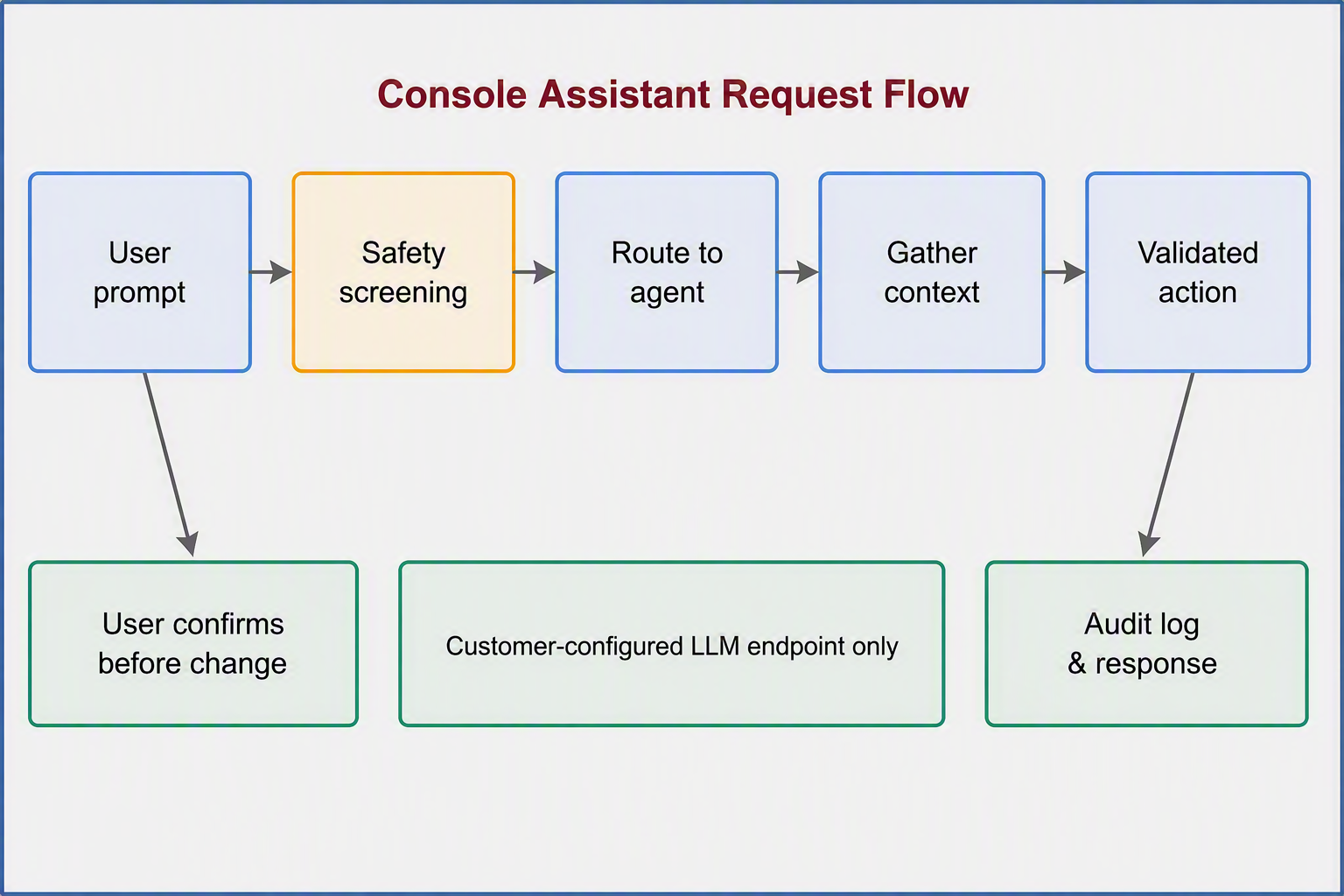
Key principles from this flow:
- Customer-controlled LLM routing — Inference uses only the endpoint configured in AI Tools; NetApp does not route prompts through NetApp-controlled models
- Safety before routing — Prompts pass through guardrails for injection, toxicity, PII, and malicious content before any agent processes them
- Policy at every step — RBAC, Storage Class constraints, and mode enforcement (Discuss vs Execute) apply throughout
- Confirmation before change — Storage-changing actions require explicit user approval, even in Read/write mode
- Full observability — Prompts, responses, tool actions, and outcomes are logged for audit and SIEM export
Auto-remediation and guided fix workflows
Console local deployment connects observability with action. When alerts fire or fleet health cards surface recommended remediations, the platform does not stop at notification, but it offers a path to resolution.
Recommended Actions (Fix-it)
Fleet health dashboards surface recommended actions tied to active conditions — for example, bringing an offline volume back online or addressing a capacity constraint. These recommendations give operators a starting point instead of a blank investigation.
Auto-remediation
Where enabled, auto-remediation allows the platform to act on approved remediation workflows automatically, reducing mean time to recovery for well-understood, low-risk fixes. Operators retain visibility into what was recommended, what ran, and what changed.
AI-assisted fix workflows
The Console assistant extends remediation into conversational workflows. When you ask the assistant to investigate an alert, it:
- Analyzes the alert in fleet context
- Suggests a fix with supporting evidence
- Requests confirmation before executing — unless policy and capability settings require additional approval
This closes the loop from see → analyze → act → verify within one control plane — whether the operator uses dashboards, the assistant, or both.
Supported LLM providers and models
Console local deployment supports three LLM provider types. Available models depend on the provider and endpoint you configure:
OpenAI – Direct OpenAI integration
OpenAI-compatible – Enterprise gateway or proxy (your Organization’s endpoint)
Anthropic – Direct Anthropic Claude integration
Currently qualified models:
- OpenAI: GPT-5.4, GPT-5.5
- Anthropic: Claude Sonnet 4.6, 5.0, 5.5, ; Claude Opus 4.6, 4.7, 4.8, 5.0, 5.5
OpenAI-compatible endpoints expose whichever models your gateway supports — giving flexibility for private, regional, or cost-optimized deployments.
Qualification for additional providers and models will expand over time as customer requirements and the agentic platform mature. Choose a model that balances performance, cost, and your governance requirements today; the platform's gateway architecture is designed to accommodate new models without changing how users interact with the assistant.
AI security and guardrails
Integrating AI with production storage requires trust by design and not trust by assumption. Console local deployment applies one unified trust model across every agent interaction:
Guardrails on every prompt and response
Before any agent processes a request, guardrails screen for:
- Prompt injection and jailbreak attempts
- Toxic or harmful content
- Personally identifiable information (PII)
- Malicious commands or data exfiltration patterns
Blocked prompts terminate with a safety notice — nothing reaches storage APIs or agent skills.
Capability and mode controls
The following controls are available in Console Assistant as a safety measure while executing the prompts:
Control | Purpose |
|---|
Off / Ask / Allow | Per-capability governance — block, require confirmation, or permit autonomous action |
Discuss vs Execute | Read-only exploration vs read/write execution |
Human confirmation | Required before destructive or storage-changing operations |
Identity, authorization, and audit
- RBAC — Assistant actions cannot exceed the logged-in user's permissions
- Storage policy — Storage Classes and platform policies constrain provisioning and remediation
- Audit trail — Every prompt, response, tool action, and outcome is logged with user identity; exportable to SIEM via OpenTelemetry or Syslog
Customers learn the trust model once — the same rules apply whether the assistant is answering a question, proposing a volume, or suggesting an alert fix.
Recommended adoption path: Start in Read-only mode → enable Read/write with confirmation for provisioning → selectively allow auto-remediation and advanced capabilities as your security review permits.
Call to action
Agentic AI in NetApp Console local deployment brings storage management from interface navigation to intent-driven operations, with provisioning, alert response, remediation, and guidance unified under one assistant, one governance model, and your choice of LLM.
Next steps:
- Review the NetApp Console local deployment technical announcement blog for platform overview and deployment prerequisites
- Install Console local deployment in your vCenter environment and add ONTAP systems
- Configure Storage Classes, RBAC, and observability dashboards
- Connect your LLM in Administration > AI Tools and validate the Console assistant in Read-only mode
- Expand to Read/write and remediation workflows as your team and security stakeholders approve
For official setup guides, refer
https://docs.netapp.com/us-en/console-local/index.html
. Learn about LLM integration*, *Connect your LLM and enable the Console assistant*, *Use the NetApp Console assistant*, and *Supported LLM providers and models*.
Or Contact your NetApp representative to download Console local deployment and begin your agentic AI evaluation.
