Electronic design automation (EDA) workflows are among the most complex and resource-intensive in modern engineering. Each design iteration can trigger compute-heavy synthesis, simulation, and verification tasks that demand high performance, rapid data access, and large-scale collaboration across distributed teams.
Managing these interdependent workloads—along with the massive datasets they generate—adds another component to time-strapped teams' already busy schedules. To meet these challenges, EDA teams need storage solutions that can support faster design cycles, greater developer productivity, and a more efficient path from concept to silicon.
Amazon FSx for NetApp ONTAP (FSx for ONTAP) is how leading EDA companies are doing that. And NetApp® Workload Factory makes it easier to deploy, operate, and optimize FSx for ONTAP environments.
In this article, we’ll take a look at how Workload Factory helps EDA teams by reducing configuration friction, automating data management, and improving time-to-market (TTM) across every phase of the chip design lifecycle.
Here’s what we’ll cover:
- EDA data storage challenges
- Workload Factory optimizes FSx for ONTAP storage
- How Workload Factory unlocks new productivity gains for EDA workflows
- Summary
EDA data storage challenges
The semiconductor design cycle has evolved into a data-intensive, globally distributed workflow that pushes storage management to its limits. From growing scalability requirements to constantly trying to improve TTM and reduce costs, EDA teams face multiple challenges.
- Design iteration overload
Each EDA project requires orchestrating many interdependent steps across many iterations, each of which demands full dataset access and environment rebuilds. These rebuilds take hours of set-up time, leaving engineers waiting.
- Datasets that keep on growing
EDA processes compound data over time, creating petabyte-scale datasets. Without automation and data lifecycle policies, data growth strains both performance and budgets.
- Slow and fragmented environment provisioning
Provisioning new environments often involves copying terabytes of project data, delaying new runs, and extending critical paths. Meanwhile, engineers, who are the most expensive resource, waste time waiting for resources.
- Growing capacity and operational costs
Persistent requirements for high-performance, multiple datasets, and continuously running compute resources all contribute to increased costs.
A strong storage layer can help address these challenges. While FSx for ONTAP provides the high-performance storage foundation that EDA workflows demand, further developer productivity benefits can be unlocked through the automation and optimization provided by Workload Factory.
Learn more about the EDA challenges and FSx for ONTAP.
Workload Factory optimizes FSx for ONTAP storage
Workload Factory is a free-of-charge service designed by NetApp to deliver a unified, intelligent approach to planning, deploying, and managing FSx for ONTAP environments. Workload Factory automates workflows that apply AWS Well-Architected Framework recommendations and NetApp best practices to configure file systems, performance tiers, and data management settings during every stage of the storage lifecycle.
For EDA organizations, this means faster provisioning, consistent configurations, and a more predictable foundation for complex design and simulation workloads. The platform guides users through workload-specific recommendations—covering capacity, throughput, and data protection—then generates production-ready templates that can be executed with infrastructure-as-code (IaC) pipelines.
Workload Factory also extends beyond initial setup. Its lifecycle management features help teams continuously optimize FSx for ONTAP file systems based on utilization, performance trends, and cost data.
By automating both deployment and optimization, Workload Factory transforms FSx for ONTAP from a high-performance storage platform into a continuously adaptive environment, one that supports the iterative, data-intensive nature of modern chip design while reducing manual effort and infrastructure overhead.
How Workload Factory unlocks new productivity gains for EDA workflows
Workload Factory provides EDA teams with features that optimize FSx for ONTAP operations, enabling developers to run automated, self-service workflows. These features include:
- FlexVol® and FlexGroup volume rebalancing
FlexVol volumes are standard, dynamic volumes; FlexGroup volumes are scale-out volumes that enable users to achieve higher capacity and performance with FSx for ONTAP storage by spreading data across multiple FSx for ONTAP instances. This level of scale is especially relevant in EDA workflows.
But as FlexGroup and FlexVol volumes scale, data might turn out to be unequally distributed, which can lead to degraded or inconsistent performance. Workload Factory solves that by providing dashboards where the status of your FlexGroup and FlexVol volumes' balance can be assessed at a glance, respectively. If the data in your volumes is unbalanced, you can remediate with a single click to automatically rebalance volumes and restore optimized performance.
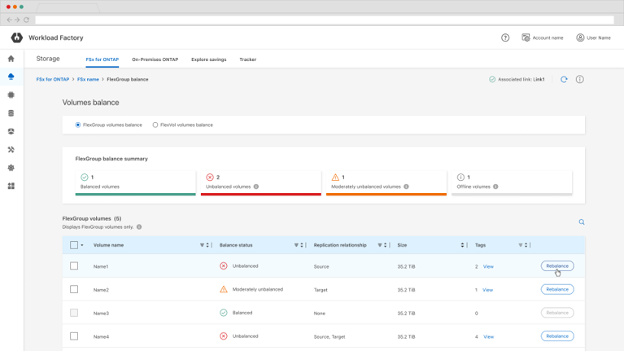
Benefits:
- Keeps performance optimized
- Reduces effort in monitoring performance and calculating the optimal distribution of large numbers of volumes.
- This is a feature exclusive to Workload Factory and not available with other FSx for ONTAP management platforms.
Watch this short video to see how rebalancing works in Workload Factory.
- Automated DevTest environment creation
The Workload Factory EDA (previously Builders) module addresses a friction point in the EDA development cycles: Creating development environments with the instant clone capabilities provided by NetApp FlexClone® and NetApp Snapshot™ technologies.
From your Workload Factory home, select the menu options in the upper-left corner (three-line icon), and then navigate to the EDA option:
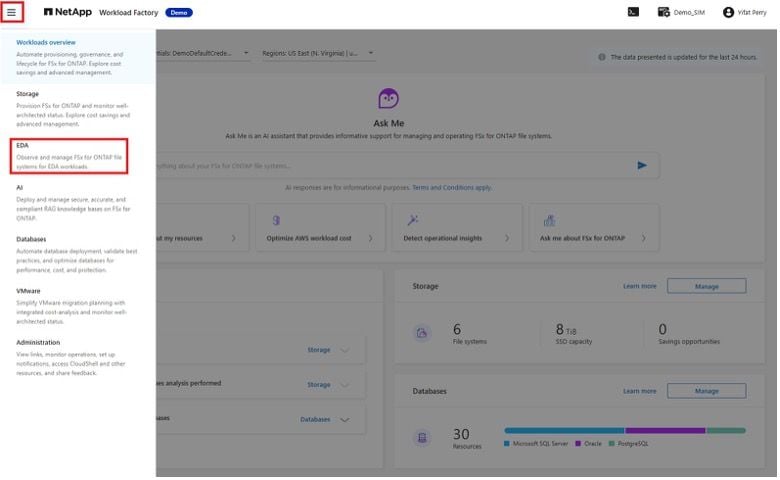
In the EDA panel, select the CI/CD option:
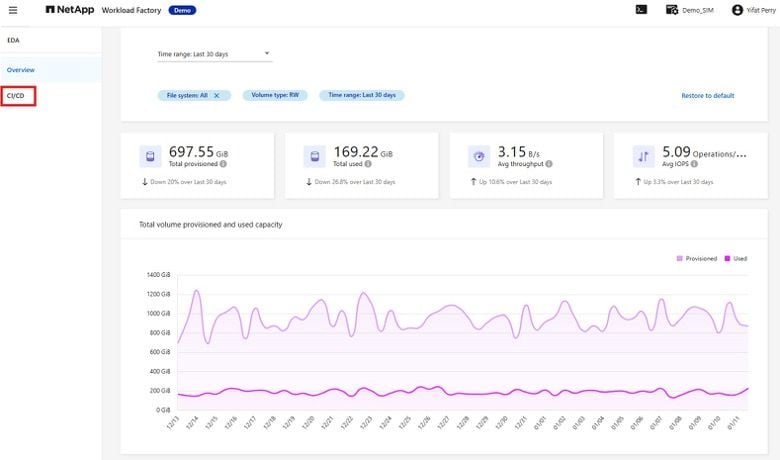
Here, you can see that the Workload Factory EDA interface provides seamless access to managing projects, verified build Snapshot copies, cloned volumes, and API support for automated continuous integration and continuous delivery (CI/CD) workflows:
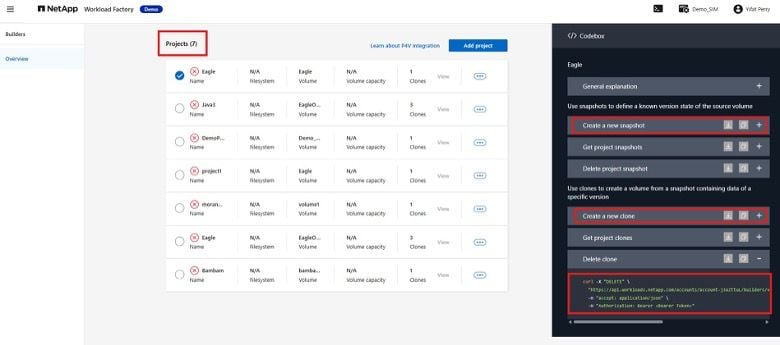
Using the EDA module, developers can create NetApp Snapshot copies of any verified build states and instantly provision highly efficient FlexClone volume workspaces from those copies.
In addition, Projects in the Workload Factory EDA module benefit from intelligent guardrails that prevent resource abuse, including maximum retention periods, clone limits per user or group, size restrictions, and granular access policies. These controls help scale self-service capabilities safely across large engineering organizations while reducing build pipeline costs.
Benefits:
- Operational efficiency with fewer time-consuming tasks for admins.
- Self-service for engineers, independent of IT admins
- Shorter environment creation wait time.
- Significant storage cost savings.
- Faster TTM.
Watch this video to see how the EDA module accelerates EDA workflows using Workload Factory.
- Integration with Perforce P4 version control system
The Workload Factory EDA module integrates FSx for ONTAP with Perforce P4 (Perforce Visual Client, formerly Helix Core) for version control, and delivers automated Snapshot and thin cloning workflows that reduce IT dependencies and repetitive manual work.
Workload Factory EDA projects are created by associating FSx for ONTAP volumes with software environments, either through API integration (recommended for CI/CD pipelines) or manual processes, via the Workload Factory interface or direct integration with Perforce P4V.
The Perforce integration brings this functionality directly into the version control environment where EDA teams already work, eliminating the context switching that fragments engineering focus. Customer deployments have reported significant improvements in developer productivity with this solution.
Here we see the self-service workspace creation directly within Perforce P4V. It shows the verified build cloned volume ready to be used with the version content. From here, you can create new workspaces, delete old ones, or access existing ones:
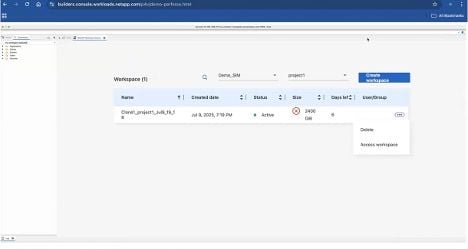
Benefits:
- Self-service for engineers, independent on IT admins
- Integration with the Perforce PV4 version control system (VCS)
- Support for other VCSs is coming in the future.
Summary
EDA workloads demand agility, scale, and precision across every stage of the design lifecycle. By usingWorkload Factory, EDA teams gain a modern, automated foundation that streamlines data management, accelerates design iteration, and optimizes infrastructure efficiency on AWS. Workload Factory facilitates operational processes, freeing engineers to focus on innovation rather than infrastructure.
To explore how FSx for ONTAP supports EDA workloads in greater detail, read the companion article: Accelerate EDA workflows and collaboration with FSx for ONTAP.
And to help your FSx for ONTAP deployments deliver the performance the EDA industry requires, get started now with Workload Factory.