NetApp Community Update
This site will enter Read Only mode on July 23 as we prepare to move to a new platform. You will still be able to view content, but posting and replying will be temporarily disabled.
We're excited to launch our new Community experience on July 30 and more information will follow soon.
Stay connected during the transition - Join our Discord community today.

Network and Storage Protocols

Third-level folders in CIFS share appear as files (not accessible)

martin_skochev
3,736 Views

Hello,

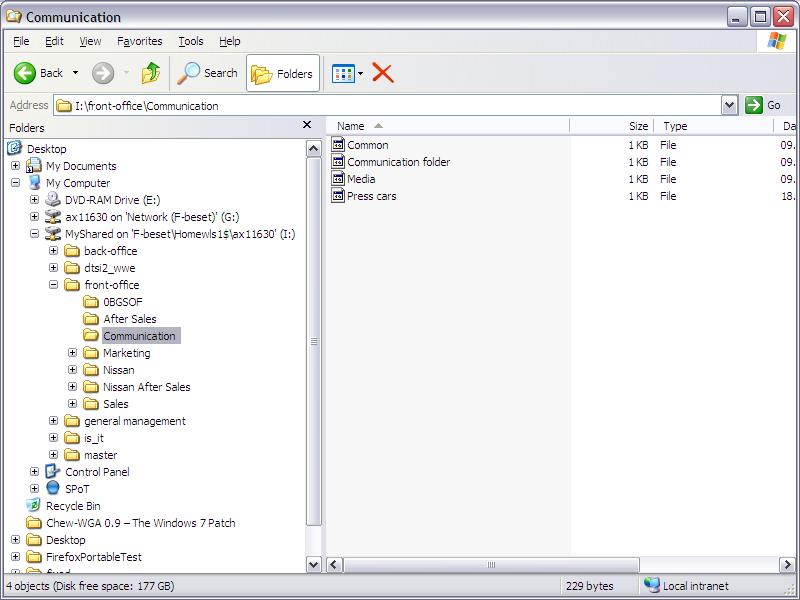
Please see the screenshot in attachment... all third level folders appear not as a folder to open and see inside, but as a file and you can't do anything with it. What could be the reason for this?

This happened on a new FAS2020, which substitutes and old FAS250. All the data was moved to the new one, volumes, Qtrees and shares are the same between both machines. But maybe I'm missing some settings somewhere.

2 REPLIES 2

rmharwood
3,736 Views

Do these "files" appear as folders through the command-line (cmd) ?  I have seen something similar before when there is a special hidden file in the parent folder that changes the type of the file/folder.  If they still appear as files on the command-line, then something probably went wrong with your copy operation. Ensure that your new qtrees are have the NTFS security style.

NETAPPCYP
3,736 Views

how was the data moved?

If you can afford to stop cifs, then probably best to use ndmpcopy.

I think the process is how it was moved.

Also what versions of DOT are you running of FAS250 and new FAS2020?

Public