NetApp Community Update
This site will enter Read Only mode on July 23 as we prepare to move to a new platform. You will still be able to view content, but posting and replying will be temporarily disabled.
We're excited to launch our new Community experience on July 30 and more information will follow soon.
Stay connected during the transition - Join our Discord community today.

ONTAP Hardware

RAID 4

Sanjivala
3,228 Views

Hi.

I would like to know the maximum size of disks (SSD and HDD) for RAID 4.


Thank.

1 ACCEPTED SOLUTION

Ontapforrum
3,210 Views

1. Go to Hardware Universe Portal:
https://hwu.netapp.com/


2. Select your Platform (FAS/AFF) & Data Ontap version and click 'show-results'.


3. Go to Supported RAID Configuration | Under RAID4 - Look for 'Drive Capacity Max'

View solution in original post

3 REPLIES 3

Ontapforrum
3,211 Views

1. Go to Hardware Universe Portal:
https://hwu.netapp.com/


2. Select your Platform (FAS/AFF) & Data Ontap version and click 'show-results'.


3. Go to Supported RAID Configuration | Under RAID4 - Look for 'Drive Capacity Max'

cedric_renauld
3,159 Views
 

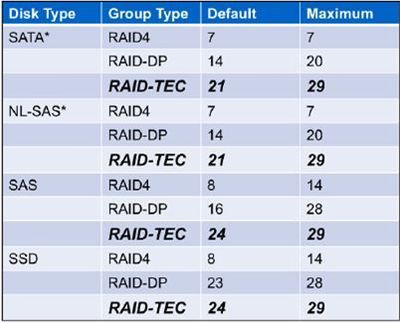
cedric_renauld_1-1681322194526.jpeg


junwang
1,875 Views

Hi,Sanjivala,

1. Go to Hardware Universe Portal:
https://hwu.netapp.com/

1.png

2. Select your Platform (FAS/AFF) & Data Ontap version and click 'show-results'.

2.png

3. Go to Supported RAID Configuration | Under RAID4 - Look for 'Drive Capacity Max'

3.png

4.png

The screenshot uses FAS8300 as an example.Please search based on the actual storage model.

Public