Modern cloud‑native developers spend most of their time in the integrated development environment (IDE). What if your IDE could not only manage your code but also help you understand, query, and operate your storage using agentic AI?
Today, we’re excited to introduce the Visual Studio Code extension for Amazon FSx for NetApp ONTAP, now integrated with Amazon Bedrock. This integration brings natural‑language, AI‑assisted storage interactions directly into Visual Studio Code (VS Code), enabling developers and platform engineers to work faster and with greater confidence without leaving their development environment.
Why use FSx for ONTAP with Bedrock in the IDE?
FSx for ONTAP provides fully managed, enterprise‑grade storage with rich data management capabilities. Amazon Bedrock enables access to foundation models without managing infrastructure.
By bringing Bedrock‑powered intelligence into the FSx for ONTAP VS Code extension, developers can:
- Ask questions about storage in plain English
- Quickly understand capacity, configuration, and policies
- Reduce context switching between consoles, scripts, and documentation
- Troubleshoot faster during development
What the VS Code Extension delivers
The FSx for ONTAP VS Code extension securely connects your AWS environment to your IDE and augments it with AI‑assisted insights.
Key capabilities include:
- Connecting to FSx for ONTAP file systems
- Querying volumes, snapshots, and configuration
- Receiving AI‑generated explanations using Amazon Bedrock
- Conversational Q&A directly inside VS Code
Asking storage questions using natural language
Once the extension is configured, you can begin interacting with your FSx for ONTAP environment using natural‑language prompts powered by Amazon Bedrock.
Example 1: Discovering file systems
This example shows how the extension can retrieve FSx for ONTAP file systems and associated properties.
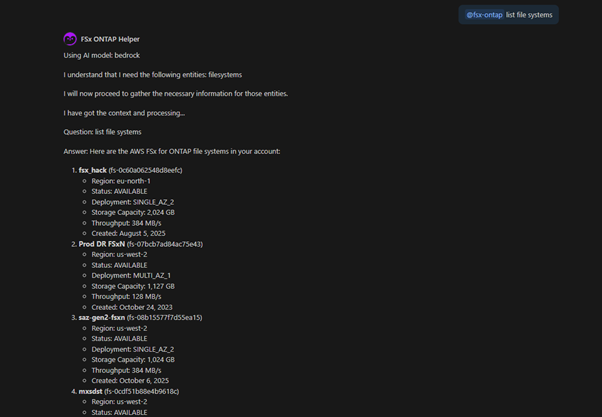
Figure 1: Natural‑language query in VS Code returning FSx for ONTAP volume information using Amazon Bedrock.
The extension translates the prompt into the appropriate backend queries and returns a clear, structured response directly inside the IDE.
Example 2: Understanding capacity utilization
This example shows how the chat participant can retrieve information on volume utilization across AWS accounts and regions.

Figure 2: Bedrock‑powered insight highlighting volume‑level capacity consumption.
Instead of manually navigating dashboards or running scripts, developers receive immediate, AI‑assisted insight.
Example 3: Generate CloudFormation and Terraform code
This example shows how the extension can generate Infrastructure-as-code from existing FSx for ONTAP resources.
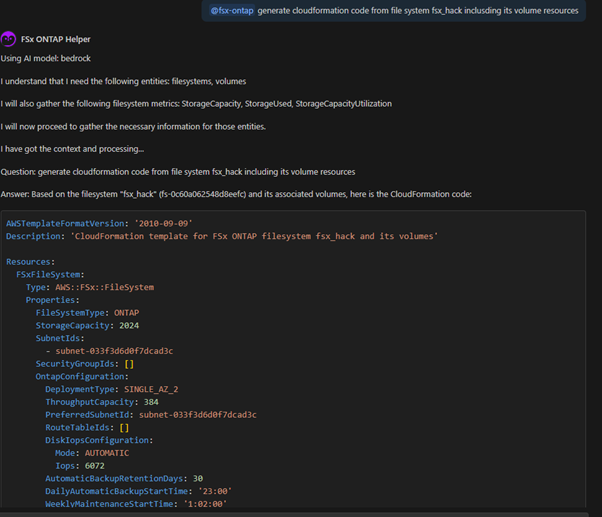
Figure 3: CloudFormation template generated for an existing FSx for ONTAP file system
This is particularly valuable for developers who are not storage experts but need to understand data protection behavior during development and testing.
Example 4: Querying ONTAP-level data using /filesystem
In addition to querying FSx for ONTAP resources through AWS APIs, the VS Code extension can also retrieve live information directly from the ONTAP for ONTAP file system itself. By using the /filesystem command, developers can ask questions that are answered using ONTAP CLI and REST data, providing deeper visibility into volumes, snapshots, and data protection state.
This capability is especially useful when accurate, real-time storage details are required, such as inspecting snapshots, validating retention behavior, or troubleshooting space usage, without manually connecting to FSx for ONTAP.
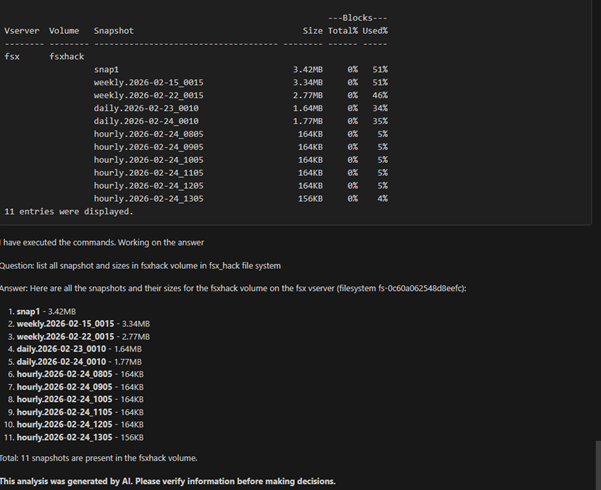
Figure 4: Using /filesystem to retrieve ONTAP snapshot information for a specific volume.
How this helps teams
For developers
- Stay inside VS Code
- Understand storage behavior without deep storage knowledge
- Get immediate answers while coding or debugging
For platform and storage teams
- Reduce repetitive operational questions
- Enable self‑service discovery with guardrails
- Accelerate troubleshooting and root‑cause analysis
By embedding intelligence directly into the IDE, teams can move faster while maintaining enterprise‑grade control.
Security and governance
The extension uses existing AWS authentication and IAM permissions. Amazon Bedrock operates within AWS security boundaries, ensuring:
- Customer data is not used to train foundation models
- Access is governed by IAM policies
- Enterprise security and compliance requirements are met
Getting Started
To begin:
- Install the FSx for ONTAP VS Code extension (search NetApp in the VS Code extension tab)
- Configure your AWS credentials (Using the key icon in the navigation bar on the top left)
- Select regions where you have FSx for ONTAP file systems (Using the globe icon in the navigation bar on the top left)
- Start asking questions using the Bedrock‑powered interface (Use the @fsx-ontap in the chat interface)
- For asking questions to the FSx for ONTAP OS, add your FSx for ONTAP credentials using the configure FSx for ONTAP connection button, available for each filesystem. (Start the question with @fsx-ontap /filesystem for Bedrock to interact with FSx for ONTAP)
Within minutes, you can explore your storage environment using natural language.
What’s Next
This integration is an important step toward AI‑assisted infrastructure workflows. Future enhancements will continue to expand insights, automation, and developer productivity around FSx for ONTAP.
If you want to combine enterprise storage, agentic AI, and developer tooling, the FSx for ONTAP VS Code extension with Amazon Bedrock is a powerful place to start.


