A ready to deploy reference architecture that addresses the challenges of building and scaling enterprise AI data pipelines for Retrieval Augmented Generation (RAG) workflows that scale into AI Agents for advanced use-cases.
Built on the Google Cloud Platform, this solution leverages the NVIDIA Foundational RAG Blueprint to develop a RAG Pipeline that will serve as the foundation data plane for several other NVIDIA Blueprints and GenAI architectures that depend on data. Google Cloud NetApp Volumes (GCNV) aka NetApp Volumes is integrated as the data plane providing scalable, customizable, high-performance file storage that is essential for Enterprise RAG.
Overview
This design is a collaborative effort between NetApp, NVIDIA, and Google that outlines the deployment of an enterprise-ready Foundational Retrieval-Augmented Generation (RAG) pipeline. These pipelines are designed to empower AI agents by connecting them with enterprise data, utilize advanced models for reasoning, and ultimately deliver trusted business insights.
It offers a step-by-step guide and reference architecture for managing large volumes of multimodal enterprise content, ensuring fast, accurate responses. This capability is powered by NVIDIA's RAG Blueprints, alongside high-performance storage provided by NetApp Volumes.
Introduction
Over 80% of all organizational data is unstructured or semi-structured (documents, emails, code, media), a vast, underutilized asset pool. This multi-modal data holds deep, domain-specific insights essential for business innovation, from accelerated R&D to hyper-personalized customer experiences.
The challenge, however, is accessing this knowledge securely, accurately, and at scale. This realization is driving a critical shift: the need for well-defined, scalable, secure and repeatable Retrieval-Augmented Generation (RAG) data pipelines that natively integrate with primary enterprise data sources.
This reference architecture details a robust Enterprise Foundational RAG solution on Google Cloud Platform, utilizing the NVIDIA Foundation RAG Blueprint and the high-performance file storage of Google Cloud NetApp Volumes.
By bridging the gap between proprietary data and generative AI models, this solution empowers organizations to extract actionable intelligence from their data landscape.
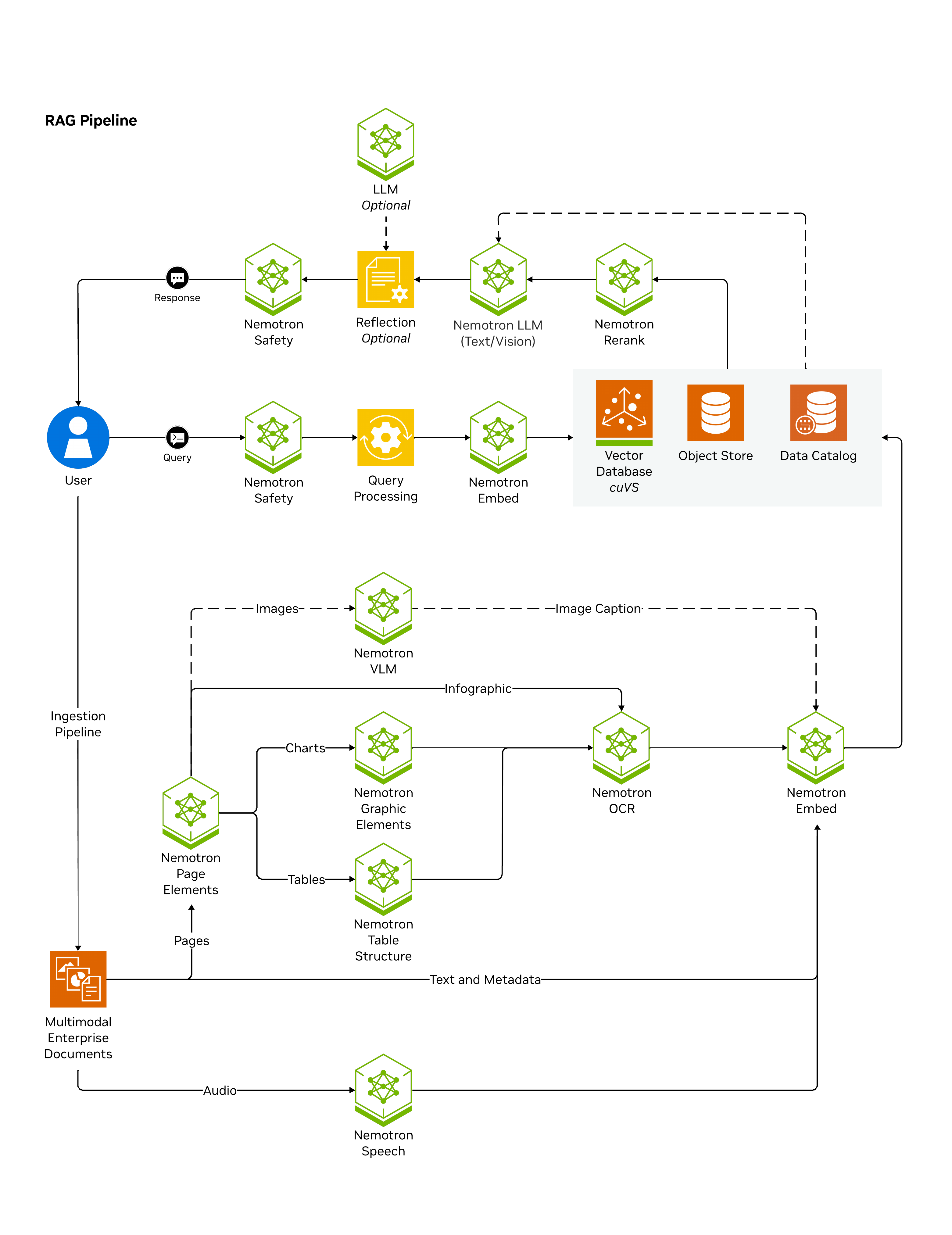
The NVIDIA AI Blueprint for RAG is a production-ready, modular, GPU-optimized reference architecture for building high-accuracy, high-performance RAG systems for enterprise use cases like search and copilots.
It supports modern agent ecosystems with features like summarization, reasoning configurability, query decomposition, and dynamic metadata filtering, using native Python libraries, OpenAI-compatible APIs, and a built-in data catalog.
It enables advanced multimodal generation and has a robust pipeline for extracting and enriching various content types.
Designed for flexibility and scale, it features hybrid dense + sparse retrieval, multi-collection search, GPU-accelerated indexing, reranking, and pluggable vector database support (ElasticSearch, Milvus). It includes Observability (OpenTelemetry), evaluation scripts (RAGAS), and optional guardrails.
Deployable via Docker or Kubernetes, it is customizable, runs standalone or integrates with other systems, and is a foundational layer of the NVIDIA AI Data Platform, transforming raw data into AI-ready knowledge. Use this architecture to ground AI-driven decisions in trusted enterprise data at production scale.
It is also foundational to the AI Agent for Enterprise Research, providing the trusted knowledge base, summarization, and retrieval capabilities required for advanced, reasoning-driven enterprise agents AI Agent for Enterprise Research, which is being showcased in this reference architecture.
NetApp Volumes is a fully managed, first-party Google Cloud data storage service built on NetApp's ONTAP technology. It delivers high-performance, scalable, and feature-rich file and block storage over NFS, SMB and iSCSI protocols for enterprise workloads within the Google Cloud Platform.
NetApp Volumes is uniquely suited to serve as the high-performance data plane for enterprise RAG pipelines by delivering -
- Enterprise-grade reliability with 99.99% availability SLA
- Available across 40+ Google Cloud regions
- Seamless integration with Google Cloud services and existing applications
- Comprehensive security with Google Managed and Customer Managed encryption at rest
- Simplified management through Google Cloud APIs, gcloud CLI, Terraform, Gemini CLI and VSCode extensions.
NetApp Volumes caters to multiple service levels that can deliver the required performance for RAG pipelines based on the scale of operations -
- Standard - 16 MiB/s per terabyte of allocated capacity, for RAG systems with minimal data change across longer time periods.
- Premium - 64 MiB/s per terabyte of allocated capacity, ideal for RAG systems that deal with frequent changes to the source data that trigger reingestion and updates.
- Extreme - 128 MiB/s per terabyte of allocated capacity, ideal for workflows that demand large volumes of data ingestion on a regular basis and for situations that need to deal with high volumes of retrieval.
- Flex - allows independent provisioning of performance and capacity delivering up to 5 GiB/s of throughput for standard volumes and up to 22 GiB/s for large volumes, ideal to handle dynamic workload requirements or where there is a need to optimize the storage solution for capacity or performance.
NetApp Volumes allows customers to start at a minimum storage capacity of 1TiB and supports capacity growth in increments of 1 GiB, providing a fine-grained approach to capacity management in the cloud. This enables RAG pipelines to grow storage capacity on-demand, as and when the source data for ingestion is subject to growth.
In addition to this, the foundational ONTAP features delivered by NetApp Volumes provide advanced data management capabilities that enrich the implementation of RAG pipelines in several ways:
| ONTAP Features via NetApp Volumes | Benefits to GenAI and RAG Pipelines |
| Snapshots | Creates immediate, space-efficient, point-in-time copies of the volumes that host the RAG pipelines and the source data. Essential for auditability and quick rollback/recovery. |
| FlexClone | Allows for instantaneous, zero-capacity-copy creation of full data volumes. This enables rapid versioning and experimentation (e.g., testing a new RAG data-pipeline) without wasting time or storage capacity by copying huge amounts of data. |
| Auto-tiering | Tier source data to lower cost storage after ingestion workflows, helps free up the high performance tier for busy workloads. |
Blueprint deployment on Google Cloud Platform
As part of this reference architecture, we will deploy the NVIDIA Foundational RAG blueprint on Google Cloud Platform. This blueprint is available as a Helm package and ready for deployment on Kubernetes.
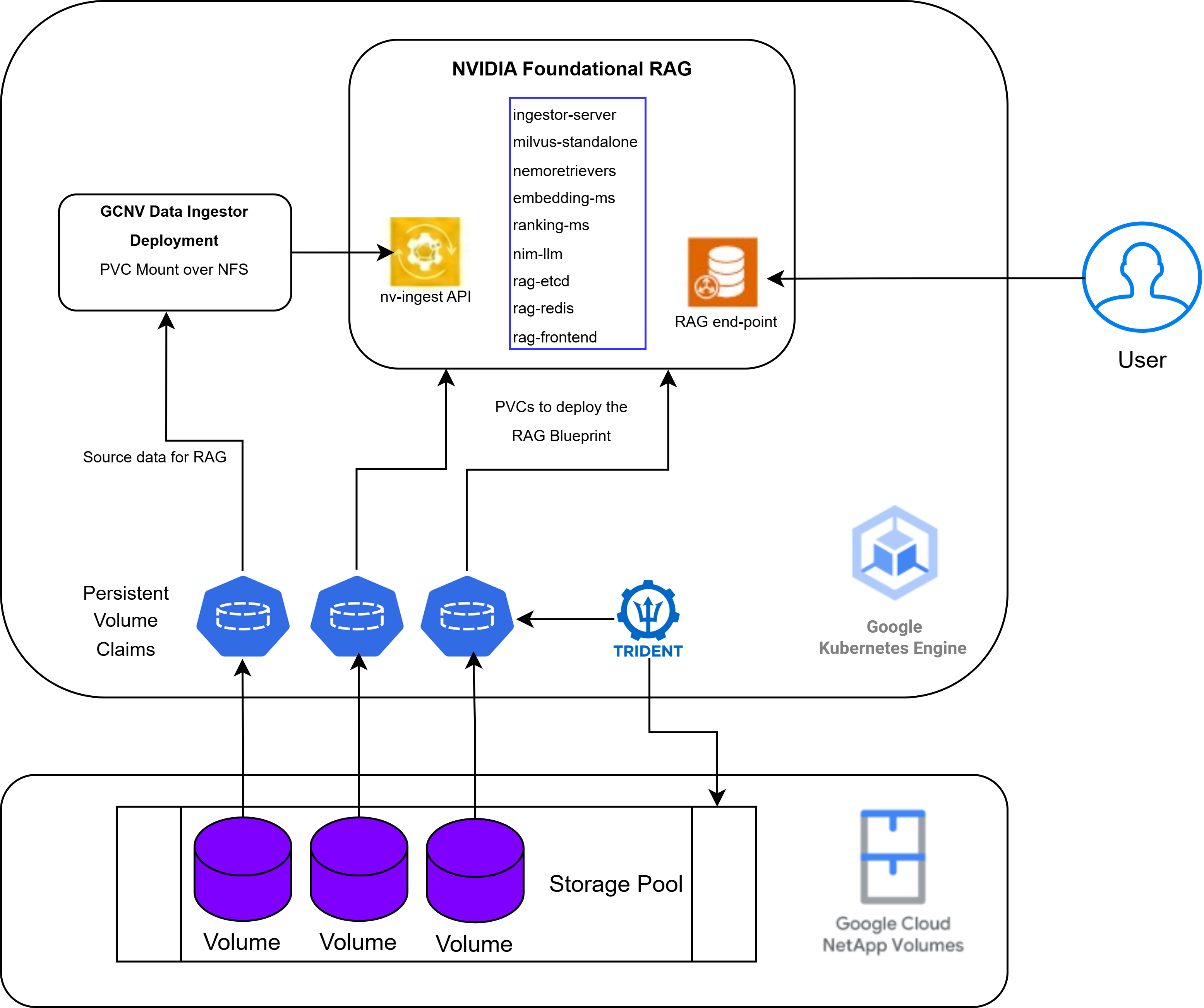
The Foundational RAG Blueprint will be deployed on GKE using the persistent storage from NetApp Volumes. Subsequently, the GCNV Data Ingestor will be deployed and the RAG data-pipeline will be configured. This will set up the file selection and embedding workflow for the data that is present in NetApp Volumes.
Google Kubernetes Engine (GKE) - a single GKE cluster will be provisioned with the requisite GPUs for container orchestration to host all the pods corresponding to the blueprint deployments.
The GKE cluster will be provisioned with a node-pool that comprises the requisite NVIDIA GPUs.
The NVIDIA blueprint components are packaged as containers and will be deployed as Kubernetes deployments on the GKE cluster. In this reference architecture design, the Foundational RAG blueprint will be deployed on a GKE cluster with a single node that contains 8 x NVIDIA RTX 6000 PRO GPUs. The NVIDIA drivers are automatically deployed as part of the GKE cluster creation.
Google Cloud NetApp Volumes (GCNV) - will deliver the high performance storage required to deploy the blueprints and will also serve as the source of user-data to implement the RAG pipeline for Research. NetApp Trident CSI is installed and configured to work with a GCNV Storage Pool as the storage backend and a Storage Class that is mapped to the Trident provisioner is configured as default storage class for the GKE cluster.
Networking - Both GKE and GCNV are provisioned in the same region and connected to the same workload VPC.
Deployment steps
Create a Kubernetes cluster using Google Kubernetes Engine
Create a GKE Cluster in your region of choice where you have GPUs available.
Below is a sample command that creates a GKE Cluster with the following parameters-
- Region - us-east1
- Node pool with 1 node
- Accelerators - 8 x NVIDIA RTX 6000 PRO GPUs
- GPU Drivers - auto installed as part of GKE setup
- OS - Ubuntu with Containerd
Update the parameters marked in BOLD with details specific to your environment.
gcloud container --project "<<project_name>>" clusters create "nvidia-gcnv-ai-blueprint" \
--zone "us-east1-b" \
--enable-ip-alias  \
--cluster-version "1.35.1-gke.1396002" \
--release-channel "regular" \
--machine-type "g4-standard-384" \
--accelerator "type=nvidia-rtx-pro-6000,count=8,gpu-driver-version=default" \
--image-type "UBUNTU_CONTAINERD" \
--disk-type "hyperdisk-balanced" \
--disk-size "300" \
--num-nodes "1" \
--network "projects/<<project_name>>/global/networks/<<network_name>>" \
--subnetwork "projects/<<project_name>>/regions/us-east1/subnetworks/<<subnetwork_name>>" \
--workload-pool "<<project_name>>.svc.id.goog" \
--logging=SYSTEM,WORKLOAD \
--monitoring=SYSTEM,STORAGE,POD,DEPLOYMENT,STATEFULSET,DAEMONSET,HPA,JOBSET,CADVISOR,KUBELET,DCGM \
--node-locations "us-east1-b"
Note: Enabling Workload Identity on the GKE cluster is a prerequisite to use Cloud Identity with the NetApp Trident CSI, which will be covered later in this solution.
Create a Storage Pool on Google Cloud NetApp Volumes
A Storage Pool using the Flex service level will be provisioned in the same region/ zone where the GKE cluster was created. The pool is configured with a Throughput of 1 GiB/s and 16384 IOPS, you can change this to suit your requirements.
Update the parameters marked in BOLD with details specific to your environment.
gcloud netapp storage-pools create nvidia-aiq-blueprint --location=us-east1-b --capacity=1024 --network=name=<<network_name>> --service-level=Flex --custom-performance-enabled=true --total-iops=16384 --total-throughput=1024
Install and Configure NetApp Trident CSI
The next step is to deploy the Trident CSI driver on the GKE cluster and configure the Storage Pool on NetApp Volumes as a Storage Backend for Trident to work with.
Create a Service Account and configure Trident to use Cloud Identity
- Follow the steps outlined here https://docs.cloud.google.com/iam/docs/service-accounts-create to create a service account.
- Grant the service account the “Google Cloud NetApp Volumes admin” role.
Install Trident using the Helm chart
helm repo add netapp-trident https://netapp.github.io/trident-helm-chart
Install the helm chat and use the service account that was created earlier.
helm install trident-csi netapp-trident/trident-operator --version 100.2602.0 --create-namespace --namespace trident --set cloudProvider="GCP" --set cloudIdentity="'iam.gke.io/gcp-service-account: <<name_of_service_account>>'"
Check if the installation was successful
kubectl get pods -n trident

NAME                                   READY   STATUS     RESTARTS    AGE
trident-controller-6c9d99984d-wcmft    6/6     Running    0           5m3s
trident-node-linux-2wlgs               2/2     Running    0           5m3s
trident-operator-774b6c5568-v2tqj      1/1     Running    0           5m26s
Bind the Google Cloud Service Account to the trident-controller service account
gcloud iam service-accounts add-iam-policy-binding <<name_of_service_account>> –role=roles/iam.workloadIdentityUser –member="serviceAccount:<<project_name>>.svc.id.goog[trident/trident-controller]"
Annotate the trident-controller service account
kubectl annotate serviceaccount trident-controller --namespace trident iam.gke.io/gcp-service-account=<<name_of_service_account>>

serviceaccount/trident-controller annotated
Create the Trident Backend definitions
To configure the Storage Pool created earlier as a Storage Backend, a TridentBackendConfig(TBC) needs to be defined.
Refer to the below sample definition of the TridentBackendConfig and create a definition trident-backend-gcnv.yaml.
apiVersion: trident.netapp.io/v1
kind: TridentBackendConfig
metadata:
   name: tbc-gcnv
   spec:
   version: 1
   storageDriverName: google-cloud-netapp-volumes
   backendName: backend-tbc-gcp-gcnv
   projectNumber: '<<gcp_project_number>>'
   location: us-east1
   storage:
   - labels:
       performance: flex
     serviceLevel: flex
Create the Trident Backend
kubectl apply -f trident-backend-gcnv.yaml -n trident

tridentbackendconfig.trident.netapp.io/backend-tbc-gcp-gcnv created
Create a Storage Class on GKE
A Storage Class that uses the NetApp Trident CSI as the provisioner will be created and it will be set as the default storage class.
Reference to the sample definition of the Storage Class here https://github.com/NetApp/trident/blob/master/trident-installer/sample-input/storage-class-samples/storage-class-ontapnas-gold.yaml
Ensure that the following parameters in the Storage Class are set -
provisioner: csi.trident.netapp.io
backendType: google-cloud-netapp-volumes
After the Storage Class has been created, set it as the Default storage class.
kubectl patch storageclass gcnv-flex -p '{"metadata": {"annotations":{"storageclass.kubernetes.io/is-default-class":"true"}}}'Install the NVIDIA Foundational RAG Blueprint
In this reference architecture the Blueprint is deployed using a Helm chart that is provided in this repository https://github.com/NVIDIA-AI-Blueprints/rag/blob/main/docs/deploy-helm.md.
Pre-requisites
- An NGC API Key from https://org.ngc.nvidia.com/setup/api-keys.
- Ensure you have Helm3 deployed, refer to the official documentation for installation instructions.
- Git clone the repository https://github.com/NVIDIA-AI-Blueprints/rag.git
Install the NVIDIA NIM Operator
The NVIDIA NIM Operator will be installed in a dedicated namespace.
helm repo add nvidia https://helm.ngc.nvidia.com/nvidia \
  --username='$oauthtoken' \
  --password=$NGC_API_KEY

helm repo update

helm install nim-operator nvidia/k8s-nim-operator -n nim-operator --create-namespace
Deploy the RAG Helm chart
- Create a namespace
kubectl create namespace rag
- Update the values.yaml file to configure the blueprint to use the NVIDIA RTX 6000 Pro GPUs.
This file can be found in the following directory in the cloned repository -
deploy/helm/nvidia-blueprint-rag/values.yaml
Within the values.yaml file, uncomment the following lines under the NIMs (dependencies) configuration section -
model:
  engine: tensorrt_llm
  precision: "fp8"
  qosProfile: "throughput"
  tensorParallelism: "1"
  gpus:
    - product: "rtx6000_blackwell_sv"
- Install the Foundational RAG helm chart within the namespace
helm upgrade --install rag -n rag https://helm.ngc.nvidia.com/nvidia/blueprint/charts/nvidia-blueprint-rag-v2.5.0.tgz \
--username '$oauthtoken' \
--password "${NGC_API_KEY}" \
--set imagePullSecret.password=$NGC_API_KEY \
--set ngcApiSecret.password=$NGC_API_KEY \
-f deploy/helm/nvidia-blueprint-rag/values.yaml
Verify the deployment
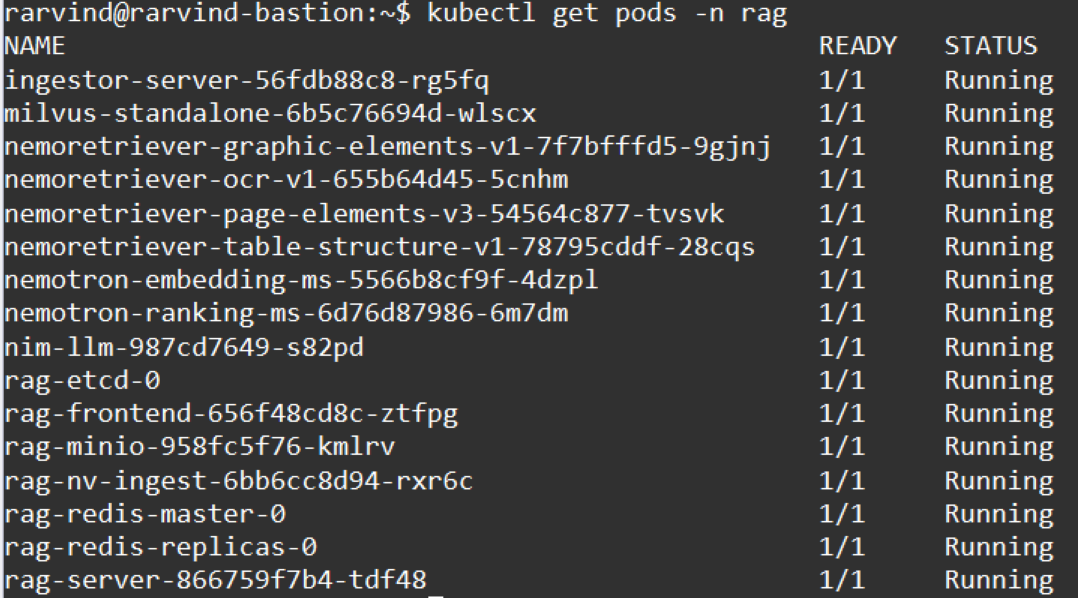
- A successful deployment would mean that all the pods in the ‘rag’ namespace are running.
kubectl get pods -n rag
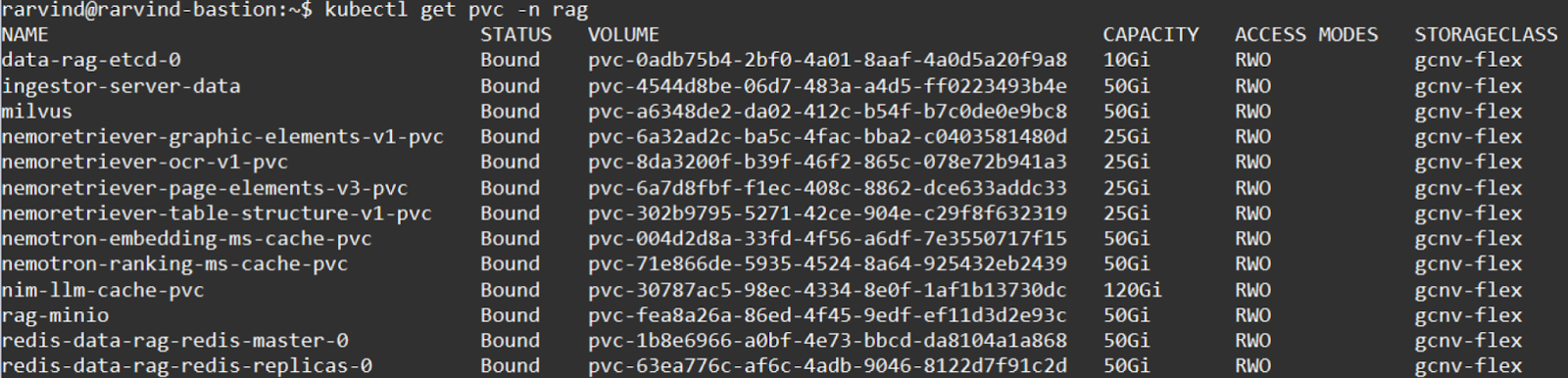
- List the PVCs that are serving the persistent storage for the pods.
kubectl get pvc -n rag
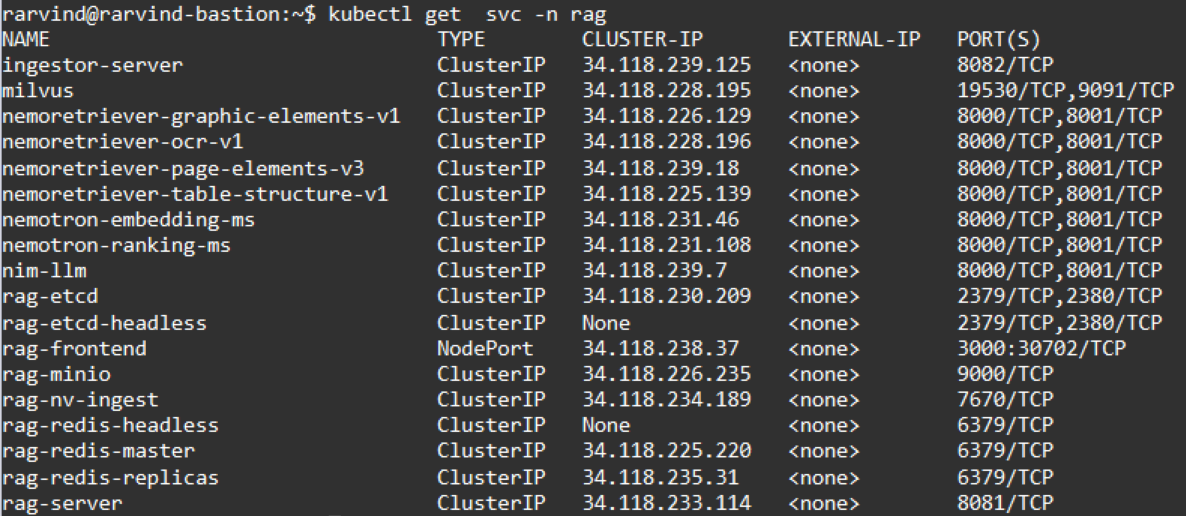
- List the services for the pods.
kubectl get svc -n rag
Access the RAG Web User Interface
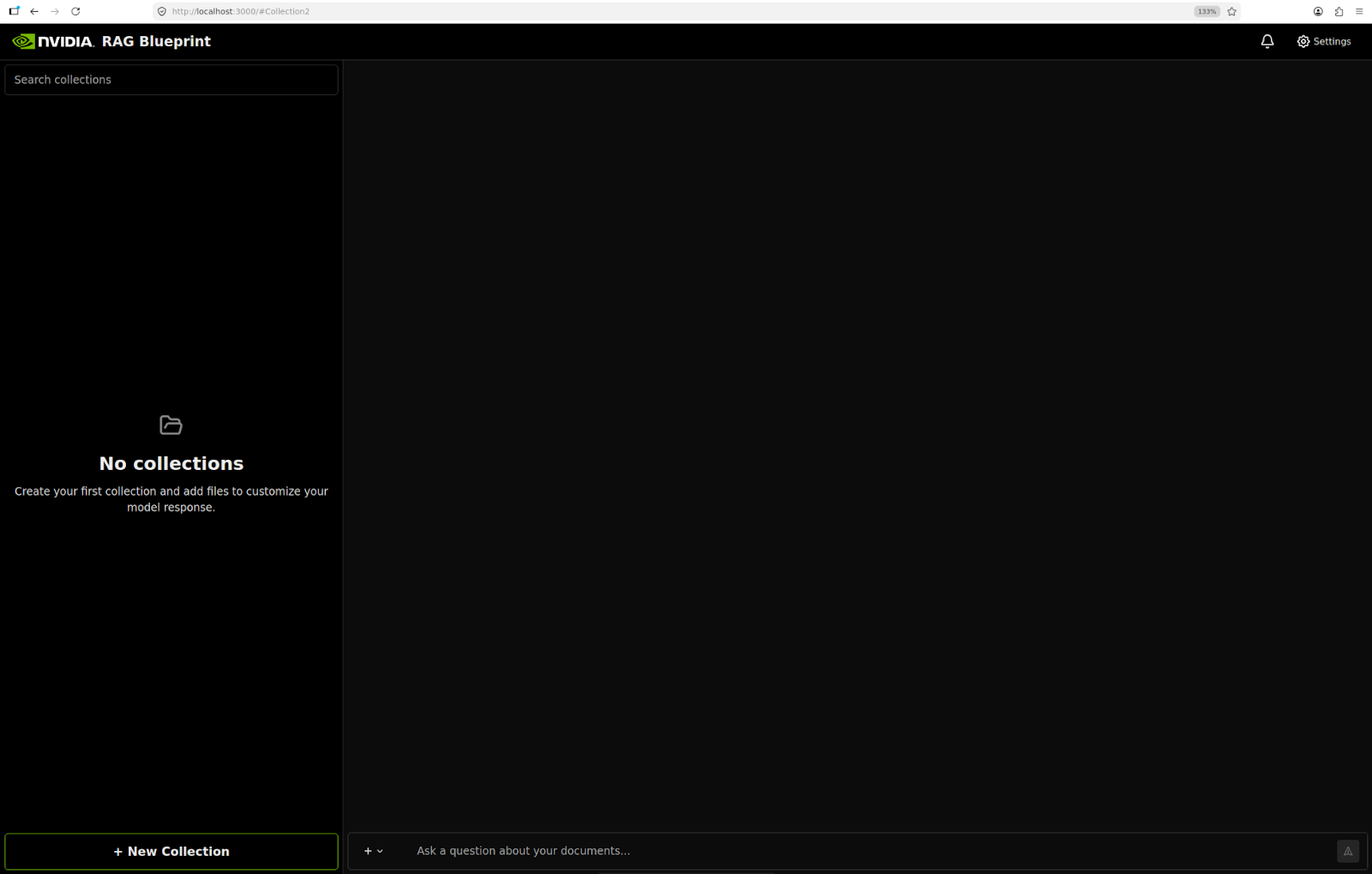
You can access the GUI interface of the RAG service by port forwarding the rag-frontend service to your local machine.
kubectl port-forward -n rag service/rag-frontend 3000:3000 --address 0.0.0.0
Create a New Collection
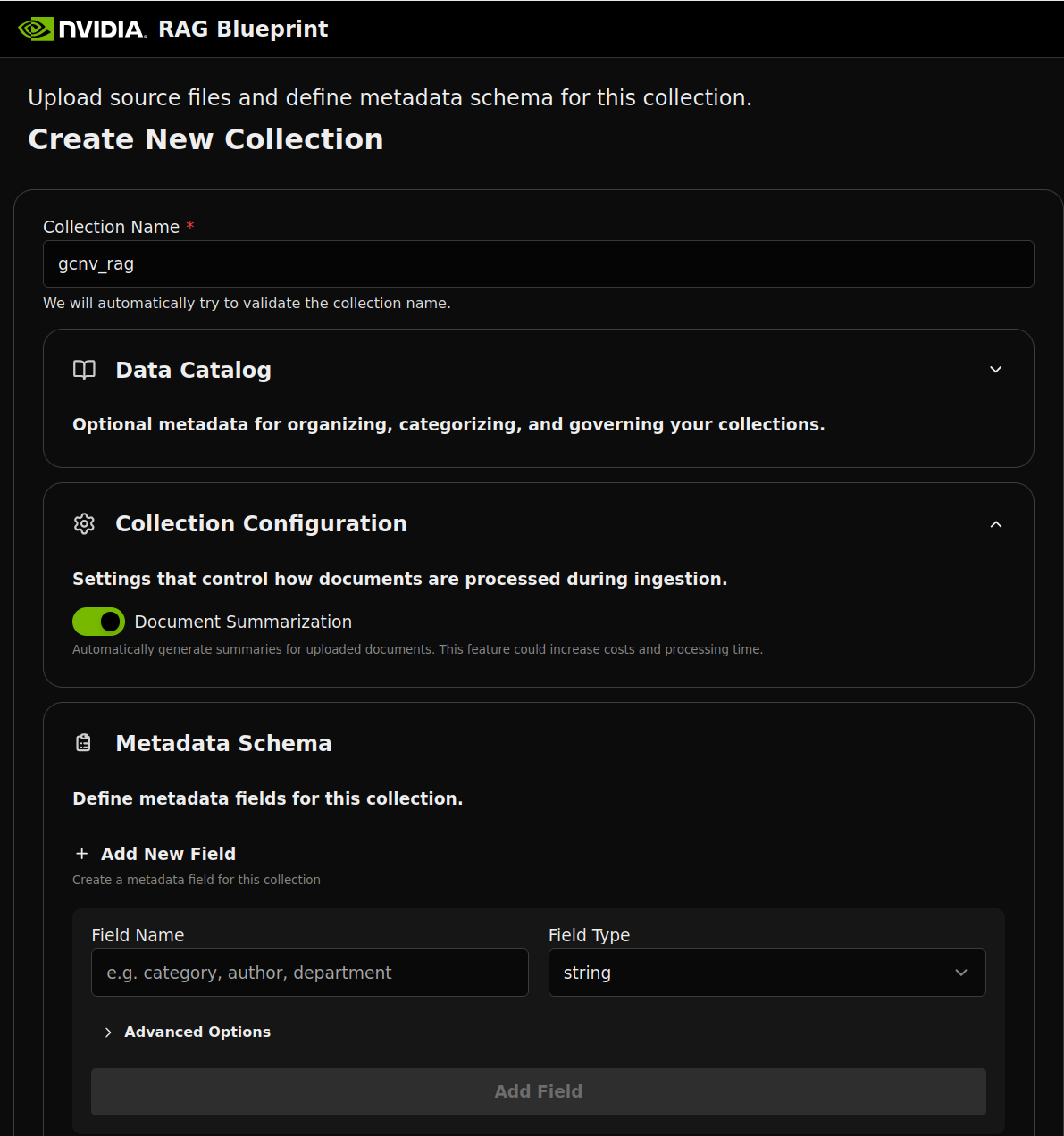
Click on ‘New Collection”.
Enter a name for the Collection, e.g. ‘gcnv_rag’.
You may configure additional settings under the Data Catalog, Collection Configuration and Metadata Schema sections.
Click “Create Collection”.
Create the data ingestion pipeline between NetApp Volumes and Foundational RAG
In this step, a data ingestion service will be configured through which a data pipeline will be setup that will create a collection of files from NetApp Volumes and ingest them into the RAG system.
This is an important step in the configuration that indicates how the source data will be made available to the RAG pipeline. The GCNV volume that represents the data source will be presented as a Persistent Volume Claim to the GCNV data ingestor pod.
Subsequently, the workflows that are part of the data ingestor will enable the creation of vector embeddings for the files that the user has identified. The details of these workflows will be covered in the upcoming section.
Create a namespace
The GCNV data ingestor will be deployed in a separate namespace, if needed it can also be deployed in the same namespace as the RAG Blueprint.
kubectl create namespace gcnv-data-ingestor
Prepare the helm installation for the GCNV data ingestor
Navigate to “examples/google-cloud-netapp-volumes-data-ingestor/values.yaml” in the directory where the GitHub repository https://github.com/NVIDIA-AI-Blueprints/rag.git was cloned earlier.
Update the following parameters in the values.yaml file before installing the helm chart for the GCNV data ingestor. Refer to the README.md file for detailed customization.
- Particulars of the container image for the GCNV data ingestor
image.repository: “ghcr.io/netapp/gcnv_data_ingestor”
image.tag: “latest”
- Persistent storage configuration for maintaining the app data related to the GCNV ingestor
appData.storageClassName: “gcnv-flex”
appData.size: app PVC size, defaults to `50Gi`
- Persistent storage configuration for accessing the source data that needs to be used to setup the RAG pipeline.
Option 1 - If data for RAG will be copied into the system after the blueprint is setup, then the recommended option will be to provision a new PVC to store the data.
New volume creation, where data will be made available
sourceData.storageClassName: “gcnv-flex”
sourceData.size: source PVC size request, defaults to `200Gi`
Option 2 - If data for RAG is already available in a GCNV volume, then leverage the Trident CSI Volume Import feature to present it as a PVC to the GKE cluster and use the below parameters to present the PVC as the data source for RAG.
To use existing PVC with data for RAG
sourceData.create=false
sourceData.existingClaim: <<name of PVC>>
Note: The PVC must exist in the same namespace where the ingestor is deployed.
- Assign the NV Ingest Endpoint, which is the endpoint of the ingestor-server service.
env.nvIngestEndpoint:http://ingestor-server.rag.svc.cluster.local:8082/v1
Dataset
A dataset comprising judgements from the Supreme Court of India has been downloaded from Kaggle and made available in the PVC.
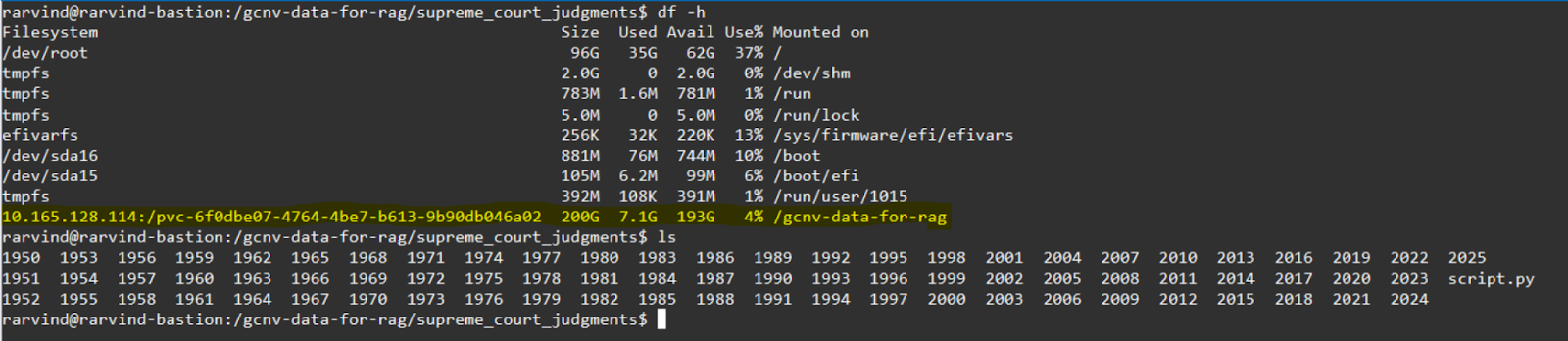
This dataset contains more than 26000 PDF files related to judgements from the year 1950 to 2024.
Deploy the Helm chart for the GCNV data ingestor
Run the below command to install the helm chart with the configured values.
helm install gcnv-data-ingestor ./examples/gcnv-data-ingestor \
  --namespace gcnv-data-ingestor \
  -f ./examples/gcnv-data-ingestor/values.yaml
Verify that the data ingestor has been deployed successfully
kubectl get pod,svc,pvc -n gcnv-data-ingestor

Access the GCNV data ingestor Web User Interface
You can access the GUI interface of the data ingestor for NetApp Volumes by port forwarding the gcnv-data-ingestor service to your local machine.
kubectl port-forward -n gcnv-data-ingestor service/gcnv-data-ingestor 8000:8000 --address 0.0.0.0
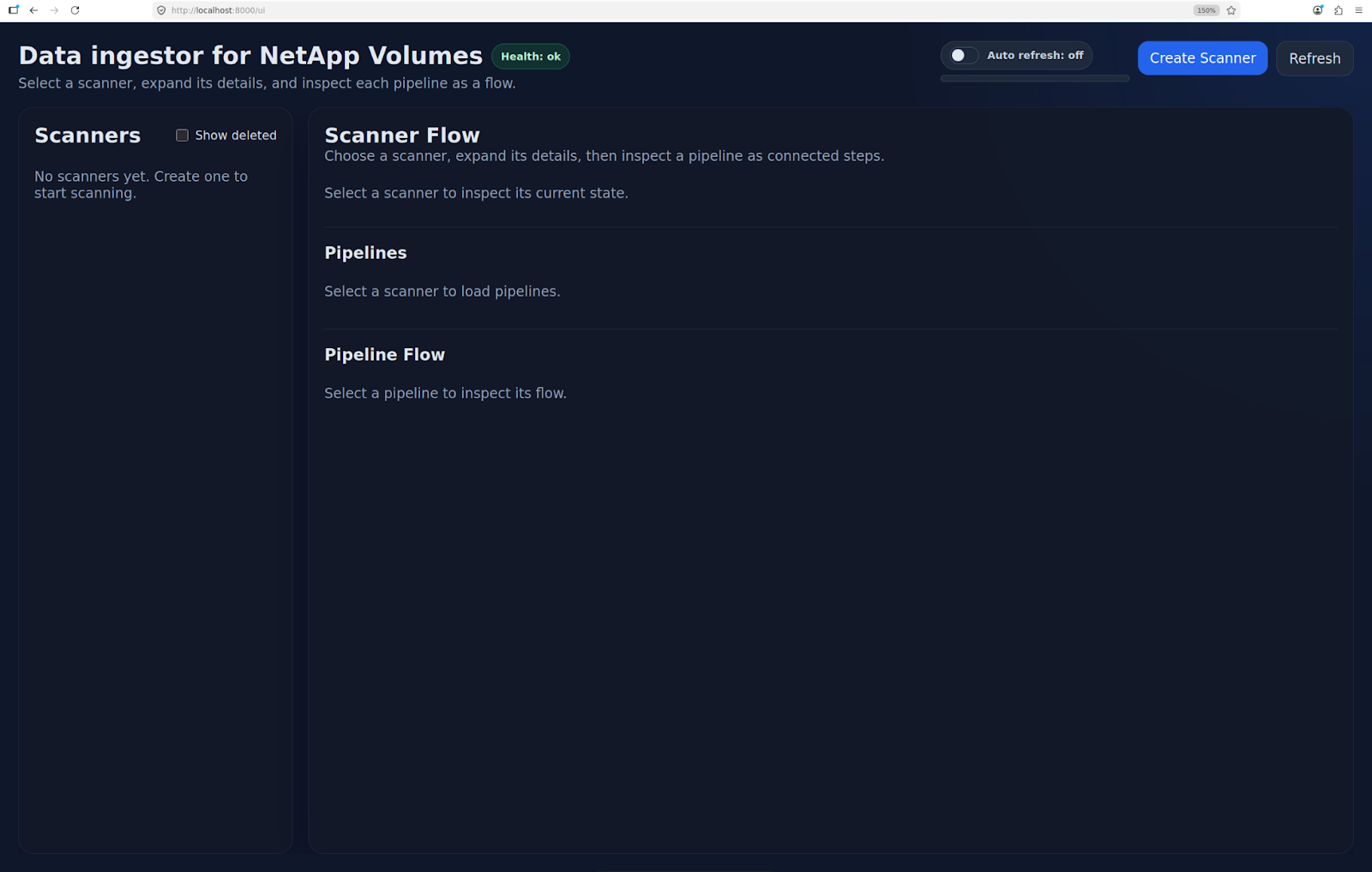
Create a file scanner to feed data to the RAG
Click on “Create Scanner”
Enter the following details to create the scanner -
- Name: provide a name for the scanner e.g. gcnv-1950-judgements
- RAG Collection ID: gcnv_rag ; this will be name of the collection created from the NVIDIA RAG Web interface
- Source Folder: /supreme_court_judgments/1950 ; the scanner will limit its operations to just this folder which has the judgements from the year 1950
- Supported File Types: PDF ; the scanner supports multiple MIME types
- Incremental Scheduler (mins): 60 ; specify a time interval in minutes after which the scanner will re-run on the Source Folder to look for new or updated files and present them for ingestion.
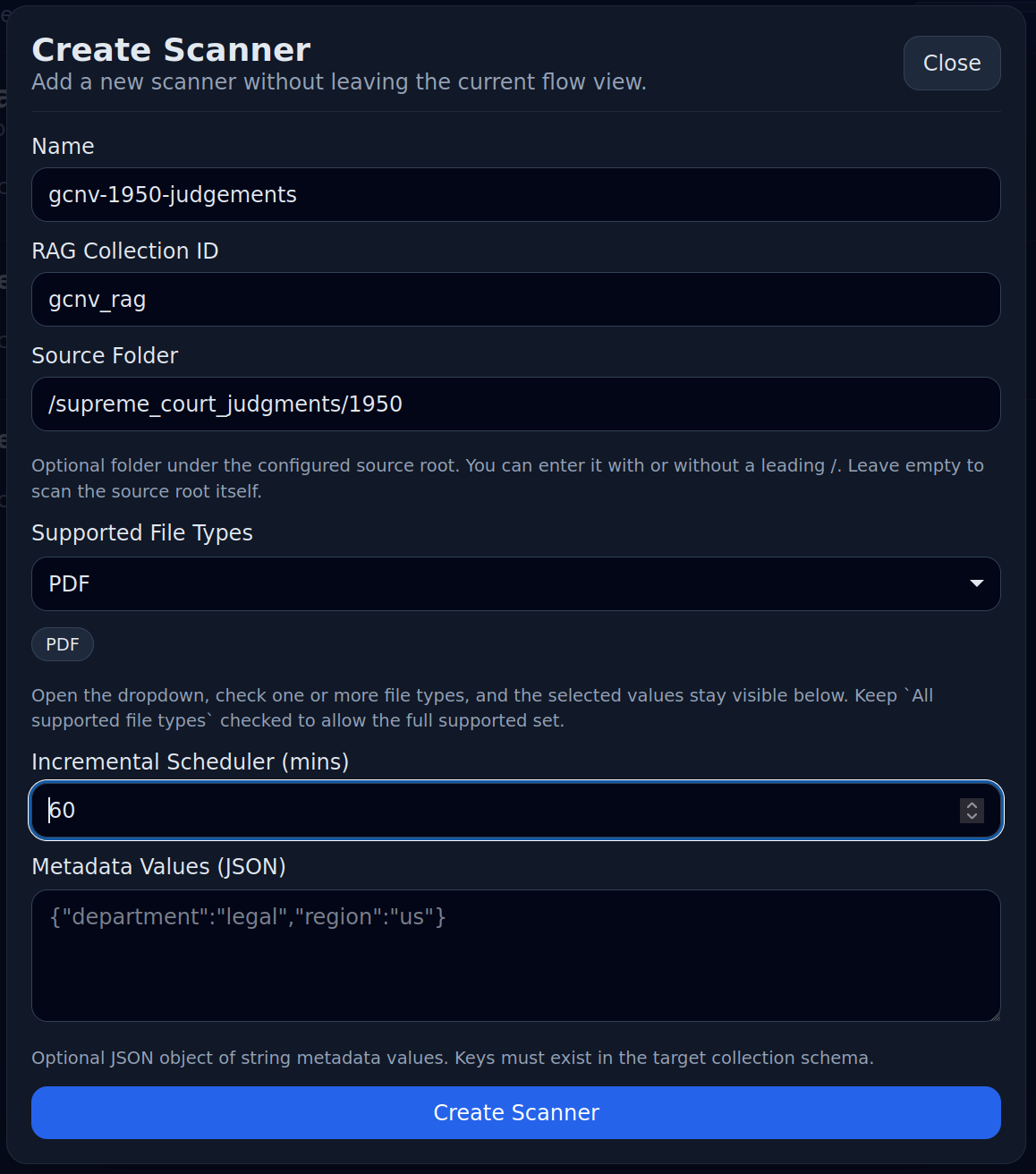
Click on “Create Scanner”
A scanner is created subsequently and since this is the first job run, a full sync operation is performed.
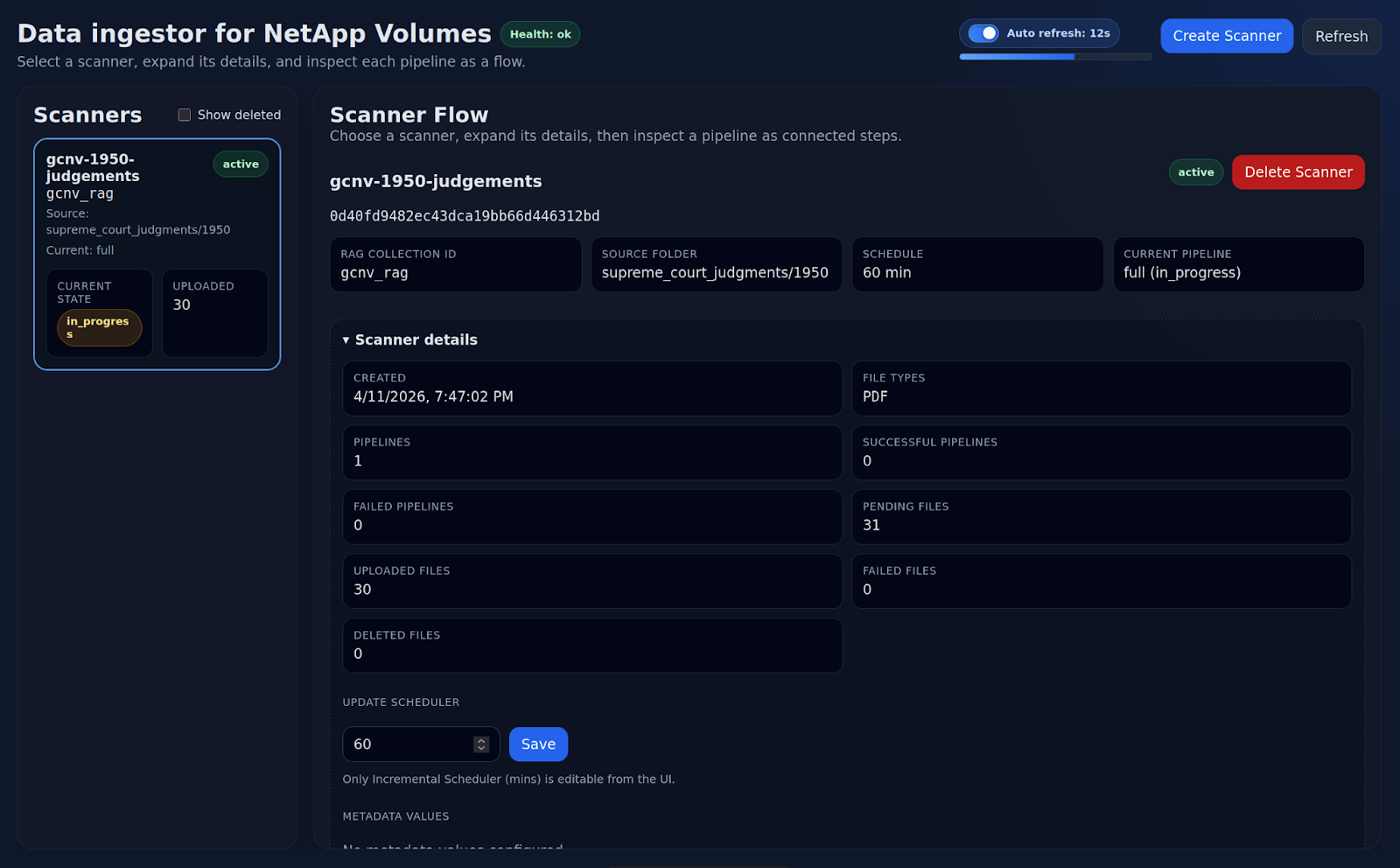
The subsequent scans that will run every 60 minutes will be incremental, i.e. only the modified files and any new files created in the last 60 minutes will be presented to the RAG ingestor for updates. Files that have not gone through any updates in the last 60 minutes will not need any updates at the RAG endpoint.
In this manner, the scanner ensures that the vector embeddings in the RAG endpoint are kept in sync with the source data every 60 minutes. If needed, the sync interval can be updated in the scanner at any time.
After the files are presented to the RAG ingestor, the Scanner transitions to an “Idle” state.
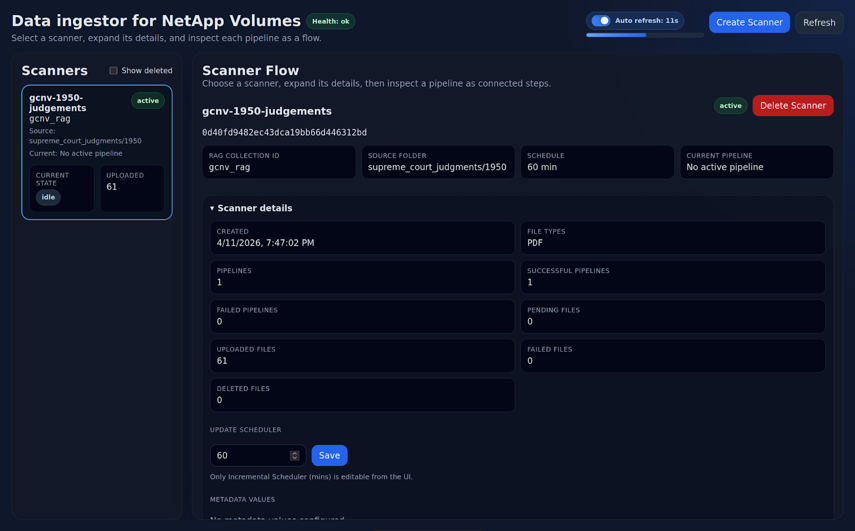
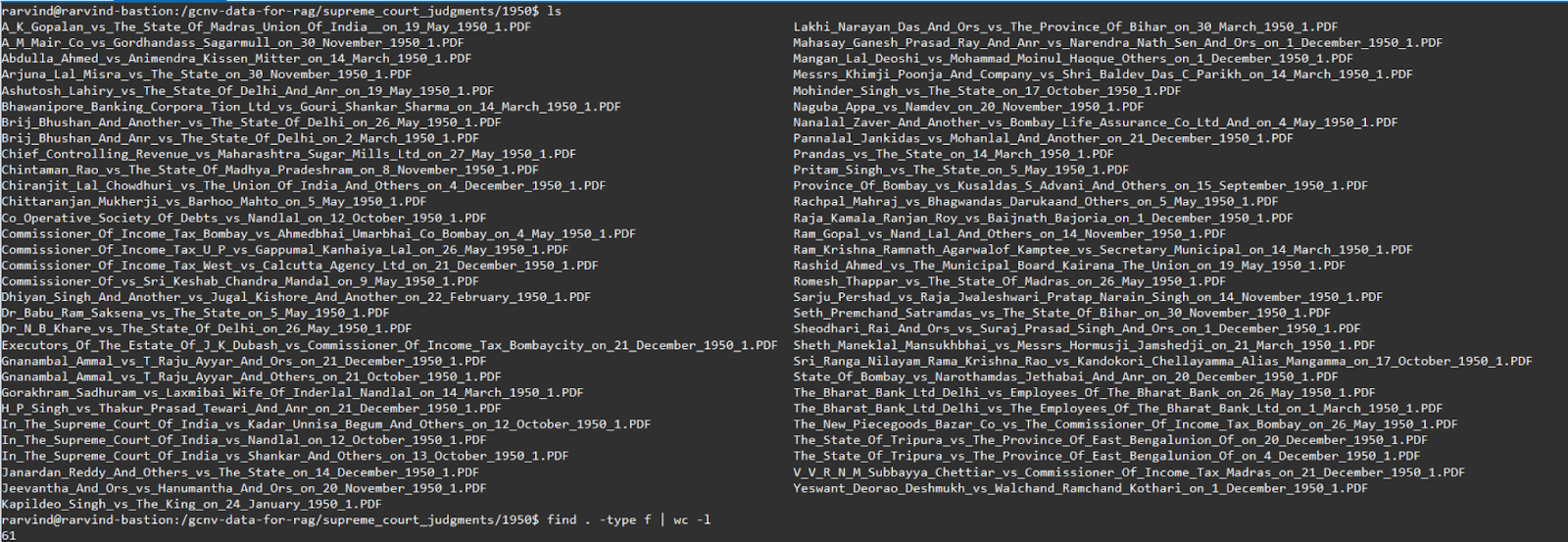
The scanner indicates that 61 files were uploaded to the RAG Ingestor in the previous iteration.
Looking at the source folder, it is confirmed that the directory had 61 files, all of them were PDFs.
Verify the RAG endpoint after data ingestion
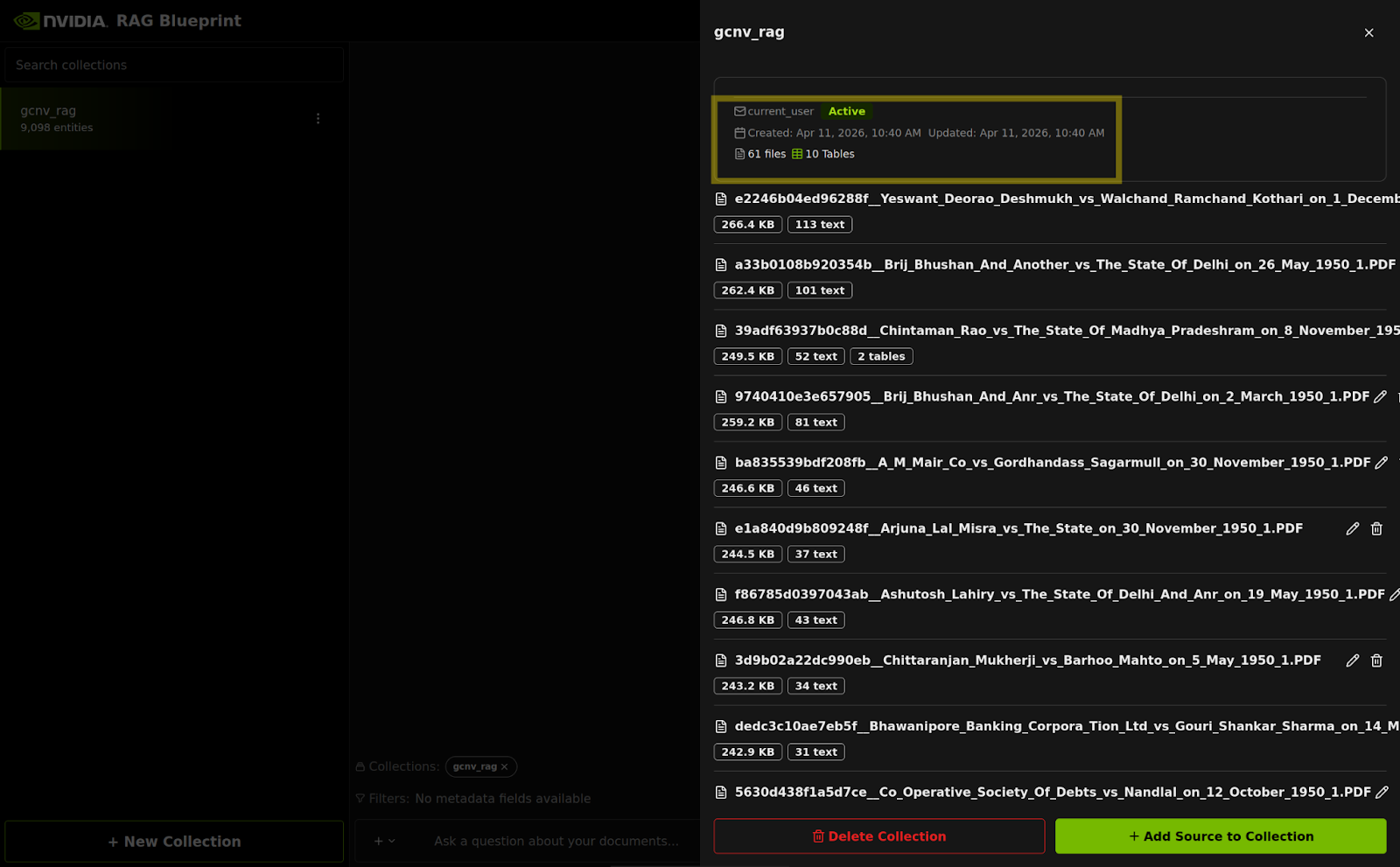
On accessing the RAG Web Server interface and navigating to the “gcnv_rag” collection, it can be easily verified that the 61 files have been ingested successfully.
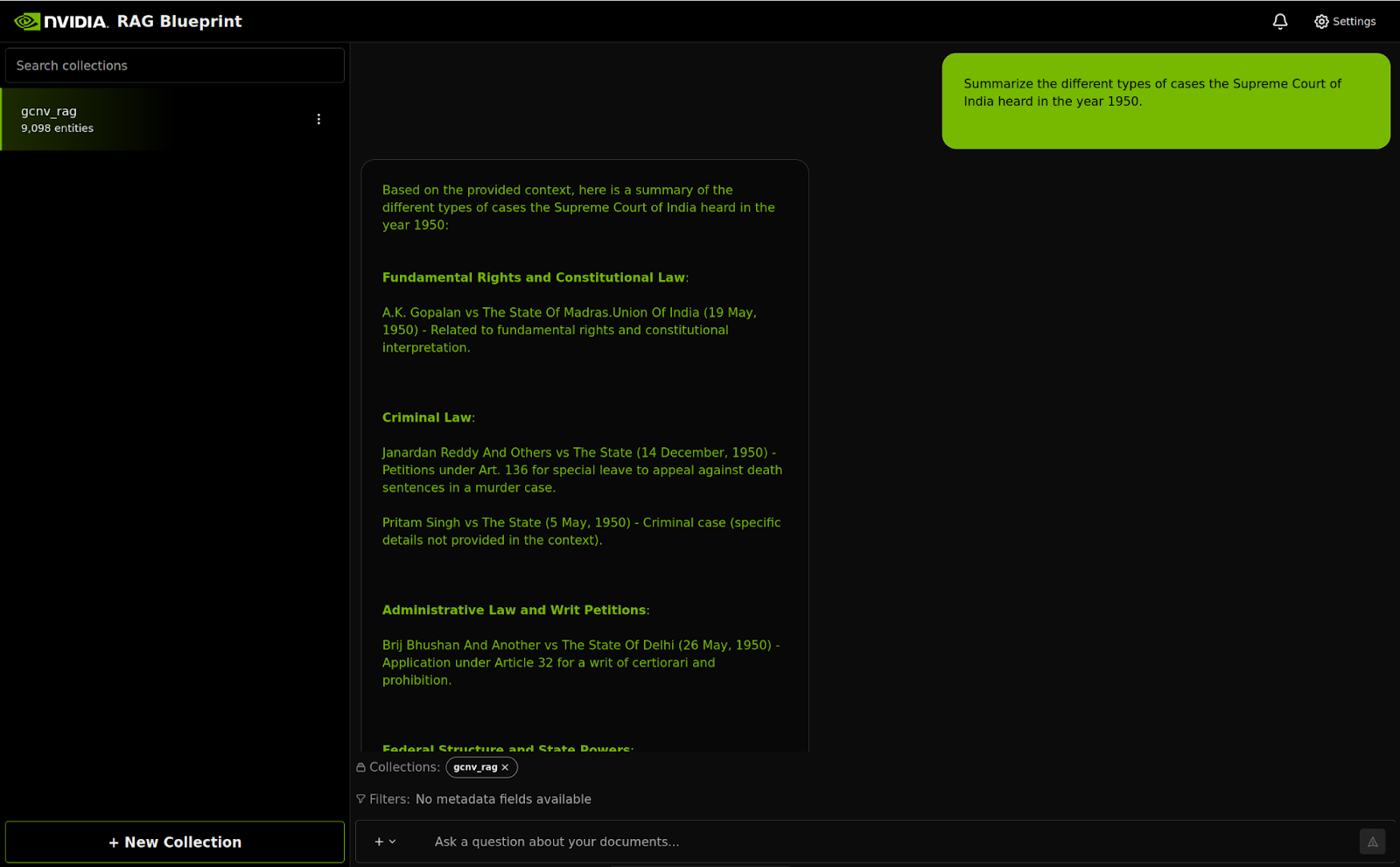
A prompt which can be answered using the available data in the gcnv_rag collection is submitted through the RAG Web Server chat interface and an appropriate response is seen.
A Foundation for Enterprise AI
This reference architecture demonstrates a robust, scalable, and highly efficient solution for building and operating enterprise-grade Retrieval-Augmented Generation (RAG) pipelines, that are fundamental to enabling advanced GenAI use cases through AI Agents e.g. Deep Research.
By leveraging the Google Cloud Platform (GCP), organizations gain the massive scalability, global reach, and secure infrastructure required to handle petabytes of unstructured data. The combination of GKE for container orchestration and Google Cloud NetApp Volumes (GCNV) for high-performance, enterprise-grade file storage provides a seamless and powerful foundation for AI at scale.
The NVIDIA Foundational RAG Blueprint offers a highly optimized, production-ready framework that drastically simplifies deployment. It provides an efficient, end-to-end RAG pipeline, complete with GPU acceleration, advanced retrieval techniques (hybrid search, re-ranking), observability, and evaluation tools, effectively reducing the time-to-market for AI-driven applications.
The critical layer between NetApp Volumes and the RAG Blueprint that elevates this reference architecture is the Google Cloud NetApp Volumes (GCNV) Data Ingestor. This service directly addresses the perennial challenge in RAG: bridging the gap between proprietary enterprise data and the RAG endpoint.
The GCNV Data Ingestor provides customers with the ability to:
- Craft Custom Extraction and Filtering Mechanisms: Users gain granular control over which files, or even subsets of files, are processed, enabling fine-grained data preparation essential for high-accuracy RAG.
- Ensure Data Freshness and Alignment: By enabling configurable, incremental scanning schedules, the ingestor ensures the RAG endpoints are automatically and frequently refreshed, keeping the vector embeddings and knowledge base closely aligned with the original source of truth residing in GCNV.
This architecture delivers a complete, production-ready solution, enabling enterprises to transform vast amounts of unstructured data into trustworthy, actionable intelligence that is securely built upon a performant and scalable foundation.
Acknowledgments
The author extends appreciation and recognition to the following individuals for their contributions to this reference architecture -
- Sam Pastoriza, Solutions Architect, NVIDIA
- Juan Pablo Guerra, Solutions Architect, NVIDIA
- Thomas Frantzen, Head of Business Development, NVIDIA
- Raj Sahoo, Sr. Engineer, GCNV, NetApp
- Andres Arnarson, Director ISV Partnerships, Google
