As Hadoop clusters expand, efficiently managing storage costs and performance becomes increasingly important. Data tiering helps by transferring frequently accessed (hot) data to high-performance storage, while moving infrequently accessed (cold) data to more affordable object storage solutions. This blog discusses an enterprise customer who maintained petabytes of mixed hot and cold HDFS data on costly on-premises disks. There was a goal to cut storage expenses by 30–40%, boost query speeds, and maintain governance standards. The article describes how the customer used NetApp XCP to migrate HDFS data to NetApp NFS for hot storage and StorageGRID S3 for cold storage, integrating with Cloudera Hadoop and automating the process using Oozie workflows.
Why Tier Hadoop Data?
Different datasets require distinct storage classes. Frequently accessed ("hot") data should reside on high‑performance storage, whereas archival or infrequently accessed ("cold") datasets are better suited for cost-effective, scalable object storage solutions. HDFS provides tiered storage policies (HOT/WARM/COLD) to optimise on‑cluster data placement, and Cloudera offers support for the S3A filesystem to integrate with object stores. NetApp XCP will be utilised to perform high‑throughput data migrations from the Hadoop cluster to NFS and S3, while Oozie workflows will facilitate automation throughout the process.
It offers scalable, high-throughput migration capabilities and ensures data integrity through its verify feature. The S3 connector enables seamless migration from HDFS to S3, supporting both profile and endpoint configurations.
Architecture
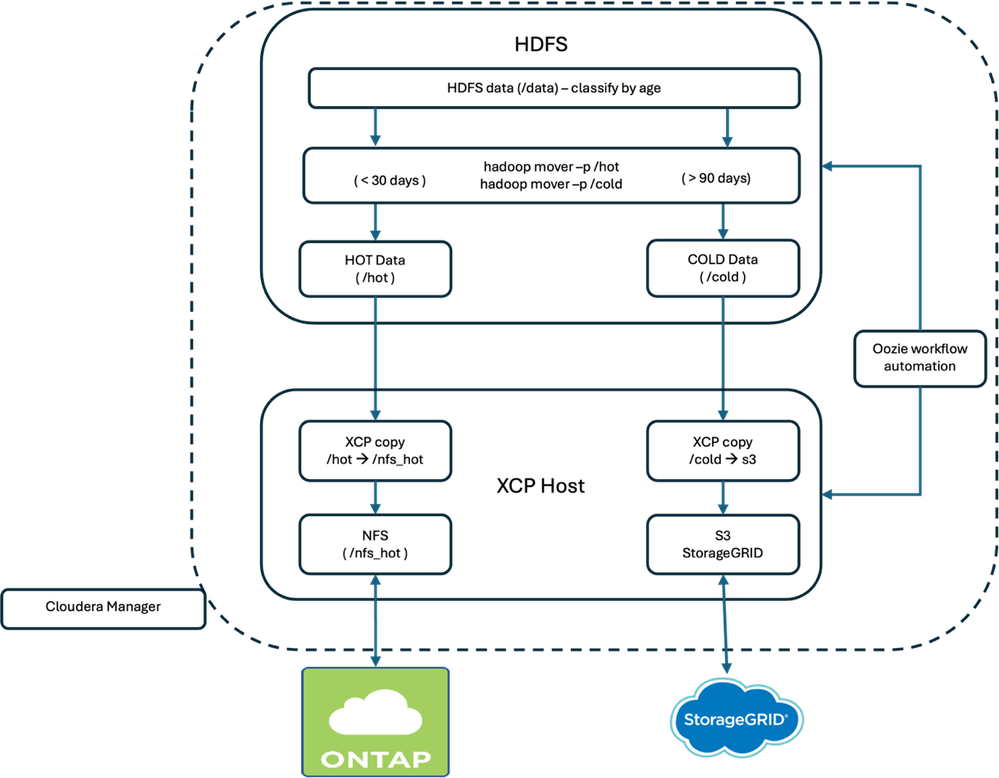
Flow:
- Use Hadoop mover and tier storage policies to sort HDFS files by their modified time (age), placing them into either /hot or /cold directories.
- Employ XCP to transfer data: move files from /hot to NetApp NFS, and files from /cold to NetApp S3.
- Perform XCP verification to ensure data integrity at both destinations.
Prerequisites
- The Hadoop cluster should be configured to use HDFS mode by setting fs.defaultFS to hdfs://<namenode>:8020, and ensuring that the HDFS daemons (NameNode and DataNodes) are running. If you run hadoop fs -df -h and see file:/// instead of hdfs://, that's local mode—switch your configuration to HDFS mode.
- Create HDFS directories if needed. Set HDFS storage policies for on‑cluster hygiene, and Hadoop mover enforces on‑cluster placement; we’ll use XCP for off‑cluster migration.
[root@rhel9nkarthik1 ~]# id
uid=0(root) gid=0(root) groups=0(root) context=unconfined_u:unconfined_r:unconfined_t:s0-s0:c0.c1023
[root@rhel9nkarthik1 ~]# sudo -u hdfs hadoop fs -mkdir /data
[root@rhel9nkarthik1 ~]# sudo -u hdfs hadoop fs -mkdir /hot
[root@rhel9nkarthik1 ~]# sudo -u hdfs hadoop fs -mkdir /cold
[root@rhel9nkarthik1 ~]# sudo -u hdfs hadoop fs -chmod 777 /data /hot /cold
[root@rhel9nkarthik1 ~]# sudo -u hdfs hdfs storagepolicies -setStoragePolicy -path /hot -policy HOT
Set storage policy HOT on /hot
[root@rhel9nkarthik1 ~]# sudo -u hdfs hdfs storagepolicies -setStoragePolicy -path /cold -policy COLD
Set storage policy COLD on /cold
[root@rhel9nkarthik1 ~]#
[root@rhel9nkarthik1 ~]# hdfs storagepolicies -getStoragePolicy -path /hot
The storage policy of /hot:
BlockStoragePolicy{HOT:7, storageTypes=[DISK], creationFallbacks=[], replicationFallbacks=[ARCHIVE]}
[root@rhel9nkarthik1 ~]# hdfs storagepolicies -getStoragePolicy -path /cold
The storage policy of /cold:
BlockStoragePolicy{COLD:2, storageTypes=[ARCHIVE], creationFallbacks=[], replicationFallbacks=[]}
[root@rhel9nkarthik1 ~]#
|
- Install on a gateway host or a Cloudera cluster node and run it as root for optimal performance and permissions. Set up an XCP catalog to store XCP operation metadata, which is used during sync and cutover for updated files. You can download the xcp software from this link: https://mysupport.netapp.com/site/products/all/details/netapp-xcp/downloads-tab
- NetApp NFS Target: Configure a NetApp NFS volume in ONTAP and export it (for example, netapp-vserver-data-lif-ip:/nfs_hot) to ensure accessibility from the XCP host. Validate the NetApp NFS volume using the command “showmount -e <data_lif_ip>” on the XCP host to display available NFS volumes. XCP supports HDFS to NFS migrations for both copy and verify operations (excluding sync).
- For a NetApp S3 target, create a NetApp bucket (for example, s3://analytics-cold) in ONTAP or StorageGRID, ensuring your AWS profile is set up with the necessary access key and secret key. The XCP S3 connector requires both the AWS profile and the endpoint, and it supports copy and verify operations (but not sync). Be sure to test the 'aws s3' command to confirm that the bucket is accessible from the XCP host.
- To enable XCP to function with HDFS as a source, it is necessary to set JAVA_HOME, CLASSPATH, NHDFS_LIBHDFS_PATH, and NHDFS_LIBJVM_PATH on the XCP host. Please refer to the sample configuration details below:
[root@rhel9nkarthik1 ~]# dirname $(dirname $(readlink $(readlink $(which javac))))
/usr/lib/jvm/java-1.8.0-openjdk-1.8.0.472.b08-1.el9.x86_64
[root@rhel9nkarthik1 ~]# export JAVA_HOME=$(dirname $(dirname $(readlink $(readlink $(which javac)))))
[root@rhel9nkarthik1 ~]# export NHDFS_LIBJVM_PATH=`find $JAVA_HOME -name "libjvm.so"`
[root@rhel9nkarthik1 ~]# echo $NHDFS_LIBJVM_PATH
/usr/lib/jvm/java-1.8.0-openjdk-1.8.0.472.b08-1.el9.x86_64/jre/lib/amd64/server/libjvm.so
[root@rhel9nkarthik1 ~]# find / -name 'libhdfs.so'
/opt/cloudera/parcels/CDH-7.3.1-1.cdh7.3.1.p0.60371244/lib64/libhdfs.so
[root@rhel9nkarthik1 ~]# export NHDFS_LIBHDFS_PATH='/opt/cloudera/parcels/CDH-7.3.1-1.cdh7.3.1.p0.60371244/lib64/libhdfs.so'
[root@rhel9nkarthik1 ~]# echo $NHDFS_LIBHDFS_PATH
/opt/cloudera/parcels/CDH-7.3.1-1.cdh7.3.1.p0.60371244/lib64/libhdfs.so
[root@rhel9nkarthik1 ~]#
[root@rhel9nkarthik1 ~]# export CLASSPATH="$(hadoop classpath --glob)"
|
Before actual migration, validate them manually to make sure the setup is ready
Create Sample Data (to Validate End‑to‑End)
[root@rhel9nkarthik1 ~]# sudo -u hdfs hdfs dfs -mkdir -p /data/hot_src/2025/15/11
[root@rhel9nkarthik1 ~]# sudo -u hdfs hdfs dfs -mkdir -p /data/cold_src/2025/08/01
[root@rhel9nkarthik1 ~]# for i in $(seq 1 10); do
  echo "hot $i $(date)" | sudo -u hdfs hdfs dfs -put - /data/hot_src/2025/15/11/hotfile_$i.txt
done
[root@rhel9nkarthik1 ~]# for i in $(seq 1 10); do
  echo "cold $i $(date)" | sudo -u hdfs hdfs dfs -put - /data/cold_src/2025/08/01/coldfile_$i.txt
done
[root@rhel9nkarthik1 ~]#
|
Verify accessibility of the NetApp NFS share by executing the Showmount command.
[root@rhel9nkarthik1 ~]# showmount -e 10.63.150.161
Export list for 10.63.150.161:
/nfs_hot                                              (everyone)
/openshifticeberg_data_perf_data_pg_metastore_0_d1747 (everyone)
/openshifticeberg_default_hive_mysql_pvc_f79c9        (everyone)
/openshifticeberg_trident_test_pvc_01543              (everyone)
/rps_test_karthik                                     (everyone)
/test_ai_data_plateform_logs_kafka_controller_1_5bde3 (everyone)
/trident_pvc_29acb31d_08ea_42b5_9a05_af361c748d8b     (everyone)
/trident_pvc_50a48ff8_e65c_4e34_ab95_5c5d6e1ba9c8     (everyone)
/trident_pvc_6b1116aa_331f_4d5e_bb2d_35a2031da8b6     (everyone)
/trident_pvc_768ea30b_5719_49e9_a279_ba6e5b87841f     (everyone)
/trident_pvc_e15a339e_4d8e_4c42_a722_25c005250cb0     (everyone)
/trident_pvc_f9853c93_18aa_4f38_a269_992880d29cfb     (everyone)
/                                                     (everyone)
/xcp_catalog                                          (everyone)
[root@rhel9nkarthik1 ~]#
[root@rhel9nkarthik1 ~]# mkdir /xcp_catalog
[root@rhel9nkarthik1 ~]# mount 10.63.150.161:/xcp_catalog /xcp_catalog
[root@rhel9nkarthik1 ~]# touch /xcp_catalog/test
[root@rhel9nkarthik1 ~]# ls -ltrah /xcp_catalog/
total 8.0K
drwxrwxrwx.  2 nobody nobody 4.0K Dec 15 17:25 .
-rw-r--r--.  1 nobody nobody    0 Dec 15 17:25 test
dr-xr-xr-x. 26 root   root   4.0K Dec 15 17:27 ..
[root@rhel9nkarthik1 ~]#
|
Verify that the xcp catalog is set correctly in /opt/NetApp/xFiles/xcp/xcp.ini.
[root@rhel9nkarthik1 ~]# cat /opt/NetApp/xFiles/xcp/xcp.ini
# Sample xcp config
[xcp]
catalog = 10.63.150.161:/xcp_catalog
[root@rhel9nkarthik1 ~]#
|
Please perform the xcp copy operation and verify the data transfer from HDFS to NFS.
XCP copy between HDFS and NetApp NFS volume:
[root@rhel9nkarthik1 ~]# /usr/src/xcp/linux/xcp copy -newid hot_test hdfs:///hot 10.63.150.161:/nfs_hot
XCP 1.9.4P1; (c) 2025 NetApp, Inc.; Licensed to Karthikeyan Nagalingam [NetApp Inc] until Tue Dec 15 18:48:05 2026

Job ID: Job_hot_test_2025-12-15_19.16.40.750569_copy
25/12/15 19:16:42 WARN util.NativeCodeLoader: Unable to load native-hadoop library for your platform... using builtin-java classes where applicable
 1 scanned, 0 in (0/s), 0 out (0/s), 5s
25/12/15 19:16:46 WARN util.NativeCodeLoader: Unable to load native-hadoop library for your platform... using builtin-java classes where applicable
25/12/15 19:16:48 WARN util.NativeCodeLoader: Unable to load native-hadoop library for your platform... using builtin-java classes where applicable
 10 scanned, 2 copied, 576 in (114/s), 428 out (84.4/s), 10s
25/12/15 19:16:51 WARN util.NativeCodeLoader: Unable to load native-hadoop library for your platform... using builtin-java classes where applicable
25/12/15 19:16:53 WARN util.NativeCodeLoader: Unable to load native-hadoop library for your platform... using builtin-java classes where applicable
 12 scanned, 4 copied, 1.12 KiB in (113/s), 844 out (81.6/s), 16s
25/12/15 19:16:56 WARN util.NativeCodeLoader: Unable to load native-hadoop library for your platform... using builtin-java classes where applicable
25/12/15 19:16:59 WARN util.NativeCodeLoader: Unable to load native-hadoop library for your platform... using builtin-java classes where applicable
 13 scanned, 5 copied, 1.41 KiB in (56.7/s), 1.03 KiB out (40.9/s), 21s
Sending statistics...
Xcp command : xcp copy -newid hot_test hdfs:///hot 10.63.150.161:/nfs_hot
Stats       : 13 scanned, 12 copied, 13 indexed
Speed       : 134 KiB in (6.20 KiB/s), 226 KiB out (10.4 KiB/s)
Total Time  : 21s.
Migration ID: hot_test
Job ID      : Job_hot_test_2025-12-15_19.16.40.750569_copy
Log Path    : /opt/NetApp/xFiles/xcp/xcplogs/Job_hot_test_2025-12-15_19.16.40.750569_copy.log
STATUS      : PASSED
[root@rhel9nkarthik1 ~]#
|
XCP verification between HDFS and NetApp NFS volume:
[root@rhel9nkarthik1 ~]# xcp verify hdfs:///hot 10.63.150.161:/nfs_hot
XCP 1.9.4P1; (c) 2025 NetApp, Inc.; Licensed to Karthikeyan Nagalingam [NetApp Inc] until Tue Dec 15 18:48:05 2026
xcp: WARNING: No index name has been specified, creating one with name: XCP_verify_2025-12-15_19.19.39.391272
Job ID: Job_2025-12-15_19.19.39.391272_verify
25/12/15 19:19:41 WARN util.NativeCodeLoader: Unable to load native-hadoop library for your platform... using builtin-java classes where applicable
25/12/15 19:19:44 WARN util.NativeCodeLoader: Unable to load native-hadoop library for your platform... using builtin-java classes where applicable
 1 scanned, 1 found, 9.95 KiB in (1.97 KiB/s), 13.6 KiB out (2.68 KiB/s), 5s
25/12/15 19:19:46 WARN util.NativeCodeLoader: Unable to load native-hadoop library for your platform... using builtin-java classes where applicable
25/12/15 19:19:47 WARN util.NativeCodeLoader: Unable to load native-hadoop library for your platform... using builtin-java classes where applicable
 10 scanned, 4 found, 10.7 KiB in (152/s), 14.0 KiB out (95.1/s), 10s
25/12/15 19:19:49 WARN util.NativeCodeLoader: Unable to load native-hadoop library for your platform... using builtin-java classes where applicable
25/12/15 19:19:52 WARN util.NativeCodeLoader: Unable to load native-hadoop library for your platform... using builtin-java classes where applicable
 12 scanned, 6 found, 11.2 KiB in (102/s), 14.3 KiB out (61.9/s), 15s
25/12/15 19:19:55 WARN util.NativeCodeLoader: Unable to load native-hadoop library for your platform... using builtin-java classes where applicable
25/12/15 19:19:58 WARN util.NativeCodeLoader: Unable to load native-hadoop library for your platform... using builtin-java classes where applicable
 13 scanned, 13 found, 7 compared, 7 same data, 263 KiB in (49.3 KiB/s), 16.6 KiB out (447/s), 20s
Sending statistics...

Xcp command : xcp verify hdfs:///hot 10.63.150.161:/nfs_hot
Stats       : 13 scanned, 13 indexed, 100% found (7 have data), 7 compared, 100% verified (data, attrs, mods)
Speed       : 265 KiB in (12.5 KiB/s), 110 KiB out (5.20 KiB/s)
Total Time  : 21s.
Job ID      : Job_2025-12-15_19.19.39.391272_verify
Log Path    : /opt/NetApp/xFiles/xcp/xcplogs/Job_2025-12-15_19.19.39.391272_verify.log
STATUS      : PASSED
[root@rhel9nkarthik1 ~]#
|
To migrate XCP data from HDFS to S3, professional support from NetApp is required.
[root@rhel9nkarthik1 ~]#
xcp copy -newid cold_test \
  -s3.profile default -s3.endpoint http://10.63.150.28 \
  hdfs:///cold s3://analytics-cold
XCP 1.9.4P1; (c) 2025 NetApp, Inc.; Licensed to Karthikeyan Nagalingam [NetApp Inc] until Tue Dec 15 18:48:05 2026

Job ID: Job_cold_test_2025-12-15_19.22.49.291514_copy
25/12/15 19:22:51 WARN util.NativeCodeLoader: Unable to load native-hadoop library for your platform... using builtin-java classes where applicable
ERROR: S3Connect 's3://analytics-cold': To use S3 feature please contact Netapp PSE
Sending statistics...
Error sending statistics
Xcp command : xcp copy -newid cold_test -s3.profile default -s3.endpoint http://10.63.150.28 hdfs:///cold s3://analytics-cold
1 error
Migration ID: cold_test
Job ID      : Job_cold_test_2025-12-15_19.22.49.291514_copy
Log Path    : /opt/NetApp/xFiles/xcp/xcplogs/Job_cold_test_2025-12-15_19.22.49.291514_copy.log
STATUS      : FAILED
[root@rhel9nkarthik1 ~]#
|
The Sample Script: Classify by Age + XCP Migrations
What it does
- The system conducts a recursive scan of the /data directory, categorizing files based on their modification time (mtime) thresholds. Data age is classified according to established requirements: files modified within the past 30 days are identified as hot, those aged between 30 and 90 days are considered warm, and files older than 90 days are designated as cold. In the provided sample script, only hot and cold data classifications are addressed.
- Recent files are transferred to /hot, while older files are moved to /cold.
- XCP copy is executed, transferring data from /hot to NetApp NFS and from /cold to NetApp S3.
- XCP verify is subsequently run on both destinations.
|
#!/usr/bin/env bash
# tiering_xcp.sh — Classify HDFS files by age, move to /hot or /cold,
# then migrate /hot -> NetApp NFS and /cold -> S3 using NetApp XCP.
# Docs:
# - XCP HDFS migration: (copy/verify/resume)
# - XCP S3 connector: (profile/endpoint; no sync)
# - XCP NFS migrate: (copy/sync/verify)
# - XCP best practices: (run as root; catalog; performance)

set -euo pipefail
SOURCE_ROOT="/data"
HOT_DAYS=30
COLD_DAYS=90
HOT_DIR="/hot"
COLD_DIR="/cold"
WARM_DIR=""              # optional mid-tier
DRY_RUN="false"
NFS_TARGET="10.63.150.161:/nfs_hot"            # e.g., netapp-vserver:/nfs_hot
S3_BUCKET="s3://analytics-cold"             # e.g., s3://analytics-cold
S3_PROFILE="default"            # e.g., prodprofile
S3_ENDPOINT="http://10.63.150.28"           # e.g., https://s3.amazonaws.com
CATALOG_PATH="file:///xcp_catalog"
HOT_COPY_ID="hot_$(date +%Y%m%d%H%M%S)"
COLD_COPY_ID="cold_$(date +%Y%m%d%H%M%S)"
LOG_FILE="${LOG_FILE:-/var/log/tiering_xcp-$(date +%Y%m%d%H%M%S).log}"

# --- parse args ---
    while [[ $# -gt 0 ]]; do
      case "$1" in
         --source)       SOURCE_ROOT="$2"; shift 2 ;;
         --hot-days)     HOT_DAYS="$2"; shift 2 ;;
         --cold-days)    COLD_DAYS="$2"; shift 2 ;;
         --hot-dir)      HOT_DIR="$2"; shift 2 ;;
         --cold-dir)     COLD_DIR="$2"; shift 2 ;;
         --warm-dir)     WARM_DIR="$2"; shift 2 ;;
         --dry-run)      DRY_RUN="true"; shift 1 ;;
         --nfs-target)   NFS_TARGET="$2"; shift 2 ;;
         --s3-bucket)    S3_BUCKET="$2"; shift 2 ;;
         --s3-profile)   S3_PROFILE="$2"; shift 2 ;;
         --s3-endpoint)  S3_ENDPOINT="$2"; shift 2 ;;
         --catalog)      CATALOG_PATH="$2"; shift 2 ;;
         --hot-copy-id)  HOT_COPY_ID="$2"; shift 2 ;;
         --cold-copy-id) COLD_COPY_ID="$2"; shift 2 ;;
         --log-file)     LOG_FILE="$2"; shift 2 ;;
         *) echo "Unknown option: $1"; exit 1 ;;
       esac
     done

     log() { printf '%s %s\n' "$(date '+%Y-%m-%d %H:%M:%S')" "$*" | tee -a "$LOG_FILE" ; }

     # --- validate ---
     [[ -z "$NFS_TARGET" ]] && { echo "ERROR: --nfs-target is required"; exit 2; }
     [[ -z "$S3_BUCKET" ]] && { echo "ERROR: --s3-bucket is required"; exit 2; }
     [[ -z "$S3_PROFILE" ]] && { echo "ERROR: --s3-profile is required"; exit 2; }
     [[ -z "$S3_ENDPOINT" ]] && { echo "ERROR: --s3-endpoint is required"; exit 2; }

     if ! sudo -u hdfs hdfs dfs -test -d "$SOURCE_ROOT"; then
       log "ERROR: HDFS source root does not exist: $SOURCE_ROOT"; exit 3;
     fi

     ensure_dir() {
       local dir="$1"
       if [[ -n "$dir" ]]; then
         if ! sudo -u hdfs hdfs dfs -test -d "$dir"; then
           log "Creating HDFS dir: $dir"
           [[ "$DRY_RUN" == "true" ]] || sudo -u hdfs hdfs dfs -mkdir -p "$dir"
         fi
       fi
     }

     ensure_dir "$HOT_DIR"
     ensure_dir "$COLD_DIR"
     [[ -n "$WARM_DIR" ]] && ensure_dir "$WARM_DIR"

     # --- classify by mtime + move ---
     log "Classifying by mtime: SOURCE_ROOT=$SOURCE_ROOT HOT_DAYS=$HOT_DAYS COLD_DAYS=$COLD_DAYS DRY_RUN=$DRY_RUN"
     now_epoch=$(date +%s)
     moved_hot=0; moved_cold=0; moved_warm=0

     sudo -u hdfs hdfs dfs -ls -R "$SOURCE_ROOT" 2>/dev/null | awk '$1 ~ /^-/' | while read -r perm repl owner group size date time path; do
       mod_epoch=$(date -d "$date $time" +%s 2>/dev/null || echo 0)
       [[ "$mod_epoch" == "0" ]] && continue
       age_days=$(( (now_epoch - mod_epoch) / 86400 ))

       target=""
       if (( age_days <= HOT_DAYS )); then
         target="$HOT_DIR"
       elif (( age_days >= COLD_DAYS )); then
         target="$COLD_DIR"
       else
         [[ -n "$WARM_DIR" ]] && target="$WARM_DIR" || target=""
       fi

       [[ -z "$target" ]] && continue

       rel="${path#$SOURCE_ROOT/}"
       tgt_dir="$target/$(dirname "$rel")"

       if [[ "$DRY_RUN" == "true" ]]; then
         log "[DRY] age=${age_days}d  $path  ->  $target/$rel"
       else
         sudo -u hdfs hdfs dfs -mkdir -p "$tgt_dir"
         sudo -u hdfs hdfs dfs -mv "$path" "$target/$rel"
         log "Moved age=${age_days}d $path -> $target/$rel"
       fi

       if [[ "$target" == "$HOT_DIR" ]]; then ((moved_hot++)); fi
       if [[ "$target" == "$COLD_DIR" ]]; then ((moved_cold++)); fi
       if [[ "$target" == "$WARM_DIR" ]]; then ((moved_warm++)); fi
     done

     log "Classification summary: moved_hot=$moved_hot moved_cold=$moved_cold moved_warm=$moved_warm"

     # --- XCP migrations ---
     export XCP_CATALOG="$CATALOG_PATH"
     HOT_CMD=( xcp copy -newid "$HOT_COPY_ID" "hdfs://$HOT_DIR" "$NFS_TARGET" )
     COLD_CMD=( xcp copy -newid "$COLD_COPY_ID" -s3.profile "$S3_PROFILE" -s3.endpoint "$S3_ENDPOINT" "hdfs://$COLD_DIR" "$S3_BUCKET" )

     if [[ "$DRY_RUN" == "true" ]]; then
       log "[DRY] ${HOT_CMD[*]}"
       log "[DRY] ${COLD_CMD[*]}"
     else
       log "Running HOT baseline: ${HOT_CMD[*]}"
       "${HOT_CMD[@]}"
       log "HOT copy completed. ID=$HOT_COPY_ID"
       log "Running COLD baseline: ${COLD_CMD[*]}"
       "${COLD_CMD[@]}"
       log "COLD copy completed. ID=$COLD_COPY_ID"
     fi

     # --- Verify both targets ---
     if [[ "$DRY_RUN" == "true" ]]; then
       log "[DRY] xcp verify hdfs://$HOT_DIR $NFS_TARGET"
       log "[DRY] xcp verify -s3.profile $S3_PROFILE -s3.endpoint $S3_ENDPOINT hdfs://$COLD_DIR $S3_BUCKET"
     else
       xcp verify "hdfs://$HOT_DIR" "$NFS_TARGET"
       xcp verify -s3.profile "$S3_PROFILE" -s3.endpoint "$S3_ENDPOINT" "hdfs://$COLD_DIR" "$S3_BUCKET"
       log "Verify completed for HOT & COLD"
     fi


     # --- Optional: incremental sync for NFS ---
     if [[ "$DRY_RUN" == "true" ]]; then
       log "[DRY] xcp sync -id $HOT_COPY_ID"
     fi

     log "Tiering with XCP completed."
|
Run the Script (Baseline + Verify)
- Dry Run: This step confirms the integrity of the copy process prior to execution.
- Production Execution: Conduct testing within the production environment.
- Validation:
- For NFS: Review the content and perform verification using `xcp verify hdfs:///hot netapp-vserver_data_lif:/nfs_hot`.
- For S3: Validate with `xcp verify -s3.profile prodprofile -s3.endpoint https://<netapp_s3_endpoint> hdfs:///cold s3://analytics-cold`.
Automate with Oozie (Workflow + Coordinator)
This section helps automate migration through a high-level sample workflow, and adjustments may be required to suit your environment. The Oozie service has been installed as an integrated component of the Cloudera platform. Make sure the action is executed on a host where XCP is installed and available in the system PATH; many teams choose to run this action on a gateway node.
workflow.xml
     <workflow-app name="hdfs-age-tiering-with-xcp" xmlns="uri:oozie:workflow:0.5">

         <parameters>
             <parameter name="appPath"/>
             <parameter name="nameNode"/>
             <parameter name="resourceManager"/>
             <parameter name="sourceRoot" default="/data"/>
             <parameter name="hotDays"     default="30"/>
             <parameter name="coldDays"    default="90"/>
             <parameter name="hotDir"      default="/hot"/>
             <parameter name="coldDir"     default="/cold"/>
             <parameter name="warmDir"     default=""/>

             <parameter name="xcpCatalog"  default="file:///xcp_catalog"/>
             <parameter name="nfsTarget"/>
             <parameter name="s3Bucket"/>
             <parameter name="s3Profile"/>
             <parameter name="s3Endpoint"/>


             <parameter name="hotCopyId"   default="hot_${nominalTime}"/>
             <parameter name="coldCopyId"  default="cold_${nominalTime}"/>
         </parameters>


         <start to="classify-and-migrate"/>

         <!-- Single shell action: runs the script (classification + XCP copy + verify + NFS sync) -->
         <action name="classify-and-migrate">
             <shell xmlns="uri:oozie:shell-action:0.2">
                 <resource-manager>${resourceManager}</resource-manager>
                 <name-node>${nameNode}</name-node>
                 <configuration>
                     <property>
                       <name>mapreduce.job.user.classpath.first</name>
                       <value>true</value>
                     </property>
                 </configuration>
                 <exec>tiering_xcp.sh</exec>
                 <argument>--source</argument><argument>${sourceRoot}</argument>
                 <argument>--hot-days</argument><argument>${hotDays}</argument>
                 <argument>--cold-days</argument><argument>${coldDays}</argument>
                 <argument>--hot-dir</argument><argument>${hotDir}</argument>
                 <argument>--cold-dir</argument><argument>${coldDir}</argument>
                 <argument>--warm-dir</argument><argument>${warmDir}</argument>
                 <argument>--nfs-target</argument><argument>${nfsTarget}</argument>
                 <argument>--s3-bucket</argument><argument>${s3Bucket}</argument>
                 <argument>--s3-profile</argument><argument>${s3Profile}</argument>
                 <argument>--s3-endpoint</argument><argument>${s3Endpoint}</argument>
                 <argument>--catalog</argument><argument>${xcpCatalog}</argument>
                 <argument>--hot-copy-id</argument><argument>${hotCopyId}</argument>
                 <argument>--cold-copy-id</argument><argument>${coldCopyId}</argument>
                 <file>${appPath}/bin/tiering_xcp.sh#tiering_xcp.sh</file>
             </shell>
             <ok to="end"/>
             <error to="fail"/>
         </action>

         <kill name="fail">
             <message>Tiering workflow failed. See Oozie logs and XCP output.</message>
         </kill>
         <end name="end"/>

     </workflow-app>
|
job.properties
     nameNode=hdfs://rhel9nkarthik1.sddc.netapp.com:8020
     resourceManager=rhel9nkarthik1.sddc.netapp.com:8032

     appPath=${nameNode}/apps/oozie/tiering-xcp
     sourceRoot=/data
     hotDays=30
     coldDays=90
     hotDir=/hot
     coldDir=/cold
     warmDir=

     xcpCatalog=file:///xcp_catalog
     nfsTarget=netapp-vserver:/nfs_hot
     s3Bucket=s3://analytics-cold
     s3Profile=prodprofile
     s3Endpoint=https://s3.amazonaws.com
     hotCopyId=hot_${nominalTime}
     coldCopyId=cold_${nominalTime}
     oozie.wf.application.path=${appPath}/workflow.xml
|
Deploy & run
     hdfs dfs -mkdir -p /apps/oozie/tiering-xcp/bin
     hdfs dfs -put /opt/tiering/bin/tiering_xcp.sh /apps/oozie/tiering-xcp/bin/tiering_xcp.sh
     hdfs dfs -put workflow.xml               /apps/oozie/tiering-xcp/workflow.xml
     hdfs dfs -put job.properties             /apps/oozie/tiering-xcp/job.properties

     oozie job -oozie http://<oozie-host>:11000/oozie \

       -config /apps/oozie/tiering-xcp/job.properties -run
|
Optional: Daily schedule with coordinator
     <!-- coordinator.xml -->
     <coordinator-app name="hdfs-age-tiering-xcp-coord" frequency="${coord:days(1)}"
                      start="${startTime}" end="${endTime}" timezone="UTC"
                      xmlns="uri:oozie:coordinator:0.5">
         <action>
             <workflow>
                 <app-path>${appPath}/workflow.xml</app-path>
                 <configuration>
                     <property><name>nameNode</name><value>${nameNode}</value></property>
                     <property><name>resourceManager</name><value>${resourceManager}</value></property>
                     <property><name>appPath</name><value>${appPath}</value></property>
                     <property><name>sourceRoot</name><value>${sourceRoot}</value></property>
                     <property><name>hotDays</name><value>${hotDays}</value></property>
                     <property><name>coldDays</name><value>${coldDays}</value></property>
                     <property><name>hotDir</name><value>${hotDir}</value></property>
                     <property><name>coldDir</name><value>${coldDir}</value></property>
                     <property><name>warmDir</name><value>${warmDir}</value></property>
                     <property><name>xcpCatalog</name><value>${xcpCatalog}</value></property>
                     <property><name>nfsTarget</name><value>${nfsTarget}</value></property>
                     <property><name>s3Bucket</name><value>${s3Bucket}</value></property>
                     <property><name>s3Profile</name><value>${s3Profile}</value></property>
                     <property><name>s3Endpoint</name><value>${s3Endpoint}</value></property>
                     <property><name>hotCopyId</name><value>hot_${nominalTime}</value></property>
                     <property><name>coldCopyId</name><value>cold_${nominalTime}</value></property>
                 </configuration>
             </workflow>
         </action>
     </coordinator-app>
|
     # coordinator.properties
     nameNode=hdfs://rhel9nkarthik1.sddc.netapp.com:8020
     resourceManager=rhel9nkarthik1.sddc.netapp.com:8032
     appPath=${nameNode}/apps/oozie/tiering-xcp

     sourceRoot=/data
     hotDays=30
     coldDays=90
     hotDir=/hot
     coldDir=/cold
     warmDir=
     xcpCatalog=file:///xcp_catalog
     nfsTarget=netapp-vserver:/nfs_hot
     s3Bucket=s3://analytics-cold
     s3Profile=prodprofile
     s3Endpoint=https://s3.amazonaws.com

     startTime=2025-12-12T02:00Z
     endTime=2026-12-12T02:00Z
     oozie.coord.application.path=${appPath}/coordinator.xml
|
Upload & start
     hdfs dfs -put coordinator.xml /apps/oozie/tiering-xcp/coordinator.xml
     oozie job -oozie http://<oozie-host>:11000/oozie \
       -config /apps/oozie/tiering-xcp/coordinator.properties -run
|
Operational Tips
- For each host, run XCP as the root user, ensuring a single instance per host and assigning a unique -newid for every execution; maintain clean catalogs to facilitate resuming operations.
- When incrementally transferring from HDFS to NFS or S3, remember that the XCP HDFS to NFS or S3 connector does not support synchronization—either repeat the copy process or implement object lifecycle/versioning measures as suitable.
- To optimise large-scale performance, divide your workload into smaller segments, such as monthly partitions, and set up multiple jobs; to the XCP host if handling more than 10 million files or experiencing high rates of change. Refer to the XCP best practice guidelines for information on XCP sizing, tuning, and additional details here: https://docs.netapp.com/us-en/netapp-solutions-dataops/xcp/xcp-bp-introduction.html
- For downstream use, reference s3a://bucket/path in Spark or Hive, and activate S3A committers to ensure write safety.
Data Tiering Workflow Conclusion
Hot datasets are stored on NetApp NFS storage, providing low-latency access for analytics workloads that require rapid data processing and retrieval. This placement ensures that frequently accessed data can be analyzed efficiently without delays.
Cold datasets, which are accessed less frequently, are moved to NetApp S3. Storing these datasets in S3 offers significant cost savings, as S3 is optimized for efficient storage of large volumes of data that do not require immediate access.
After each data transfer operation, xcp verify is run to validate the integrity of the datasets. This verification step ensures that the data has been accurately and completely moved, maintaining trust in the workflow.
The entire workflow is designed to be auditable, repeatable, and schedulable using Oozie. This means that every step of the process can be tracked and reviewed, jobs can be re-executed as needed, and scheduling functionality is available for automation and operational consistency.
By default, HDFS operates on Direct Attached Storage (DAS) with a replication factor of three to ensure high availability and data protection. After migrating data to NetApp NFS and NetApp Object Storage, only a single copy of the data is required, as NetApp enterprise storage offers high availability and data protection at the storage layer. With NetApp's erasure coding and additional storage management features, some extra space is necessary for data management. Overall, customers can achieve 40–60% capacity savings when storing their data.
Contact and Next Steps
If you have any questions regarding the data tiering workflow or the operational tips provided, please do not hesitate to reach out to our team. We are available to address your concerns and provide additional clarification as needed.
Additionally, if you have proof of concepts (POCs) that you would like to discuss or move forward with, we encourage you to contact us so we can assist you in advancing to the next step in the process.


