Practical configuration guidance for block storage (iSCSI/LUN) deployments on Google Cloud NetApp Volumes (GCNV) — storage, host, and database layers for both Oracle and SQL Server.
Core Principles
- Multipathing — GCNV presents each iSCSI volume over two target portal IPs. Connect and use both; this is a baseline requirement, not an optimization.
- Capacity headroom — Maintain a provisioned capacity buffer of at least 20% above expected utilization as a baseline, per Google’s own sizing guidance, and monitor continuously. SQL Server workloads — with more volatile log and TempDB growth — typically warrant a larger buffer, on the order of 35%.
- Tiering — Auto-tiering (available on Premium, Extreme, and Flex custom-performance pools) moves cold data to a cheaper tier automatically. It’s well suited to archives and backups; avoid enabling it for active data, redo/log, or TempDB, since retrieval latency can spike when the database needs that data fastest.
Putting data, logs, TempDB, archives, and backups on separate volumes is what makes tiering eligibility actually controllable per workload:
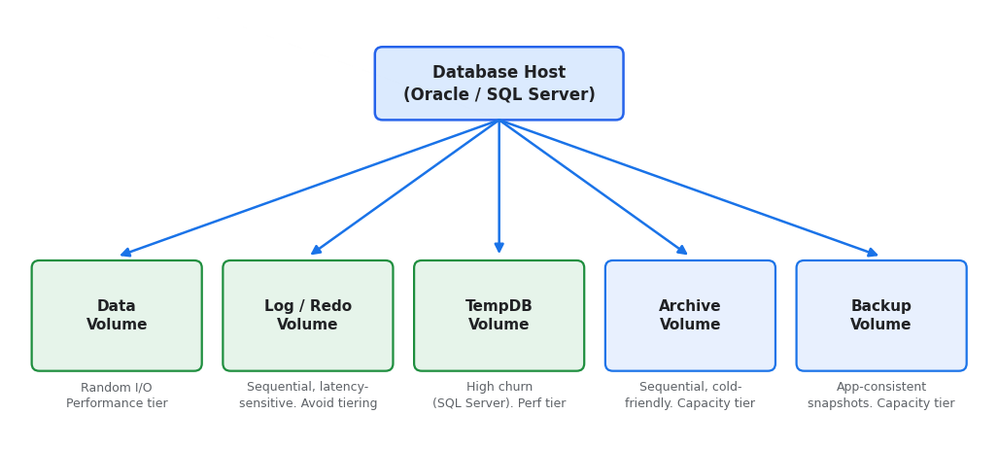
Storage layout mapping data, logs, TempDB, archive, and backup to separate volumes
Universal Best Practices (Oracle and SQL Server)
- Capacity: Resize volumes proactively (1 GiB increments via console/gcloud/API/Terraform) — monitor usage continuously and expand capacity before hitting your buffer limit.
- Snapshots: Configure a schedule (hourly/daily/weekly/monthly) with a retention count per volume; the oldest snapshot is deleted automatically once the count is reached.
- Replication: Enable cross-location volume replication on production volumes.
- Multipath: Connect to both target portal IPs GCNV provides for each iSCSI volume (engine-specific session counts below).
- Host fundamentals:
o Swap: 1.5–2x RAM for hosts with ≤2 GB RAM; equal to RAM (±10% tolerance) for 2–16 GB; capped at 16 GB (±10% tolerance) above that
o Enable TCP timestamps, SACK, and window scaling (`net.ipv4.tcp_timestamps`, `net.ipv4.tcp_sack`, `net.ipv4.tcp_window_scaling` = `1`, set via `/etc/sysctl.d/`)
Oracle-Specific Best Practices (ASM / iSCSI)
- Multipath:
- At least 4 iSCSI sessions per target (node.session.nr_sessions) across both GCNV portals
- 5-second replacement timeout
- device-mapper-multipath with ALUA + service-time policy
- Install sanlun (NetApp Host Utilities) for visibility
- ASM:
- External redundancy (storage already provides resiliency)
- Enable ASM/AFD logical block size support (oracleafd_use_logical_block_size=1 for AFD, use_logical_block_size=Y for ASMLib) so ASM matches the LUN’s native block size instead of forcing a fixed 512-byte block
- Spread data across multiple LUNs per disk group rather than one large LUN — at least 4 LUNs for data disk groups and at least 2 for redo/FRA/archive disk groups is a good starting point
- File placement:
- Multiplex control files (2–3 copies) and redo logs onto separate volumes, excluded from auto-tiering
- Isolate data files, archive logs, and binaries onto their own volumes where practical
- OS layer:
- Disable Transparent HugePages
- Leave db_file_multiblock_read_count unset
- Disable or permissive SELinux (per your security posture)
SQL Server-Specific Best Practices (Windows / iSCSI / MPIO)
- MPIO:
- Install NetApp Windows Host Utilities
- Enable MPIO
- Connect to both GCNV target portals with Round Robin (or Round Robin with Subset)
- Use multiple sessions per portal (5 per target portal is a good target)
- Set the MPIO timeout to 60 seconds to ride through a storage-side failover event
- Filesystem/LUN:
- Set host group OS type to WINDOWS
- Format NTFS with a 64K allocation unit
- File placement:
- Separate drives for data (.mdf), log (.ldf), and TempDB once a database reaches 500 GB or more — as a starting heuristic, size the log drive at 20–30% of data (26–35% for an Always On primary replica) and TempDB at 10–20% of data
- Exclude active data/TempDB from auto-tiering
- MAXDOP: Bound MAXDOP by core count (4 / 8 / 16 for ≤ 8 / 9–16 / >16 vCPUs) instead of leaving it at the unbounded default.
- HA (FCI / Always On):
- Add every cluster node’s IQN to the same GCNV host group for shared-LUN visibility
- Keep drive letters identical across nodes
- Configure Node and Disk Majority quorum with a Disk Witness
- Set cluster heartbeat thresholds to SameSubnetDelay/CrossSubnetDelay/CrossSiteDelay = 1000 ms and SameSubnetThreshold/CrossSubnetThreshold/CrossSiteThreshold = 40 across same-subnet, cross-subnet, and cross-site paths
- Set SQL Server service recovery to automatic restart
Common Deployment Mistakes
- Connecting through only one of GCNV’s two target portals
- No proactive capacity monitoring — usage needs to be tracked and capacity expanded ahead of time
- Letting a volume run nearly full
- Redo and data on the same volume
- Default MPIO settings (effectively single-path)
- Default MAXDOP (unbounded query parallelism)
- ASM Normal redundancy on ONTAP-backed storage (redundant protection)
- Active volumes enrolled in auto-tiering
Conclusion
Reliable Oracle and SQL Server deployments on GCNV come down to five things: proactive capacity management (a 20% buffer as a baseline, more for SQL Server, since standalone volumes require manual expansion), multipath using both target portals, file placement that isolates latency-sensitive I/O from auto-tiering, layered data protection (replication + app-consistent snapshots + a backup vault), and host-level fundamentals (swap, TCP tuning, patching). All of it is configurable through GCNV’s console, CLI, API, Terraform, the host OS, or the database engine.


