NetApp Community Update
This site will enter Read Only mode on July 23 as we prepare to move to a new platform.
You will still be able to view content, but posting and replying will be temporarily disabled.
To learn more, please review the information in this blog post.

Tech ONTAP Blogs

Unlocking the Power of SMIS with Hyper-V: A Comprehensive Guide

RachelZhu
NetApp
1,343 Views

NetApp Storage Management Initiative Specification (SMI-S) is a powerful tool for managing and monitoring storage systems. NetApp SMI-S leverages the Web-Based Enterprise Management (WBEM) protocols to provide a unified interface for various management tasks, including the handling of LUNs, volumes, CIMOM configuration settings, and CIM server users.


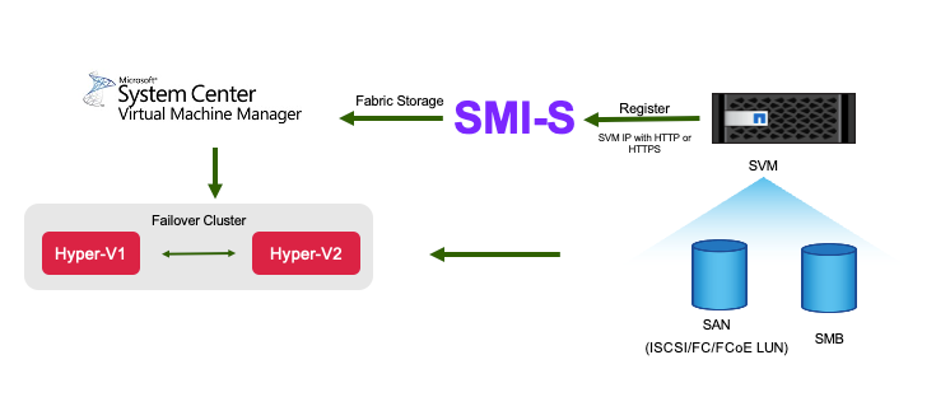
SCVMM is a comprehensive management solution for virtualized data centers. SCVMM has its ability to integrate with various storage systems through the Storage Management Initiative – Specification (SMI-S).


Benefits of using NetApp SMI-S Provider with SCVMM


Integrating NetApp SMI-S Provider with SCVMM enables organizations to manage storage resources more effectively in a virtualized data center by providing a standardized interface for storage management.

  • Storage system detection and management: detects storage systems running ONTAP software and provides tools to manage them effectively.

  • Simplified administration: simplifies the management of storage systems by providing a single command-based interface.

  • Monitoring and reporting: offers robust monitoring and reporting features to keep track of storage elements and their performance.
RachelZhu_0-1752187377552.png

Get ready for SMI-S Provider deployment

A seamless integration with existing storage systems requires proper installation and configuration of NetApp SMI-S Provider.

  • Compatibility: NetApp SMI-S Provider 5.2.7 supports Windows Server SCVMM 2025, 2022, 2019, and 2016. This release is not compatible with Windows Server 2012 or SCVMM 2012.
  • Installation: There is no upgrade path available for NetApp SMI-S Provider 5.2.7. You must deploy it as a new installation.
  • Hardware: SMI-S Virtual Machine Hardware Requirements
  • Support: NetApp SMI-S Provider supports ONTAP 9 and later FAS and AFF systems.
  • Licensing: NetApp ONTAP ONE license covers all the SMI-S provider license requirements. If you are not using ONTAP ONE license:
    • FCP, iSCSI, or both FCP and iSCSI licenses are required for creating LUNs on the storage systems.
    • A CIFS license is required for creating file shares on supported ONTAP storage systems.
    • A FlexClone license is required to create LUN clones on clustered storage systems running supported ONTAP versions.

Install SMI-S Provider and connect SMI-S Provider with SCVMM

For step by step guide on SMI-S installation and connecting to SCVMM, check NetApp SMI-S provider for Microsoft Hyper-V.  


Install SMI-S Provider 

Before you start the SMI-S provider deployment, you need to deploy Microsoft Hyper-V with SCVMM and NetApp 9 above FAS or AFF storage system. It is important to understand the command-based interface to perform various management tasks, check NetApp SMI-S Provider commands.  


Best Practice:
NetApp recommends using a dedicated Windows Server to install NetApp SMI-S Provider, - do not be installed on the SCVMM server to prevent interference, optimize performance and simplify troubleshooting.


Connect SMI-S Provider with SCVMM

To add a remote storage device in SCVMM and connect to an SMI-S provider, you need to ensure the following prerequisites and steps are met:

  • Network Access: Ensure that the SCVMM server has network access to the SMI-S provider via its IP address or fully qualified domain name (FQDN).

  • Communication Ports: Verify that SCVMM and the SMI-S provider can communicate over the network using the appropriate ports:

    • HTTPS on port 5989

    • HTTP on port 5988

Note: 

An outdated certificate is placed during SMI-S Provider installation. As a result, the SSL connection to the SMI-S provider fails from Add Storage Devices in System Center Virtual Machine Manager (SCVMM). The solution is to generate a self-signed certificate for the CIM server and restart SMI-S service afterwards. For more information, check KB article CSMIS-3: cimom.cert in NetApp SMI-S Provider 5.2.7 is expired at the time of installation.


Provisioning storage with SCVMM using an SMI-S Provider

SCVMM uses the SMI-S Provider to interact with storage systems, allowing you to create and manage storage resources directly from SCVMM.


iSCSI storage

  1. In the SCVMM console, select Fabric > Storage , right-click on Classifications and Pools and select Create Logical Unit. Choose the storage pool and classification and enter the name, description, size and host group for the logic unit.

    RachelZhu_0-1752189270702.png


SMB storage

  1. Select Fabric > Storage > right click File Servers and choose Create File Share, select File server, enter name, storage type, storage pool and classification.

    RachelZhu_1-1752189270804.png


  2. To use SMB file share for Hyper-V, you need to add SMB file share to the Hyper-V host clusters. In SCVMM, click servers > All Hosts > [Host Group]. Right-click the Cluster name and select properties. At "File Share Storage" Tab, click on add and enter the SMB path.

    RachelZhu_2-1752189270909.png


    The NetApp SMI-S Provider is an essential tool for storage administrators, providing a standardized, efficient, and comprehensive solution for managing and monitoring storage systems. By utilizing industry-standard protocols and schemas, it ensures compatibility and simplifies the complexities associated with storage network management.

Public