Google Cloud NetApp Volumes connects to your project through Private Service Access (PSA). PSA uses VPC Network Peering under the hood. VPC peering is not transitive: traffic cannot cross two consecutive VPC peerings. That design choice—not a NetApp Volumes defect—explains many support cases where mounts work from your VMs but Active Directory (AD), DNS, or clients in another VPC do not.
This post walks through how PSA connects the consumer and producer VPCs, why a second peering hop breaks traffic, how to fix the topology, and how to fix routing and return paths for hybrid networks.
The symptoms users report
You might see all of the following at once:
VMs in the consumer VPC mount volumes successfully over NFS or SMB.
NetApp Volumes cannot complete Active Directory integration—often with DNS errors—even though the same DNS servers and domain controllers are reachable from VMs in the consumer VPC.
Clients in a third VPC that is peered only to the consumer VPC can reach those VMs but cannot mount volumes.
That asymmetry is expected. Client traffic to a volume uses one peering hop (consumer to producer). Traffic from NetApp Volumes toward DNS, domain controllers, or a third VPC often needs a second peering hop from the consumer VPC. Google Cloud drops that traffic.
For product networking requirements, see Configure networking and Connect additional networks.
How NetApp Volumes connects to your VPC
NetApp Volumes provisions volumes in a dedicated tenant VPC inside a Google-managed producer project. When you set up PSA for NetApp Volumes, you reserve an allocated CIDR in your VPC (the consumer VPC) and create a private connection to netapp.servicenetworking.goog. That connection establishes VPC peering named sn-netapp-prod between your consumer VPC and the NetApp Volumes producer (tenant) VPC. Volume IP addresses are assigned from your allocated range; your VPC imports routes to those addresses over the peering.
The following diagram shows the two VPC roles and the single peering between them. Client VMs and volume endpoints communicate across that peering; NetApp Volumes control-plane operations (such as AD join) originate in the producer VPC.
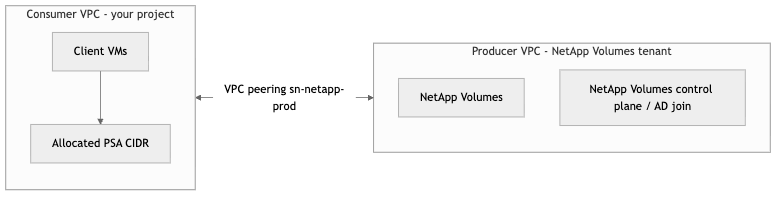
Terms:
Consumer VPC — The VPC you select when you create a storage pool. Client VMs usually run here (or in a Shared VPC service project attached to this network).
Producer VPC — The Google-managed tenant network where volume endpoints and NetApp Volumes service logic run. You do not deploy VMs here.
Allocated range — Internal CIDR you reserve for PSA (minimum /24). NetApp Volumes consumes /28 or /27 subranges for volumes and pools per Configure networking.
Peering hop — PSA is implemented as VPC peering. Traffic involving the producer network is limited to one peering hop unless you use a supported alternate design (NCC or direct tenant peering).
After PSA setup, enable custom route import and export on sn-netapp-prod as described in the NetApp Volumes networking guide. That step is required for hybrid routing but does not make peering transitive.
Two peerings in a row drops traffic
VPC Network Peering does not provide transitive routing. If packet forwarding would require two consecutive VPC peerings, Google Cloud drops the traffic.
For NetApp Volumes, the first peering is always PSA (consumer ↔ producer). A common failure pattern adds a second peering from the consumer VPC to a transit VPC (which then reaches on-premises Active Directory or DNS). NetApp Volumes traffic stops at the second peering even when consumer VMs reach AD without trouble.
The diagram below shows producer and consumer connected by PSA (peering 1), consumer connected to a transit VPC (peering 2), and transit reaching on-premises AD over VPN or Cloud Interconnect. The dashed path from NetApp Volumes to on-premises AD is blocked because it would cross two peerings.

What NetApp Volumes needs for Active Directory
For AD integration to work, NetApp Volumes must reach both of the following on a path with no second VPC peering hop:
The DNS server IP addresses you configure in the Active Directory policy (SRV lookups, domain-controller discovery, and name resolution).
At least one Active Directory domain controller (LDAP, Kerberos, and related ports documented in Active Directory integration).
When either requirement fails, errors often appear as DNS problems first—timeouts for _ldap._tcp or _kerberos._tcp, or messages that no domain controller was found. Treat DNS errors in NetApp Volumes AD workflows as a connectivity signal until routing and peering are validated.
Google's AD guidance also states that you must not add VPC peering hops beyond the one PSA already uses, and that domain controllers in a different VPC behind another peering require alternate connectivity.
Why the behavior feels wrong
NFS client mounts (without LDAP) work — A VM in the consumer VPC sends traffic to a volume IP in the allocated range. Routes point across sn-netapp-prod (one peering). NFS mounts succeed.
NetApp Volumes to AD/DNS fails — NetApp Volumes sends traffic from the producer VPC to the consumer VPC (peering 1), then toward a transit VPC or another peered VPC (peering 2). That second peering is not allowed.
Consumer tests mislead — DNS and LDAP checks from a consumer VM can succeed while NetApp Volumes still fails, because the VM does not use the same path as NetApp Volumes. See Validation and troubleshooting.
Symptoms to watch for:
Active Directory policy tests or domain join fails with DNS resolution or domain controller not found messages.
DNS lookups from consumer VPC VMs to the policy DNS servers succeed; NetApp Volumes integration still fails.
SMB, Kerberos, or LDAP timeouts during authentication after the pool otherwise looks healthy.
Connectivity tests from the consumer VPC to DNS or DC IPs work; NetApp Volumes operations do not.
Third VPC clients: another peering hop
A workload VPC peered only to the consumer VPC can reach subnets in the consumer VPC (one peering). Reaching volume IPs requires traffic to cross the consumer-to-producer PSA peering as well. From the third VPC's perspective, that is two peerings—and it is blocked.

If you can SSH to an application server in the consumer VPC but NFS or SMB to NetApp Volumes fails from a third VPC, you are seeing the same constraint.
Do not fix this by peering the third VPC only to the consumer. Connect the third VPC directly to the producer using Network Connectivity Center (NCC) or manual tenant peering so the path is third ↔ producer (one peering), not third ↔ consumer ↔ producer (two peerings). See the next section.
Fix the topology: remove the second VPC peering hop
Restructure the network so NetApp Volumes never needs two consecutive VPC peerings to reach your policy DNS servers, domain controllers, or remote clients. Options from Connect additional networks include the following.
1. Shared VPC (often best for AD in Google Cloud)
Attach the storage pool to the same Shared VPC host network that already hosts domain controllers, DNS forwarders, and client service projects. Workloads in service projects and NetApp Volumes share one VPC network, so there is no extra peering hop to the DNS and DC IPs in your AD policy. This matches Google's recommendation to attach NetApp Volumes to a Shared VPC that hosts domain controllers.
2. VPN instead of VPC peering to "behind" networks
Connect a transit VPC or third VPC to the consumer VPC with Cloud VPN or HA VPN instead of VPC peering. VPN tunnels are not subject to the peering transitivity limit. The path NetApp Volumes → consumer → VPN → transit or on-premises (DNS/DC) uses one peering plus VPN, which is supported.
3. Third-party routing appliances (Palo Alto, Fortinet, and similar)
Many enterprises hub traffic through a network virtual appliance (NVA) or cloud firewall that routes between VPCs, on-premises, and other clouds. NVAs forward based on their own route tables; they are not limited by Google VPC peering transitivity.
If you already route consumer ↔ transit ↔ on-premises through an NVA, you typically should not hit the double-VPC-peering problem for AD and DNS—provided the NVA imports and advertises routes correctly and PSA custom routes are exported to the producer. Do not replace a working NVA hub with a VPC-peering-only hub solely for NetApp Volumes.
Contrast these models:
VPC peering hub-spoke — Often broken for NetApp Volumes when AD or DNS sit beyond the consumer VPC.
NVA-routed hub — Often works; validate NVA routes and PSA export/import.
4. Connect a third VPC directly to the producer VPC
When clients or DNS/DC live in a VPC that is not the PSA consumer VPC, peering that VPC only to the consumer forces two peerings to reach NetApp Volumes. Instead:
NCC producer VPC spoke (Flex Unified and Flex File only) — Add the third VPC as an NCC spoke and create a producer VPC spoke for peering sn-netapp-prod. Volume traffic can reach NetApp Volumes without chaining third → consumer → producer as two peerings from the client's perspective.
Manual peering to the tenant VPC — Google Cloud Customer Care can peer your third VPC directly to the NetApp Volumes tenant network. That removes the consumer VPC from the path between that VPC and volume IPs.
NCC limitations worth noting: Standard, Premium, and Extreme service levels are not reachable through NCC producer spokes; NCC incurs hub and data transfer charges; some spoke parameters require delete and recreate to change.
5. NCC for broader hybrid and multi-VPC meshes
The same NCC producer spoke pattern applies when Flex Unified or Flex File pools must be reachable from many spokes (WAN, other clouds) without chaining VPC peerings. The consumer VPC must already have PSA; the peering name remains sn-netapp-prod.
6. Cloud Interconnect and hybrid transitive routing
When networks behind the consumer attach through Cloud Interconnect rather than a second VPC peering, you can configure transitive routing per NCC and hybrid patterns in the connect-additional-networks documentation.
Decision guide
AD DNS, DCs and clients already on Shared VPC → attach NetApp Volumes to that Shared VPC host network.
Traffic already flows through a Palo Alto, Fortinet, or similar NVA between VPCs → verify NVA routes and PSA custom route export; you may not need a peering redesign.
A third VPC needs NetApp Volumes or AD connectivity → use direct producer connectivity (NCC producer spoke or manual tenant peering), not consumer-only peering.
Legacy hub-spoke uses VPC peering only → migrate consumer ↔ transit links to VPN, Shared VPC, or NVA routing, or use direct producer peering.
Flex Unified or Flex File with a large hub-spoke WAN or multi-cloud mesh → evaluate an NCC producer spoke.
After the topology fix: routing and return path
Fixing peering hops is not always enough. You must also configure routes so NetApp Volumes can reach remote DNS and DCs, and so responses can return to volume IP addresses.
Export routes to the producer (Google Cloud side)
By default, the producer network only learns subnet routes from the consumer VPC. Other destinations are dropped. See Configure hybrid connectivity for PSA.
Update peering sn-netapp-prod to export custom routes from the consumer VPC and ensure the producer side imports them (the gcloud compute networks peerings update example earlier).
Terminate VPN or Interconnect in the same VPC (or Shared VPC host) as the PSA connection. Peering still does not bridge a different VPC.
With export enabled, NetApp Volumes can initiate traffic toward on-premises or transit prefixes if return routing exists.
Advertise PSA ranges to remote networks (return path)
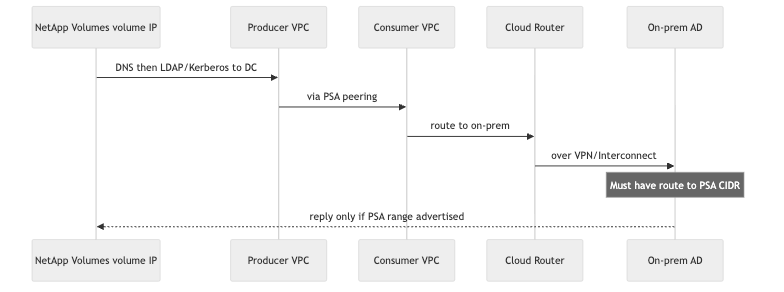
Forward routing into the producer is often correct after export and import, but return traffic is lost when:
On-premises AD, DNS, or clients have no route to the PSA allocated CIDR where volume IPs live.
Remote routers only know consumer VPC subnet ranges, not the delegated VPC_PEERING reserved range.
Steps for network administrators:
List PSA reserved ranges in your project. You can use this helper script List GCNV PSA ranges.
On the Cloud Router for your VPN or Interconnect attachment to the consumer (or Shared VPC host), use custom route advertisement to advertise PSA CIDRs—not only VPC subnet prefixes.
Confirm on-premises or transit routers learn those prefixes with a next hop toward Google Cloud.
Confirm firewalls allow DNS, LDAP, and Kerberos between the producer CIDR and your DC and DNS IPs, in both directions.
For NCC deployments, include PSA ranges in producer spoke export filters (--include-export-ranges) per NCC producer spoke guidance.
The sequence below shows forward and return paths for NetApp Volumes reaching an on-premises domain controller. Replies reach volume IPs only if the remote network has a route to the PSA range.
Validation and troubleshooting
Use consumer VPC checks, on-premises verification, GCP routing views, and NetApp Volumes AD operations as the authoritative test.
1. Client baseline (consumer VPC VM)
Run showmount, mount NFS exports, or exercise SMB authentication from a VM in the consumer VPC. Success confirms the PSA path for clients only.
2. DNS and DC from a consumer VM (limited value)
Run nslookup or dig against the exact DNS IP addresses in your Active Directory policy. Probe LDAP and Kerberos ports to DC IP addresses if your security policy allows.
Important: If DNS or DCs sit behind a second VPC peering hop, these tests often succeed from the consumer VM while NetApp Volumes still fails. The VM does not traverse producer → consumer → blocked second peering. Treat consumer-side DNS success as necessary but not sufficient, not proof that AD integration will work.
3. Routing and peering (console or gcloud)
Confirm the consumer VPC has routes to volume IPs (PSA CIDR) with next hop sn-netapp-prod.
Confirm sn-netapp-prod has export custom routes and import custom routes enabled when AD or DNS are on-premises or behind VPN or an NVA.
Confirm the consumer VPC has routes to AD policy DNS and DC prefixes via VPN, Interconnect, NVA, or local subnets—not via a chain of two VPC peerings.
In VPC network peering route details, confirm on-premises or transit prefixes are exported toward the producer per PSA hybrid guidance.
List PSA CIDRs for return-path advertisements (for example with List GCNV PSA ranges).
4. Authoritative NetApp Volumes-side test (recommended)
Create or update an Active Directory policy, or attach AD to a storage pool. Use either Test the Active Directory policy connection or SMB volume creation to trigger a DNS discovery and domain-controller reachability test from the producer network. Success or failure here is ground truth. Capture error text (often DNS-related) and relevant Cloud Logging entries for support.
5. On-premises and remote network (return path)
Confirm routers advertise or learn the PSA allocated CIDR.
Confirm firewalls allow DNS, LDAP, and Kerberos between the producer CIDR and DC and DNS IPs.
Optionally run ping or traceroute to a volume IP from a host that should mount, if your security policy allows.
6. After topology changes
Re-run the Active Directory policy or pool attachment test (step 4). Re-verify client mounts and authentication.
Summary
NetApp Volumes uses PSA and one VPC peering hop between consumer and producer VPCs—by design.
Active Directory requires reachable AD DNS servers and at least one domain controller; failures often look like DNS errors.
Resources "behind" the consumer VPC across another VPC peering need a topology change—Shared VPC, VPN, NVA routing, NCC, or manual tenant peering—not only firewall rules. NVA-based hubs are a common exception.
Third VPCs should connect to the producer (NCC or manual peering), not only to the consumer, to avoid an extra peering hop.
After fixing hops, enable custom route export on sn-netapp-prod and ensure remote networks advertise PSA CIDRs so return traffic reaches volume IPs.
Further reading
