Introduction
Workload Factory Migration Advisor helps organizations plan and execute VMware migrations to Google Cloud VMware Engine (GCVE) with less manual effort and greater confidence in sizing, architecture, and cost estimates. This post focuses on how Migration Advisor supports the GCVE planning workflow end-to-end.
Migration Advisor (free to use) automates assessment and planning, applies validated best practices, and produces deployment-ready outputs, helping teams move from “what should we build?” to “here’s how we deploy it” with less risk and rework.
The migration-planning problems Migration Advisor is built to solve
- Inventory and dependency assessment take too long
Teams must gather VM inventory data and translate it into cloud-ready requirements. When this is manual or spread across tools, planning cycles stretch, and key details get missed. - Cost modeling is uncertain (and over-provisioning is common)
Without a defensible sizing model, teams often add GCVE nodes “just in case.” And if vSAN is the only datastore option considered, storage growth can force additional compute nodes—raising cost beyond what was planned. - Right-sizing and architecture validation are hard to do consistently
Even experienced teams can struggle to align designs with validated guidance across Google Cloud, VMware, and storage options. Inconsistent designs create performance risk, remediation work, and delivery delays. - The plan-to-deployment handoff is disconnected
Many approaches stop at an estimate or a diagram. Teams are then left to manually convert designs into configurations and Infrastructure as Code, increasing the chance of drift between what was approved and what is deployed.
How Workload Factory Migration Advisor helps
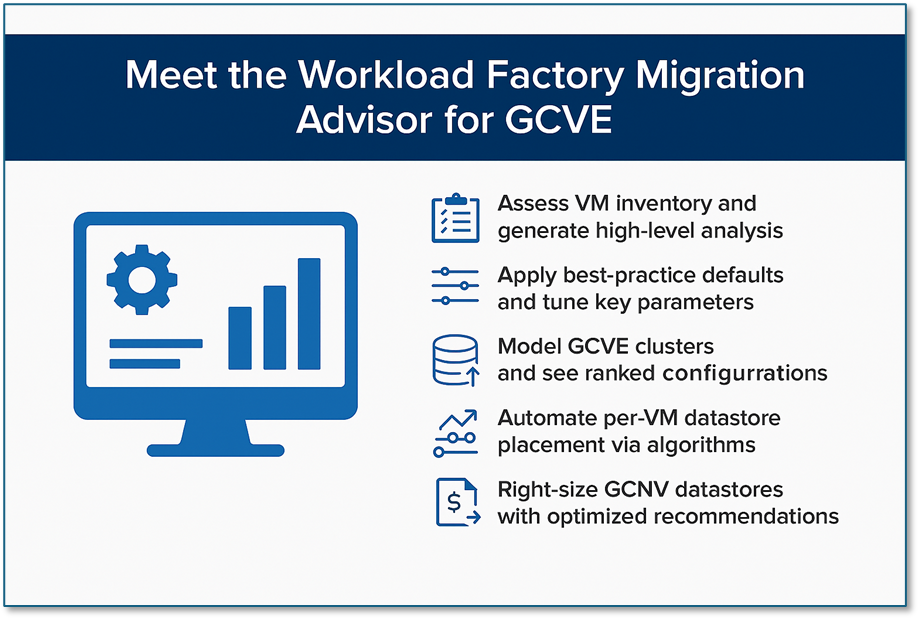
Workload Factory Migration Advisor (free to use) helps you assess your current VMware environment, generate a right-sized target design, compare architecture and cost options, and export deployment-ready artifacts—grounded in validated best practices.
- Automated assessment and plan generation
Migration Advisor automates inventory analysis and produces an optimized GCVE plan faster than manual, spreadsheet-driven approaches—helping teams move from discovery to a concrete design with fewer gaps. - Side-by-side cost modeling
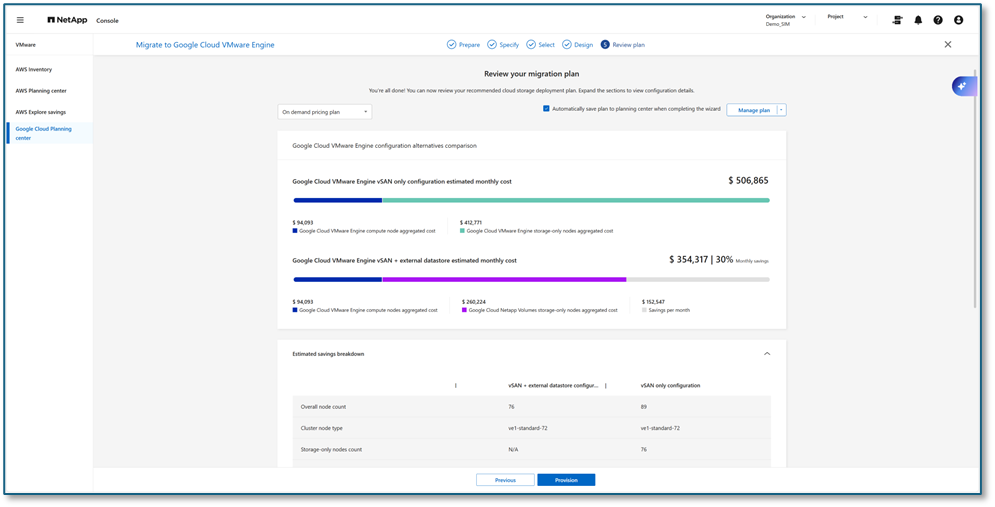
Model GCVE clusters with vSAN-only storage and compare them to designs that use external Google Cloud NetApp Volumes (GCNV) NFS datastores. This visibility helps teams right-size confidently and avoid unnecessary compute node and VCF licensing spend. - Validated architectures and guardrails
Migration Advisor applies guidance aligned with best practices from Google Cloud, VMware, and NetApp to reduce design errors and help deliver a first-time-right target architecture. - From plan to deployment-ready outputs
When you’re ready to execute, Workload Factory can generate Terraform outputs (where applicable) to make deployment repeatable and consistent, reducing manual configuration and implementation drift.
How to run a Migration Advisor assessment (in NetApp Console)
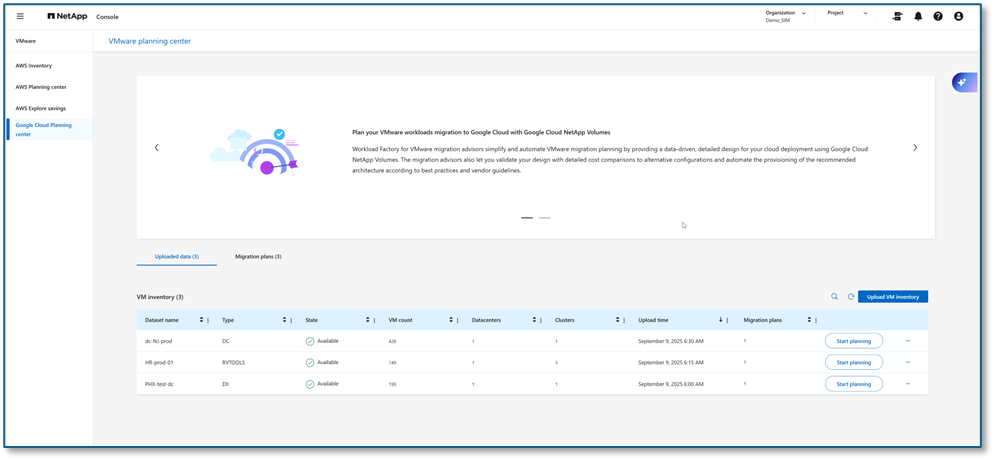
- Open Workload Factory in NetApp Console
Sign in to NetApp Console and navigate to Workload Factory, where you can launch Migration Advisor for GCVE planning. - Provide inputs for assessment
Provide your VMware inventory details and target preferences (for example, region, cluster assumptions, and storage approach, such as vSAN-only or GCNV NFS datastores). - Review recommended designs and cost comparisons
Migration Advisor generates cluster sizing recommendations and presents cost modeling to support decision-making before anything is deployed. - Export deployment artifacts
Export deployment-ready outputs (such as Terraform, where applicable) to enable consistent implementation and easier handoff across teams.
GCVE + external NFS datastores (GCNV): the recommended target pattern
The core focus of Migration Advisor for GCVE is helping customers adopt an architecture that separates compute from storage for flexible scaling and cost control. In many cases, that means combining a right-sized GCVE cluster with external Google Cloud NetApp Volumes (GCNV) NFS datastores:
- GCVE cluster sized to workload demand
Compute is right-sized based on VM inventory capacity and performance requirements. - Google Cloud NetApp Volumes (GCNV) NFS datastores for scalable storage
Storage scales independently of GCVE nodes, which can reduce pressure to add compute for capacity. - Infrastructure as Code for repeatable deployment
Use Terraform (and associated operational processes) to maintain consistent deployments over time.
What can this mean for cost and timelines?
By combining right-sizing guidance with side-by-side architecture comparisons, Workload Factory can help teams reduce avoidable spend and shorten planning cycles. Typical value areas include:
- Avoiding over-provisioned GCVE nodes
Decoupling storage from compute with GCNV NFS datastores can prevent “storage-driven” node additions, which are common in vSAN-only designs. This can lower GCVE consumption and, because VCF licensing is influenced by vCPU and vSAN capacity, may also reduce VCF licensing expense. - Clearer cost tradeoffs before deployment
Side-by-side modeling helps stakeholders understand the cost impact of different sizing and storage choices early, reducing late-stage surprises. - Faster, more repeatable execution
Automated plan outputs and IaC-friendly artifacts reduce manual steps and make it easier to implement consistently across environments.
Terraform Code for Deploying GCNV NFS Datastores
Below is a Terraform example for deploying Google Cloud NetApp Volumes resources used with NFS datastores. Use it as a starting point and adapt it to your organization’s standards, variables, and security requirements.
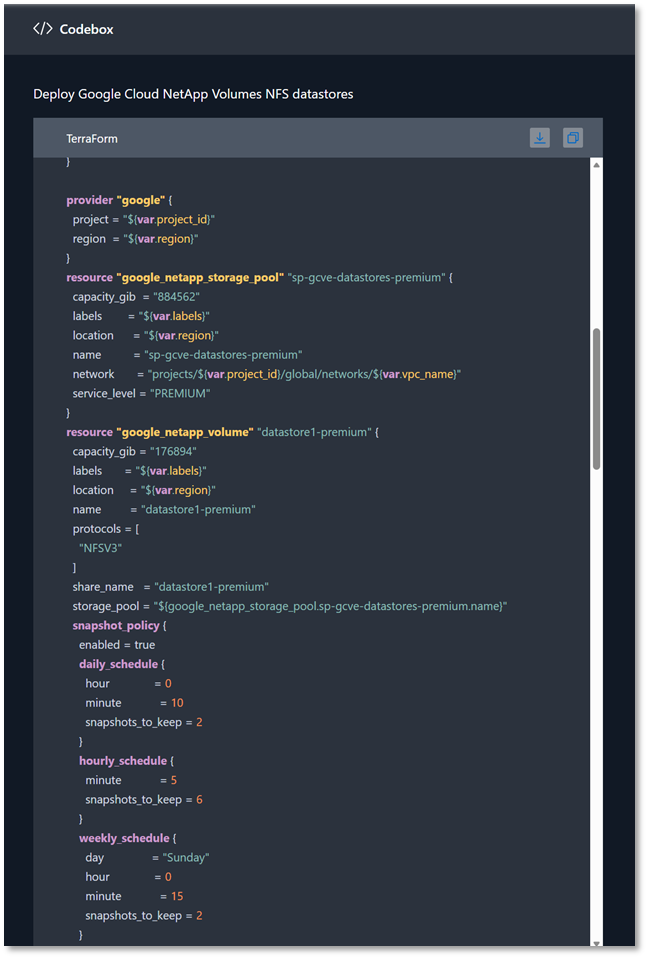
This code defines a NetApp volume with NFSv3, sets a snapshot policy for data protection, and outputs the volume ID for downstream configuration.
Conclusion
VMware migrations to GCVE don’t have to be a prolonged exercise in spreadsheets, uncertain sizing, and cost guesswork. NetApp Workload Factory Migration Advisor helps teams automate assessment and planning, apply validated architecture guidance, and create deployment-ready outputs, so you can reduce risk and move forward with more confidence.
To get started, run an assessment in Workload Factory Migration Advisor from NetApp Console to generate a plan and cost comparison for your environment. Because Migration Advisor is free to use, it’s an easy first step for internal teams and customers to validate an approach before committing to implementation decisions.
Try the Workload Factory Migration Advisor
#WorkloadFactory #MigrationAdvisor #NetApp #VMwareMigration #GCVE #GoogleCloud #NetAppConsole #RightSizing #CostOptimization #Terraform