
This site will enter Read Only mode on July 23 as we prepare to move to a new platform. You will still be able to view content, but posting and replying will be temporarily disabled.
We're excited to launch our new Community experience on July 30 and more information will follow soon.
Stay connected during the transition - Join our Discord community today.
Active IQ Unified Manager Discussions
- Home
- :
- Active IQ and AutoSupport
- :
- Active IQ Unified Manager Discussions
- :
- Upgraded WFA 4.0 to 4.2 receiving SOAP and REST SSL errors
Active IQ Unified Manager Discussions
- Subscribe to RSS Feed
- Mark Topic as New
- Mark Topic as Read
- Float this Topic for Current User
- Bookmark
- Subscribe
- Mute
- Printer Friendly Page

- Mark as New
- Bookmark
- Subscribe
- Mute
- Subscribe to RSS Feed
- Permalink
- Report Inappropriate Content
After upgrading WFA and migrating the database to a new server we aren't able to do rest or soap over powershell. Error is related to SSL.
Error received when attempting SOAP
New-WebServiceProxy : The request was aborted: Could not create SSL/TLS secure channel.
Error received when attempting REST
Exception calling "GetResponse" with "0" argument(s): "The request was aborted: Could not create SSL/TLS secure channel."


- Mark as New
- Bookmark
- Subscribe
- Mute
- Subscribe to RSS Feed
- Permalink
- Report Inappropriate Content
Please contact customer support and submit a ticket.
Regards,
Abhi
- Mark as New
- Bookmark
- Subscribe
- Mute
- Subscribe to RSS Feed
- Permalink
- Report Inappropriate Content
Had no idea NetApp supported WFA under the standard case creation process.

- Mark as New
- Bookmark
- Subscribe
- Mute
- Subscribe to RSS Feed
- Permalink
- Report Inappropriate Content
Hi @ninja is the issue what you are facing solved ?
I am also having similar error when trying to connect to WFA 4.2 .... with WFA 4.1 its works fine ..
is it possible for your to post the code which you are using to connect to WFA using REST over powershell ? .
Thanks
Shyam
- Mark as New
- Bookmark
- Subscribe
- Mute
- Subscribe to RSS Feed
- Permalink
- Report Inappropriate Content
I don't have a fix yet. My NetApp case is still open. I will post the fix once I have it.
- Mark as New
- Bookmark
- Subscribe
- Mute
- Subscribe to RSS Feed
- Permalink
- Report Inappropriate Content
you need to enable TLS 1.1 and TLS 1.2 on your windows server and also enable the same protocol on WFA . I tried it and its works fine for me .
try downloading "IISCrypto.exe " from https://www.nartac.com/Products/IISCrypto .. by this is pretty easy to enable it .
then enable the same protocol in WFA by
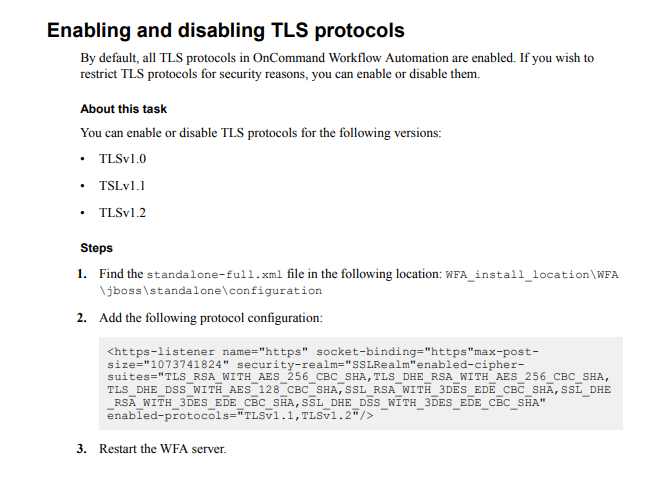
Then restart your windows server ..
use below code in your script ensure that you are using TLS 1.2 .
[Net.ServicePointManager]::SecurityProtocol = [Net.SecurityProtocolType]::Tls12
Thanks
Shyam

