NetApp Community Update
This site will enter Read Only mode on July 23 as we prepare to move to a new platform. You will still be able to view content, but posting and replying will be temporarily disabled.
We're excited to launch our new Community experience on July 30 and more information will follow soon.
Stay connected during the transition - Join our Discord community today.

Data Protection

backup all instance and DB without configure again

do
4,322 Views

Hi


I have a multipule instance on the sql server.

when I add a new instance of add a new DB, I have to configure the task schedular again.


Is there a way to configure that it backup all the DB and the instance On the server?


Doron

3 REPLIES 3

dmauro
4,319 Views

Hi Doron,


yes, if you have a standalone server with multiple instances installed, you just schedule the backup with the hostname of the SQL server, without needing to mention the names of the instances:


new-backup  –svr 'Host1' ...


if you prefer the SMSQL GUI, you need to click the top level check box:
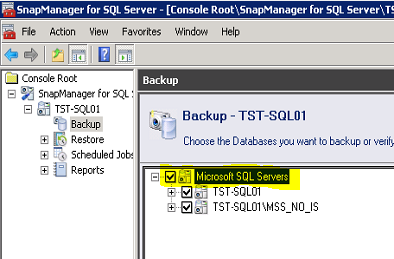


GUI.PNG


 instances which you install later (if configured within the same lun's of the other instances and within the correct configuration), they will be backed up too, because the new-backup command will not include a specific instance name and will pick up all instances currently installed.


hope that helps,

Domenico Di Mauro.

 

do
4,304 Views

when I use the GUI and add a new instace It dont backup the new instance, even I mark the top of the tree.


dmauro
4,294 Views

then there is a problem with the backup.

you may want to start by looking at the backup report.


Public
