This site will enter Read Only mode on July 23 as we prepare to move to a new platform. You will still be able to view content, but posting and replying will be temporarily disabled.
We're excited to launch our new Community experience on July 30 and more information will follow soon.
Stay connected during the transition - Join our Discord community today.
ONTAP Discussions
- Home
- :
- ONTAP, AFF, and FAS
- :
- ONTAP Discussions
- :
- Re: Disk Not Available after Replacement
ONTAP Discussions
- Subscribe to RSS Feed
- Mark Topic as New
- Mark Topic as Read
- Float this Topic for Current User
- Bookmark
- Subscribe
- Mute
- Printer Friendly Page

- Mark as New
- Bookmark
- Subscribe
- Mute
- Subscribe to RSS Feed
- Permalink
- Report Inappropriate Content
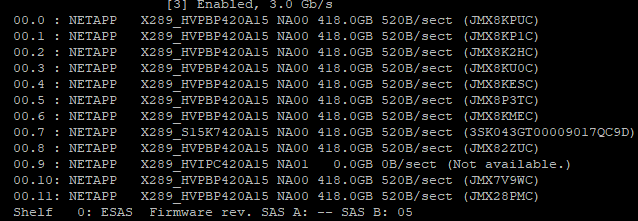
Pardon me as I have very little NetApp experience. We have a legacy FA2040 device running Ontap 7G. It is currently out of warranty so we are looking for some advice. We recently replaced a failed hard drive with refurbished one (same model) and the light for the drive is now green. When we go to review the status of the drive with command sysconfig -a, it shows the drive as 'Not available' with a size of 0.0GB. Does anyone have any insight or steps we can take to troubleshoot this drive? Any advice is welcome. Thanks!
Attached are the results from sysconfig -a and from our FilerView (Disk Report)


- Mark as New
- Bookmark
- Subscribe
- Mute
- Subscribe to RSS Feed
- Permalink
- Report Inappropriate Content
Looks like you are hitting a known issue:
https://kb.netapp.com/app/answers/answer_view/a_id/1000211
The X289 drive is a faulty drive identifier. Looks like they should be X411 instead. The KB article talks about it.
That is likely why it is not picking up correctly.
- Mark as New
- Bookmark
- Subscribe
- Mute
- Subscribe to RSS Feed
- Permalink
- Report Inappropriate Content
Actually finding a number of articles. You may want to contact support to see if they would suggest a better path.
- Mark as New
- Bookmark
- Subscribe
- Mute
- Subscribe to RSS Feed
- Permalink
- Report Inappropriate Content
Thank you TMAC, we are looking into the first suggestion you provided and reviewing other articles as well before making any changes. I will update this message as soon as we resolve it.

- Mark as New
- Bookmark
- Subscribe
- Mute
- Subscribe to RSS Feed
- Permalink
- Report Inappropriate Content
hi
Check whether the disk microcode is compatible with the storage device, check whether the disk is a bad disk, etc., then it is recommended to remove the disk again, and the worst result is to buy a new disk