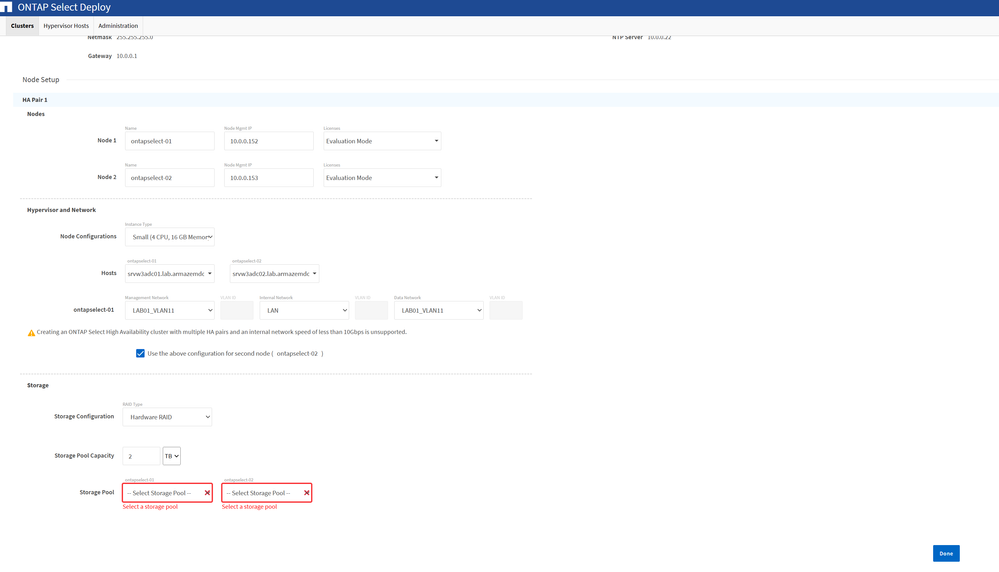
I’m facing an issue while deploying an ONTAP Select cluster (2-node HA) using ONTAP Select Deploy 9.18.1 in a VMware environment.
During the cluster creation, the Storage Pool dropdown is empty, even though I have available datastores that should meet the requirements.
Environment details:
- ONTAP Select Deploy: 9.18.1
- Deployment type: 2-node HA cluster
- License: Evaluation Mode
- VMware ESXi, 8.0.2, 23825572
- Storage configuration: Tried Software RAID
- vCenter-managed ESXi hosts
What I verified:
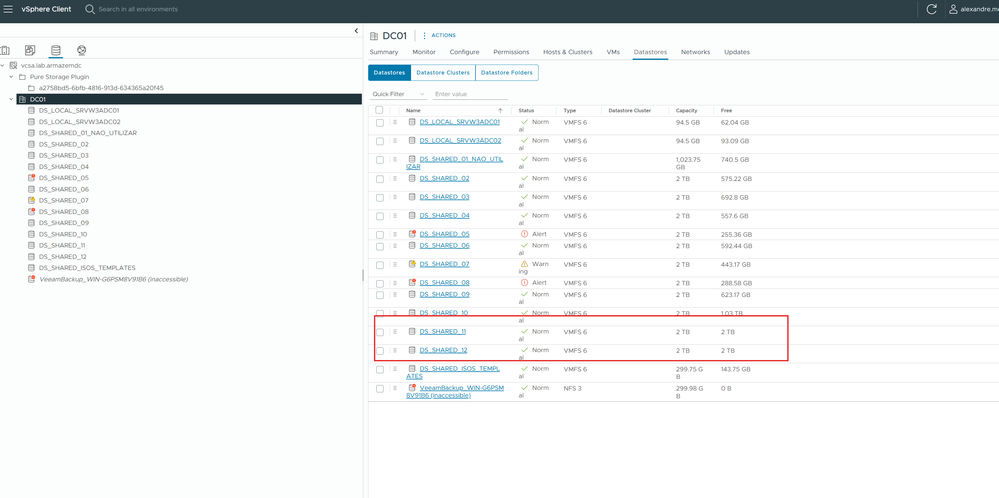
- I created new shared datastores (DS_SHARED_11 and DS_SHARED_12)
- Each datastore:
- 2 TB capacity
- 2 TB free space
- Datastores are visible and accessible in vCenter
- Both hosts are part of the same datacenter and see the same storage
- Minimum capacity requirement is met (UI shows ~1.9 TB required)
Issue:
Even with these datastores available, the “Select Storage Pool” dropdown does not list any options.
Additional notes:
- I previously had smaller datastores (~1 TB free) that were not listed, which made sense due to requirements
- After adding larger datastores (2 TB free), the issue persists
- Software RAID is not an option (no qualified disks)
- Hosts are currently added via vCenter (not standalone)
I’ve attached screenshots showing:
- The available datastores in vCenter
- The ONTAP Select Deploy UI where no storage pools appear
Question:
Is there any additional requirement or constraint (permissions, datastore type, host configuration, vCenter integration, etc.) that could prevent ONTAP Select Deploy from discovering these datastores?