Contents
Purpose
How PolyBase Minimizes Data Movement
How PolyBase Integrates with FSx for ONTAP S3 Access Points
How PolyBase Works (Step-by-Step)
Full Query demo
Purpose
Modern organizations increasingly recognize that data movement—whether through ETL/ELT pipelines, ingestion workflows, replication, or system‑to‑system integration has become one of the most significant hidden cost drivers within their data platforms. As enterprises scale, they adopt more tools, onboard more data sources, and support more real‑time workloads, all of which dramatically increase the amount of data being shuffled across environments.
To combat this, enterprises are shifting away from “copy-first” architectures and embracing data virtualization, where compute moves to data not the other way around. This approach becomes especially powerful when combining SQL Server PolyBase with Amazon FSx for NetApp ONTAP (FSx for ONTAP) S3 Access Points, enabling seamless querying of external data without traditional ETL overhead. With PolyBase, SQL Server can connect to systems such as Oracle, Teradata, MongoDB, Hadoop, Azure Blob Storage, Azure Data Lake Storage, S3-compatible storage, Cosmos DB, and more all using standard T‑SQL. Instead of extracting the data into SQL Server, PolyBase creates external tables that reference the remote data, enabling SQL Server to process queries as if the data were local.
Microsoft explicitly highlights that one of the core benefits of PolyBase is the ability to keep data in its original location and format while minimizing the need for ETL processes traditionally used for data movement. PolyBase pushes computations down to the external source when possible and retrieves only the necessary results. This reduces network load, lowers storage duplication, and removes the need for multiple, overlapping pipelines. In distributed and hybrid data environments, PolyBase acts as a unified query layer, improving agility and enabling real-time access to diverse data systems without the overhead of managing complex data flows.
As SQL Server continues to enhance PolyBase such as adding native support for Parquet, Delta, Azure storage sources, and generic ODBC connectors in SQL Server 2025 the technology is becoming central to modern data architectures focused on reducing movement, simplifying integration, and lowering overall data platform costs. This becomes even more impactful when combined with Amazon FSx for NetApp ONTAP (FSx for ONTAP) S3 Access Points, which expose ONTAP file system data via the S3 API without requiring users to copy or restructure their data. FSx for ONTAP S3 Access Points allow applications to interact with file data as if they were stored natively in S3, unlocking compatibility with AWS analytics, AI/ML, and serverless services—without the historical need to duplicate NFS/SMB file datasets into S3 buckets. Because access points provide direct read/write S3 access to FSx for ONTAP volumes, SQL Server PolyBase can leverage these S3 endpoints to query file‑based data in place. Meanwhile, FSx for ONTAP enforces S3‑level and file‑system‑level authorization, ensuring secure access through IAM policies and file system identities. Together, PolyBase and FSx for ONTAP S3 Access Points form a modern data‑access architecture that drastically reduces ETL costs, eliminates redundant pipelines, and gives SQL Server the ability to analyze cloud‑accessible file data without moving it finally allowing organizations to gain insights while keeping both data gravity and budgets under control.
How PolyBase Minimizes Data Movement
- Queries external data in place using T‑SQL, which eliminate the need to ingest or copy data into SQL Server.
- Uses external tables to virtualize remote datasets, which allow SQL Server to treat external files or object storage as if they were local tables without data duplication.
- Keeps data in its original location and format, which significantly reduces reliance on ETL/ELT processes traditionally used to move data.
- Supports S3‑compatible object storage access, by enabling SQL Server to directly read/write data stored in S3 endpoints (including FSx for ONTAP S3 Access Points) instead of copying it into relational storage.
- Pushes down query operations to external storage systems when possible, reducing the amount of data transferred over the network.
- Enables federated queries across heterogeneous data sources (e.g., Hadoop, Blob Storage, S3, or Oracle), eliminating the need to consolidate datasets into a single warehouse.
How PolyBase Integrates with FSx for ONTAP S3 Access Points
When combined, SQL Server PolyBase and FSx for ONTAP S3 Access Points create a powerful architecture that reduces data movement dramatically
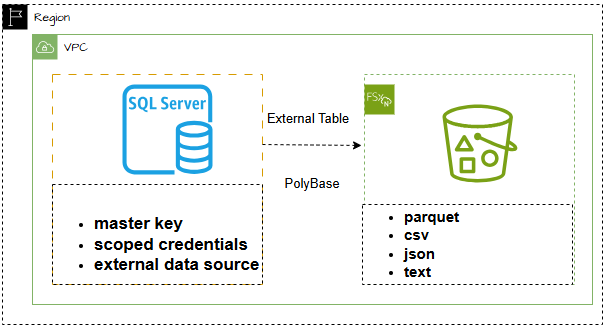
FSx for ONTAP S3 access point is an endpoint that helps control and simplify how different applications or users can access data. With S3 access points you can easily discover new insights, innovate faster and make better data decisions. With S3 access points large buckets policy can be broken down into separate policies for each application that need access to the dataset without interfering with workflow.
- PolyBase can query S3‑compatible storage directly, meaning SQL Server can now query FSx for ONTAP file system data exposed over S3.
- FSx for ONTAP Access Points eliminate the need to migrate or duplicate file shares into S3 buckets.
- Organizations gain real‑time access to file-based datasets through T‑SQL without building complex or costly pipelines.
- Dual‑layer access controls (IAM + ONTAP security) ensure strong governance without additional infrastructure.
How PolyBase Works (Step-by-Step)
- Create Master Key
A Master Key is a symmetric encryption key that SQL Server use to protect sensitive credentials stored inside the database. Creating a Master Key is a mandatory prerequisite before you can create database‑scoped credentials that PolyBase uses to authenticate against remote systems. When PolyBase connects to external systems such as SQL Server, Oracle, S3-compatible storage, or FSx for ONTAP S3 Access Points it uses database scoped credentials to store authentication details (e.g., usernames, passwords, S3 Access Key IDs). SQL Server encrypts these credentials using the Master Key to ensure that: The stored credentials are unreadable to users without proper access, SQL Server itself can decrypt the credentials at runtime to authenticate externally, and Sensitive information is protected even if the database is backed up or moved. storing credentials in plain text would be a major security risk, the Master Key acts as the root protector in the security chain.
- Create Database Scoped Credential
Database Scoped Credential is a secure object in SQL Server that stores authentication information. This credential is encrypted and stored within a specific database, and PolyBase relies on it to authenticate when accessing remote data sources. When you create a database scoped credential, SQL Server encrypts it using the Database Master Key. Once a credential is created and referenced by an External Data Source, SQL Server uses it during every query execution to authenticate against the remote system.
- Define an External Data Source
You configure an external data source in SQL Server pointing to an S3‑compatible endpoint such as an FSx for ONTAP S3 Access Point. In SQL Server PolyBase, an External Data Source is a metadata object that defines how SQL Server connects to a remote storage system so that users can query external data as if it were part of the SQL Server database. It serves as the connection configuration for PolyBase and acts as the foundational object required before creating external tables, which map remote data into SQL Server. Purpose of an External Data Source tells SQL Server:
- Where the remote data is located (URL, endpoint, or cluster path)
- How to authenticate (credentials, access keys, or Kerberos/STS tokens)
- What type of source is (Hadoop/HDFS, S3, Blob Storage, Oracle, other SQL Servers, etc.)
It is the bridge that enables PolyBase to virtualize and query external data in place, eliminating the need for traditional ETL ingestion. Without an External Data Source, SQL Server cannot interact with remote data through PolyBase
4. Create External File Format
When using SQL Server PolyBase to query external data you need to tell SQL Server how to interpret the structure and encoding of those files. This is done by creating an External File Format object, which describes the format of the files e.g., CSV, Parquet, ORC, delimiters, encoding, and other relevant formats. The file format specifies how rows and columns are separated, what encoding is used, and how null values are represented. Proper configuration of this object is essential for successful data virtualization and minimizing data movement costs.
- 5. Create External Tables
These tables map remote objects or directories to SQL Server schemas. is a SQL Server table object whose data lives outside SQL Server but can be queried using standard T‑SQL as if it were a local table. It acts as a schema-on-read pointer to remote data stored in file systems (CSV, Parquet, JSON, Delta), External tables allow SQL Server to virtualize data querying it in place without loading or migrating it into SQL Server storage, which dramatically reduces data movement. This minimizes the need for ETL jobs, staging tables, or ingestion pipelines.
- 6. Execute T‑SQL Queries
SQL Server uses PolyBase to push down operations wherever possible, retrieving only the minimum required data.
------------------------------------------------------------------------------------------------------------------------------------------------------------------------------------------------------------------------------------------------------------------------------------------------------------------------------------------------------------------------------------------------------------------------------------------------------------------------------------------------------
Full Query demo
---1#: enabled polybase feature
EXEC sp_configure 'polybase enabled', 1;
GO
RECONFIGURE;
GO
--2#: enable polybase to export data
EXEC sp_configure 'allow polybase export', 1;
GO
RECONFIGURE;
GO
--- 3#: restart sql server service and polybase engine
EXEC sp_configure @configname = 'polybase enabled';

CREATE MASTER KEY ENCRYPTION BY PASSWORD = 'Password1';
SELECT * FROM sys.symmetric_keys;
GO

---5# Create a database-scoped credential
IF EXISTS (SELECT * FROM sys.database_scoped_credentials WHERE name = 'Marydoe')
BEGIN
DROP DATABASE SCOPED CREDENTIAL [Marydoe].
END
CREATE DATABASE SCOPED CREDENTIAL marydoe
WITH IDENTITY = 'S3 Access Key',
SECRET = 'AKXXXXXXXJHOTJU:jMpLQkuw9n0cnb88XXXXXXXXXXJWDpbHRfpdy4mx';
GO
-- VERFIY credential was created
SELECT * FROM sys.database_scoped_credentials;

---6#: Create a database-data source
DROP EXTERNAL DATA SOURCE S3accesspoint;
CREATE EXTERNAL DATA SOURCE S3accesspoint
WITH
(
LOCATION = 's3://bronze-s3ap-xuyhkilelyiwrakeg9tbccn56gcuse1a-ext-s3alias.s3.dualstack.us-east-1.amazonaws.com/sql/'
, CREDENTIAL = Marydoe
);
GO
--- Verify the external data source connection was successful.
SELECT * FROM sys.external_data_sources;

--7#: Create a file format to use for Parquet
USE demoDB;
GO
IF EXISTS (SELECT * FROM sys.external_file_formats WHERE name = 'ParquetFileFormat')
DROP EXTERNAL FILE FORMAT ParquetFileFormat;
CREATE EXTERNAL FILE FORMAT ParquetFileFormat WITH (FORMAT_TYPE = PARQUET);
GO
---8#: Using OPENROWSET WITH WILDCARD TO READ THE DATA IN THE S3 ACCESS POINT BUCKET
SELECT *
FROM OPENROWSET(
BULK 'yellow_tripdata_202501.parquet',
DATA_SOURCE = 'S3accesspoint',
FORMAT = 'PARQUET'
) AS [data];

---9#: create external table
IF OBJECT_ID('dbo.yellow_tripdata', 'U') IS NOT NULL
BEGIN
DROP EXTERNAL TABLE dbo.yellow_tripdata;
END
GO
CREATE EXTERNAL TABLE dbo.yellow_tripdata
(
VendorID INT,
tpep_pickup_datetime DATETIME2(0),
tpep_dropoff_datetime DATETIME2(0),
passenger_count INT,
trip_distance FLOAT, -- <-- was DECIMAL(9,2); must be FLOAT to match Parquet DOUBLE
RatecodeID INT,
store_and_fwd_flag CHAR(1),
PULocationID INT,
DOLocationID INT,
payment_type TINYINT,
fare_amount FLOAT, -- consider FLOAT if Parquet stores as DOUBLE
extra FLOAT,
mta_tax FLOAT,
tip_amount FLOAT,
tolls_amount FLOAT,
improvement_surcharge FLOAT,
total_amount FLOAT,
congestion_surcharge FLOAT,
airport_fee FLOAT
)
WITH
(
LOCATION = 'yellow_tripdata_202501.parquet', -- single file: no trailing slash
DATA_SOURCE = S3accesspoint,
FILE_FORMAT = ParquetFileFormat
);
GO
-- get the top 10 row
SELECT TOP 10 *
FROM dbo.yellow_tripdata ;
-- Get the total count
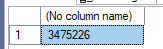
SELECT COUNT(*) FROM dbo.yellow_tripdata;
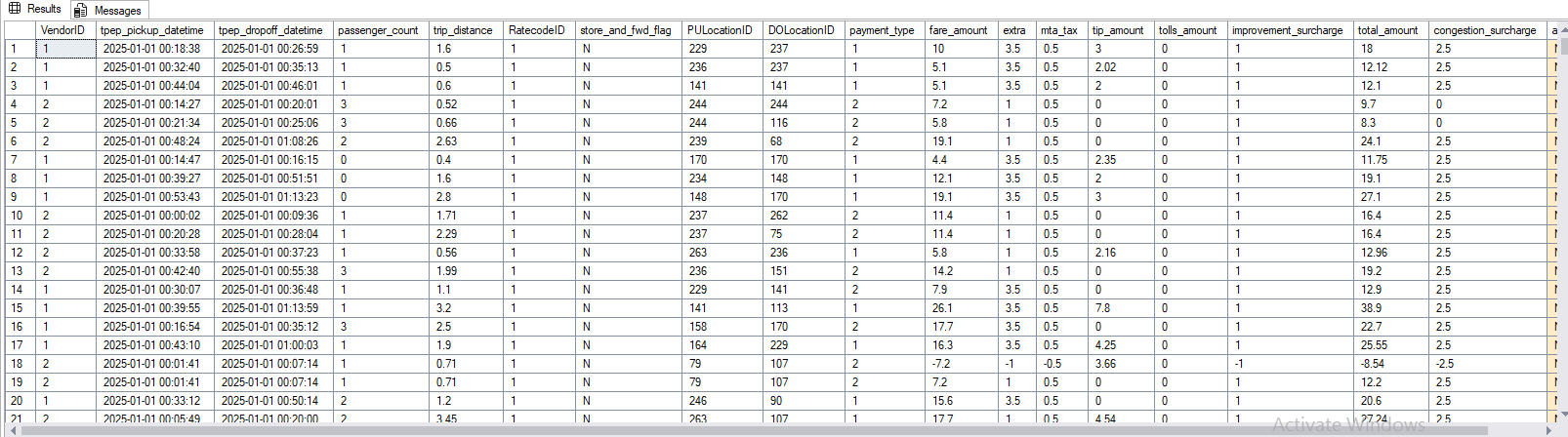
select * from dbo.yellow_tripdata;
-- create a view
CREATE OR ALTER VIEW dbo.yellow_tripdata_view
AS
SELECT
VendorID,
tpep_pickup_datetime,
tpep_dropoff_datetime,
passenger_count,
CAST(trip_distance AS DECIMAL(9,2)) AS trip_distance,
RatecodeID,
CAST(store_and_fwd_flag AS CHAR(1)) AS store_and_fwd_flag,
PULocationID,
DOLocationID,
payment_type,
CAST(fare_amount AS DECIMAL(10,2)) AS fare_amount,
CAST(extra AS DECIMAL(10,2)) AS extra,
CAST(mta_tax AS DECIMAL(10,2)) AS mta_tax,
CAST(tip_amount AS DECIMAL(10,2)) AS tip_amount,
CAST(tolls_amount AS DECIMAL(10,2)) AS tolls_amount,
CAST(improvement_surcharge AS DECIMAL(10,2)) AS improvement_surcharge,
CAST(total_amount AS DECIMAL(10,2)) AS total_amount,
CAST(congestion_surcharge AS DECIMAL(10,2)) AS congestion_surcharge,
CAST(airport_fee AS DECIMAL(10,2)) AS airport_fee
FROM dbo.yellow_tripdata;
GO
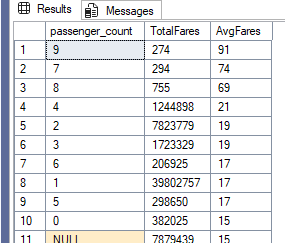
--- query to find passenger count
SELECT DISTINCT [passenger_count]
, ROUND (SUM ([fare_amount]),0) as TotalFares
, ROUND (AVG ([fare_amount]),0) as AvgFares
FROM dbo.yellow_tripdata
GROUP BY [passenger_count]
ORDER BY AvgFares DESC
Reference:
https://learn.microsoft.com/en-us/sql/relational-databases/polybase/polybase-configure-s3-compatible?view=sql-server-ver16
Simplify data access with S3 Access Points for FSx for ONTAP | NetApp Blog
Introducing Data Virtualization with PolyBase - SQL Server | Microsoft Learn