This site will enter Read Only mode on July 23 as we prepare to move to a new platform. You will still be able to view content, but posting and replying will be temporarily disabled.
We're excited to launch our new Community experience on July 30 and more information will follow soon.
Stay connected during the transition - Join our Discord community today.
Active IQ Unified Manager Discussions
- Home
- :
- Active IQ and AutoSupport
- :
- Active IQ Unified Manager Discussions
- :
- Re: OnCommand 3.1.2 Will not launch
Active IQ Unified Manager Discussions
- Subscribe to RSS Feed
- Mark Topic as New
- Mark Topic as Read
- Float this Topic for Current User
- Bookmark
- Subscribe
- Mute
- Printer Friendly Page

- Mark as New
- Bookmark
- Subscribe
- Mute
- Subscribe to RSS Feed
- Permalink
- Report Inappropriate Content
I have a fresh install of OnCommand 3.1.2 on a Windows 7 maching that previously had Chrome installed, but it has since been uninstalled. I can not launch a fresh install of OnCommand. I receive the below error message, and I can not locate the registrey key or config file to change the default browser.
NetApp OnCommand System Manager
"Unable to launch the browser. Ensure the path 'C:\Program Files (x86)\Google\Chrome\Application\chrome.exe' is correct and try again.'
Solved! See The Solution


- Mark as New
- Bookmark
- Subscribe
- Mute
- Subscribe to RSS Feed
- Permalink
- Report Inappropriate Content
Is that your %USERPROFILE% or is your profile on another dirve?

- Mark as New
- Bookmark
- Subscribe
- Mute
- Subscribe to RSS Feed
- Permalink
- Report Inappropriate Content
It can be edited at "SystemManager.config" file present in the folder:
In Win-7 say for Administrator:
C:\Users\Administrator\NetApp\SystemManager\
Refer https://kb.netapp.com/support/index?page=content&id=2022092 (requires login)
- Mark as New
- Bookmark
- Subscribe
- Mute
- Subscribe to RSS Feed
- Permalink
- Report Inappropriate Content
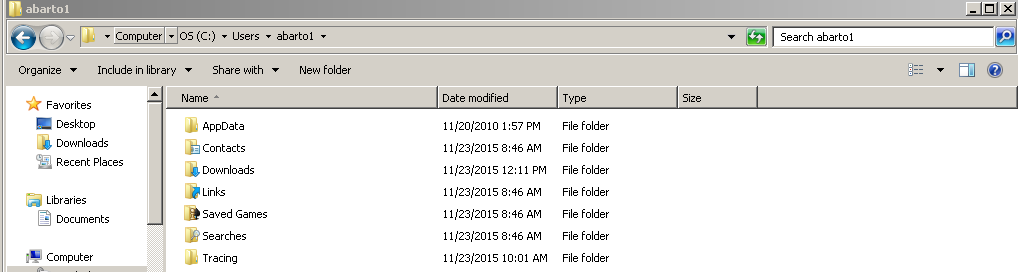
Could this be in a different location? I am unable to locate a Netapp folder under /users/administrator/
- Mark as New
- Bookmark
- Subscribe
- Mute
- Subscribe to RSS Feed
- Permalink
- Report Inappropriate Content
replace "Administrator" in that path with your username.
- Mark as New
- Bookmark
- Subscribe
- Mute
- Subscribe to RSS Feed
- Permalink
- Report Inappropriate Content
Of course. Already checked there
- Mark as New
- Bookmark
- Subscribe
- Mute
- Subscribe to RSS Feed
- Permalink
- Report Inappropriate Content
- Mark as New
- Bookmark
- Subscribe
- Mute
- Subscribe to RSS Feed
- Permalink
- Report Inappropriate Content
Is that your %USERPROFILE% or is your profile on another dirve?
- Mark as New
- Bookmark
- Subscribe
- Mute
- Subscribe to RSS Feed
- Permalink
- Report Inappropriate Content
Recent had my laptop reimaged. Apparently I now how a roaming profile on a network drive. The netapp folder was there. Thank you for your help.