The NetApp Community is moving to a new platform and is in Read-Only mode. Click to learn more.
Stay connected during the transition - Join our Discord community today.

Active IQ Unified Manager Discussions

problem with oncommand report installation

hannah
3,537 Views

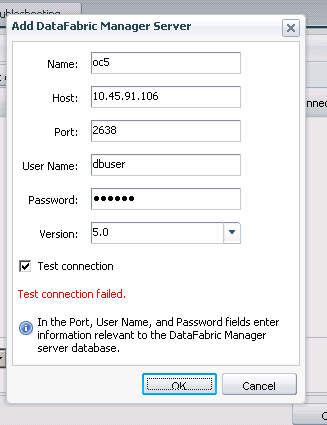
I've installed the report 1.0 with no issues. My problem is with configuring the oncommand 5.0 server. I fill in the name, IP address but the default is dbuser with hidden password.

-Do I use dbuser as my login? I've tried using the administrator/password for the windows server but it didn't work

-Do I have create a user on oncommand/DFM server?

-Is the default port correct?

Steve

1 REPLY 1

yuvaraju
3,537 Views

A user with OnCommand/DFM server database read access has to be created. This information is captured in the OnCommand Report configuration demo video uploaded on community.Link to the video: https://communities.netapp.com/videos/2329

The commands for your reference:

dfm database user create  -u dbuser -p dbuser  Creates database user 'dbuser'

dfm database access enable -u dbuser     Enables database access for user 'dbuser'

Yuvaraju B

Public