
This site will enter Read Only mode on July 23 as we prepare to move to a new platform. You will still be able to view content, but posting and replying will be temporarily disabled.
We're excited to launch our new Community experience on July 30 and more information will follow soon.
Stay connected during the transition - Join our Discord community today.
EF & E-Series, SANtricity, and Related Plug-ins
- Home
- :
- Products and Services
- :
- EF & E-Series, SANtricity, and Related Plug-ins
- :
- Change NTP servers on E2760
EF & E-Series, SANtricity, and Related Plug-ins
- Subscribe to RSS Feed
- Mark Topic as New
- Mark Topic as Read
- Float this Topic for Current User
- Bookmark
- Subscribe
- Mute
- Printer Friendly Page

- Mark as New
- Bookmark
- Subscribe
- Mute
- Subscribe to RSS Feed
- Permalink
- Report Inappropriate Content
I'm trying to figure out how to change the NTP servers on my E2760. The procedure doesn't seem to be the same as my other SANS (5560, 5660). I found documentation (https://mysupport.netapp.com/NOW/public/eseries/cli/index.html#page/GUID-C39AE1DE-C63B-4B37-9DCA-C0183EB68F36/GUID-36B1991E-CD9C-48F6-85E5-5BD9676414E...) stating to use SMLi or Script Editor, but when I use the example script in the doc, I get a syntax error. For example:
When I enter this
set controller[a] NTPServers=("0.pool.ntp.org" "1.us.pool.ntp.org");
The results box in Script Editor gives me this after selecting Verify and Execute
Performing syntax check...
Encountered "NTPServers" at line 1, column 19.
Was expecting one of:
"availability" ...
"NVSRAMByte" ...
"batteryInstallDate" ...
"globalNVSRAMByte" ...
"hostNVSRAMByte" ...
"rloginEnabled" ...
"ethernetPort" ...
"serviceMode" ...
"serviceAllowedIndicator" ...
"gatewayIp" ...
"IPV4GatewayIP" ...
"IPV6RouterAddress" ...
"iscsiHostPort" ...
I don't understand why the example provided in the doc doesn't work. If there's a way to do it in the GUI, I'd be fine with that.
Solved! See The Solution


- Mark as New
- Bookmark
- Subscribe
- Mute
- Subscribe to RSS Feed
- Permalink
- Report Inappropriate Content
Hi Kevin,
Based on the picture you shared, I believe this is a E5460 instead of E2760. E54xx doesn't have the capability of configuring NTP servers.


- Mark as New
- Bookmark
- Subscribe
- Mute
- Subscribe to RSS Feed
- Permalink
- Report Inappropriate Content
I don't have access to an eSeries to try this on at the moment, but I did find the documentation for doing this in the System Manager GUI here.
- Mark as New
- Bookmark
- Subscribe
- Mute
- Subscribe to RSS Feed
- Permalink
- Report Inappropriate Content
Thanks for the reply, but this appears to be for a more modern E-series. The steps you provided work on my E5760 but don't apply to the E2760--it's a much older SAN.
- Mark as New
- Bookmark
- Subscribe
- Mute
- Subscribe to RSS Feed
- Permalink
- Report Inappropriate Content
The command CLI syntax is correct. I tested it in our lab on an E2760 and it worked successfully.
With regard to the GUI (Array Management Window), you can find the steps to configure NTP servers in this document (pages 181-182): https://mysupport.netapp.com/ecm/ecm_get_file/ECMLP2862590
- Mark as New
- Bookmark
- Subscribe
- Mute
- Subscribe to RSS Feed
- Permalink
- Report Inappropriate Content
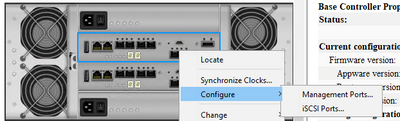
Thanks for the help, but this doesn't work either. I only have Management Ports and iSCSI Ports under Configure.
- Mark as New
- Bookmark
- Subscribe
- Mute
- Subscribe to RSS Feed
- Permalink
- Report Inappropriate Content
Hi Kevin,
Based on the picture you shared, I believe this is a E5460 instead of E2760. E54xx doesn't have the capability of configuring NTP servers.
- Mark as New
- Bookmark
- Subscribe
- Mute
- Subscribe to RSS Feed
- Permalink
- Report Inappropriate Content
I think you're right. We must have this one mislabeled. Thanks!

