This site will enter Read Only mode on July 23 as we prepare to move to a new platform. You will still be able to view content, but posting and replying will be temporarily disabled.
We're excited to launch our new Community experience on July 30 and more information will follow soon.
Stay connected during the transition - Join our Discord community today.
EF & E-Series, SANtricity, and Related Plug-ins
- Home
- :
- Products and Services
- :
- EF & E-Series, SANtricity, and Related Plug-ins
- :
- E-Series SANTricity Manager change volume Thick to Thin
EF & E-Series, SANtricity, and Related Plug-ins
- Subscribe to RSS Feed
- Mark Topic as New
- Mark Topic as Read
- Float this Topic for Current User
- Bookmark
- Subscribe
- Mute
- Printer Friendly Page

- Mark as New
- Bookmark
- Subscribe
- Mute
- Subscribe to RSS Feed
- Permalink
- Report Inappropriate Content
Hello,
Can someone show me the reference material/guide on how to change a volume from thick provisioning to thin?
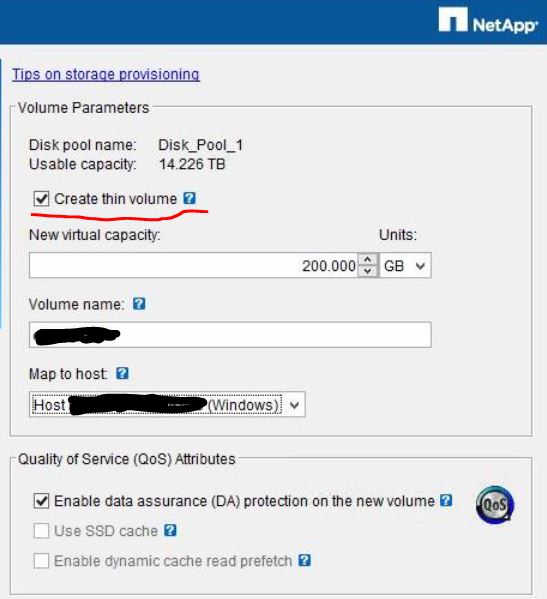
I have a volume that was created without "Create thin volume" (view image). I need the volume to have the "Thin Volume" feature active. Attached image.
I need to increase or reduce the volume size on demand.
Thanks, best regards.
Rodolfo MG.
Solved! See The Solution
- Mark as New
- Bookmark
- Subscribe
- Mute
- Subscribe to RSS Feed
- Permalink
- Report Inappropriate Content
Hello, MitchBlackburn...
Excellent. It's just what I needed to know.
Thank you very much.
Greetings.
Romago


- Mark as New
- Bookmark
- Subscribe
- Mute
- Subscribe to RSS Feed
- Permalink
- Report Inappropriate Content
There is no conversion from thick to thin or vice versa. You will need to recreate the volume as thin. Please check SANtricity System Manager for hep with shrinking volumes. You will need to use the OS's UNMAP feature to shrink volumes.
- Mark as New
- Bookmark
- Subscribe
- Mute
- Subscribe to RSS Feed
- Permalink
- Report Inappropriate Content
Hello MitchBlackburn, thanks for the reply,
Then this volume if necessary if it can increase its current size or not?
Greetings.

- Mark as New
- Bookmark
- Subscribe
- Mute
- Subscribe to RSS Feed
- Permalink
- Report Inappropriate Content
- Mark as New
- Bookmark
- Subscribe
- Mute
- Subscribe to RSS Feed
- Permalink
- Report Inappropriate Content
Yes, you can increase the volume size. If your volume group or pool is full you can add more drives to increase the size of the group or pool and then increase the volume size. This can all be done dynamically.
- Mark as New
- Bookmark
- Subscribe
- Mute
- Subscribe to RSS Feed
- Permalink
- Report Inappropriate Content
Hello, MitchBlackburn...
Excellent. It's just what I needed to know.
Thank you very much.
Greetings.
Romago


.JPG)