
This site will enter Read Only mode on July 23 as we prepare to move to a new platform. You will still be able to view content, but posting and replying will be temporarily disabled.
We're excited to launch our new Community experience on July 30 and more information will follow soon.
Stay connected during the transition - Join our Discord community today.
ONTAP Discussions
- Home
- :
- ONTAP, AFF, and FAS
- :
- ONTAP Discussions
- :
- Re: No snapshot policy on volume
ONTAP Discussions
- Subscribe to RSS Feed
- Mark Topic as New
- Mark Topic as Read
- Float this Topic for Current User
- Bookmark
- Subscribe
- Mute
- Printer Friendly Page

- Mark as New
- Bookmark
- Subscribe
- Mute
- Subscribe to RSS Feed
- Permalink
- Report Inappropriate Content
On one of my client's volume , under overview , snapshot policy it's note "None".
But there are still snapshots, how it's possible ?
Solved! See The Solution

- Mark as New
- Bookmark
- Subscribe
- Mute
- Subscribe to RSS Feed
- Permalink
- Report Inappropriate Content
Yes, that's correct. B'cos it is a 'mirrored' destination volume , therefore it maintains exact copy of the source volume.
- Mark as New
- Bookmark
- Subscribe
- Mute
- Subscribe to RSS Feed
- Permalink
- Report Inappropriate Content
Those snapshots that you are seeing may be from the previous policy (ex- default). Storage Admin may have disabled the snapshot policy (set to 'none') for the given volume later on. Changing the snapshot policy to 'none' do not delete the previous snapshots (unless the prefixes matches) created under a another policy.
Ideally, if it's none - You shouldn't see any newer snaps there. How old are they ? Could you share the output.
- Mark as New
- Bookmark
- Subscribe
- Mute
- Subscribe to RSS Feed
- Permalink
- Report Inappropriate Content
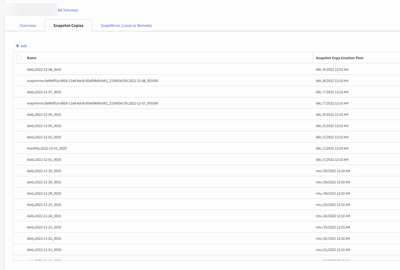
No it's not because that is recent snapshots. Everyday i got net snapshot !

- Mark as New
- Bookmark
- Subscribe
- Mute
- Subscribe to RSS Feed
- Permalink
- Report Inappropriate Content
Thanks for the screenshot. You can see the volume 'Type' is - Data Protection. So, this is the SnapMirrored destination volume, so it's picking up those snapshots as part of the Mirror transfer. Please check it's Source Relationship, the source volume would be 'Type' - Read & Write.
- Mark as New
- Bookmark
- Subscribe
- Mute
- Subscribe to RSS Feed
- Permalink
- Report Inappropriate Content
Yes it's "Read&Write". So on the destination volume, snapshot correspond to snapshots on the source volume ?
- Mark as New
- Bookmark
- Subscribe
- Mute
- Subscribe to RSS Feed
- Permalink
- Report Inappropriate Content
Yes, that's correct. B'cos it is a 'mirrored' destination volume , therefore it maintains exact copy of the source volume.
- Mark as New
- Bookmark
- Subscribe
- Mute
- Subscribe to RSS Feed
- Permalink
- Report Inappropriate Content
Okkeyyyy i was pretty lost .
Thank 's for the help 😉
- Mark as New
- Bookmark
- Subscribe
- Mute
- Subscribe to RSS Feed
- Permalink
- Report Inappropriate Content
And last question, when i try to see the snapmirror schedule with this command :
snapmirror show -fields schedule
i get "there are no entries matching your query "
while snapmirror are still made

