NetApp Community Update
This site will enter Read Only mode on July 23 as we prepare to move to a new platform. You will still be able to view content, but posting and replying will be temporarily disabled.
We're excited to launch our new Community experience on July 30 and more information will follow soon.
Stay connected during the transition - Join our Discord community today.

VMware Solutions Discussions

SnapClone a physical SQL DB to a VM -- can't then move the VM to another host?

PL
3,577 Views

Environment: FAS8040,  7-Mode 8.2.2p1, Vsphere 5.1 U3; FC and iSCSI datastores available.


I want to clone a SQL 2008r2 DB that lives on a physical Windows failover cluster to a virtual machine. This is to replace another cluster as the destination. I want to be able to take advantage of VMware's HA capability to ensure reasonable up-time on the clone.


I can clone the database via SnapManager (7.1) to the VM, this works fine. But once the clone is in place, the VM can't be moved to another host with VMotion. The Compatibility window in the Migrate Virtual Machine dialog displays an error message for each of the cloned VMDKs:  "Virtual disk 'Hard disk 7' is a mapped direct-access LUN that is not accessible.'
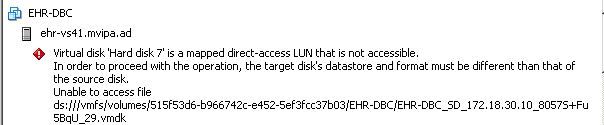
 

VM.JPG


I suspect the problem may be that the cloned LUN doesn't have any initiators listed other than that of the original target host?


Is it even possible to VMotion a machine holding a cloned database to another host?

1 REPLY 1

georgevj
3,499 Views

Most probably, what you suspect could be right. You may confirm this by issuing "lun show -v" and "igroup show -v" commands on the storage system's commandline. It will show whether the LUNs are mapped or not, and if mapped, to which host(s).

If this post resolved your issue, help others by selecting ACCEPT AS SOLUTION or adding a KUDO.
Cannot find the answer you need? No need to open a support case - just CHAT and we’ll handle it for you.
Public
