NetApp Community Update
This site will enter Read Only mode on July 23 as we prepare to move to a new platform. You will still be able to view content, but posting and replying will be temporarily disabled.
We're excited to launch our new Community experience on July 30 and more information will follow soon.
Stay connected during the transition - Join our Discord community today.

Network and Storage Protocols

Fail Connect RSH Netapp by "DOS"

wagnerpcj44
5,993 Views

I can not connect to the netapp storage by RSH, i am trying by Windows "DOS" rsh.exe, below is the error log, can anyone help me?

"DOS"

C:\>rsh netapp01 -l root:netapp1 lun show

Answer Netapp

Mon Jun 14 14:50:08 BRT [netapp01 (takeover): rshd_4:info]: couldn't connect second port on 192.168.92.1
Mon Jun 14 14:50:08 BRT [netapp01 (takeover): rshd_1:info]: couldn't connect second port on 192.168.92.1

thanks

2 REPLIES 2

adamfox
5,948 Views

I did a bug lookup and found burt 187044.  It says this is typically client or network side issue:

rshd is expecting a port number for standard error from the client.  The client
did not return one within 60 seconds, thus rshd timed out with the error
message.

In /etc/messages, there is also:

Tue Nov  8 13:24:03 IST [rshd_0:info]: couldn't connect second port on cornice
Tue Nov  8 13:24:10 IST [rshd_1:info]: couldn't connect second port on cornice

Again this implies that there are no stderr ports on the client cornice.

%%% TITLE: rsh is timing out when reading port number for standard error
%%% DESCRIPTION:
The rsh protocol needs a stdout and stderr port.  When the rsh client and rshd
on the filer are connecting, rshd asks for a stderr port from the client.  rshd
waited 60 seconds for a response and did not receive one, so rshd timed out with
the message: "[rshd_0:error]: rshd: when reading port number for standard error
from <client>, it didn't arrive within 60 seconds."
%%% WORKAROUND:
There is no workaround.
%%% NOTES:
There are some causes for this problem, one is network configuration, the filer
cannot get a return path to the client.  Also the client's reserved ports
may be heavily used.  Do a netstat -a to determine this.

wagnerpcj44
5,948 Views

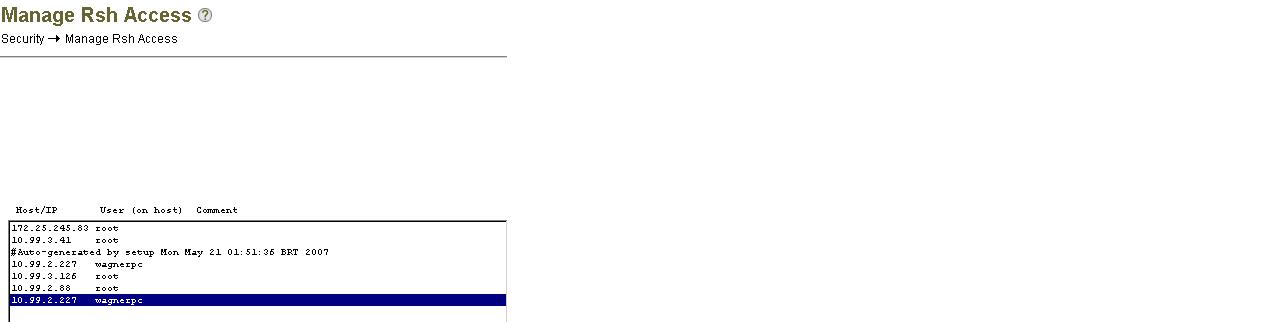
Hi adam, I managed to configure rsh on NetApp storage, I had free access to the Windows machine and user in the configuration file RSH Manage Access. The test was previously performed on a server in the same range of network, but using NAT, configured to access a server on the same network without NAT, it worked ok. The problem was the return port connection could not return the search result. You were right!

C:\>rsh 10.99.2.141 -l root snap list
Volume vol0
working...

  %/used       %/total  date          name
----------  ----------  ------------  --------
  1% ( 1%)    0% ( 0%)  Jun 17 12:00  hourly.0
  2% ( 1%)    0% ( 0%)  Jun 17 08:00  hourly.1
  4% ( 2%)    0% ( 0%)  Jun 17 00:00  nightly.0
  6% ( 1%)    0% ( 0%)  Jun 16 20:00  hourly.2
10% ( 5%)    1% ( 0%)  Jun 16 00:00  nightly.1
16% ( 6%)    1% ( 1%)  Jun 15 00:00  nightly.2
21% ( 7%)    2% ( 1%)  Jun 14 00:00  weekly.0
36% (24%)    4% ( 2%)  Jun 07 00:00  weekly.1
47% (24%)    7% ( 2%)  May 31 00:00  weekly.2

Thanks for your help.

Public