NetApp Community Update
This site will enter Read Only mode on July 23 as we prepare to move to a new platform. You will still be able to view content, but posting and replying will be temporarily disabled.
We're excited to launch our new Community experience on July 30 and more information will follow soon.
Stay connected during the transition - Join our Discord community today.

ONTAP Hardware

FAS8020 SFP+ 10Gbase-T on uta2 port

ygt
8,103 Views

Hi,


I would like to know if it's possible using a SFP+ 10Gbase-T made by Prolabs on FAS8020 because

we have 10G copper ports on core switch.


This module is SFF-8431 and SFF-8432 MSA Compliant and have the same specifications that module twinax cables.


I read in netapps web site https://library.netapp.com/ecmdocs/ECMP1636035/html/GUID-503DCA61-D81C-4C98-87BE-1AF101E7F0E0.html

"You must connect to the X1143A-R6 ports using LC fiber optic cables with supported SFP+ optical modules, or by using copper Twinax cables (in 10GbE mode only)"


You find in attachment the specifications for this module.


I really appreciate any help you can provide.


Sincerly.

 

1 ACCEPTED SOLUTION

georgevj
8,058 Views

You can check the supported hardware on each platform at https://hwu.netapp.com/

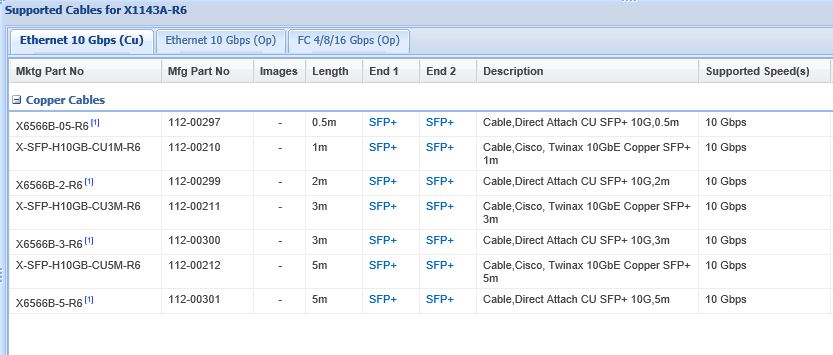
Here is a screenshot that shows the supported cables on X1143A-R6 adapter.  I think you will have to use one of these, unless you plan not to receive tehnical support from NetApp. 😞


cables.JPG


If this post resolved your issue, help others by selecting ACCEPT AS SOLUTION or adding a KUDO.
Cannot find the answer you need? No need to open a support case - just CHAT and we’ll handle it for you.

View solution in original post

1 REPLY 1

georgevj
8,059 Views

You can check the supported hardware on each platform at https://hwu.netapp.com/

Here is a screenshot that shows the supported cables on X1143A-R6 adapter.  I think you will have to use one of these, unless you plan not to receive tehnical support from NetApp. 😞


cables.JPG


If this post resolved your issue, help others by selecting ACCEPT AS SOLUTION or adding a KUDO.
Cannot find the answer you need? No need to open a support case - just CHAT and we’ll handle it for you.
Public