NetApp Community Update
This site will enter Read Only mode on July 23 as we prepare to move to a new platform. You will still be able to view content, but posting and replying will be temporarily disabled.
We're excited to launch our new Community experience on July 30 and more information will follow soon.
Stay connected during the transition - Join our Discord community today.

Simulator Discussions

How to add SSD's of bigger size to vSIM.

kennvarg
4,062 Views

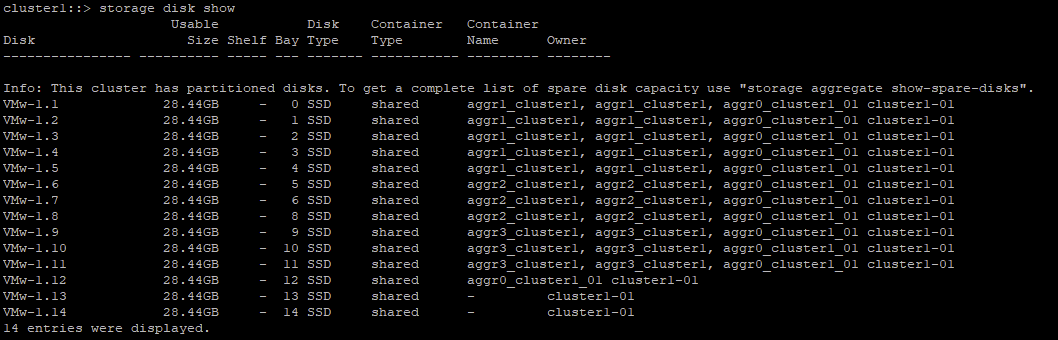
I launched a hands-on lab and ran a "storage disk show".  I noticed all disks were 28.44 GB SSDs.  I can't see disks of that size if I run "vsim_makedisks -h". Also the disks prefix name is "VMw-". How would I go about simulating those disks? Any step by step guide avail?  


PS: I am using vSIM for ONTAP 9.8

2 REPLIES 2

NetApp_SR
3,928 Views

Not seeing the disk size is because the disks are partitioned as mentioned in the screen shot. Run the command "storage aggregate show-spare-disks" and look at the physical size. If it is the online lab I do not believe you will be able to add disks.

SeanHatfield
3,897 Views

The simulators in the hands-on labs use virtual scsi disks (each disk is a separate vmdk), but the ones in the downloadable simulators for fusion/workstation use simulated fc/vha disks (each disk is a file on a single shared vmdk).  It's not possible to run the vscsi disk subsystem on workstation or fusion, for technical reasons I've never been able to get to the bottom of.  scsi inquiry errors, missing vpd data, deep deep weeds where driver meets hypervisor.  

If this post resolved your issue, help others by selecting ACCEPT AS SOLUTION or adding a KUDO.

Public