NetApp Community Update
This site will enter Read Only mode on July 23 as we prepare to move to a new platform. You will still be able to view content, but posting and replying will be temporarily disabled.
We're excited to launch our new Community experience on July 30 and more information will follow soon.
Stay connected during the transition - Join our Discord community today.

VMware Solutions Discussions

snapshot Directory not visible on ESX datastore

brauntisc
6,665 Views

Hi All


Following Environment:

Clustered Data ONTAP 8.2.2P1

ESX/Vcenter Client 5.5

Protocol NFS


In the Datastore Browser we see only the .snapshot directory from the Volume, which is mouted to the / of the Namespace. All underlying Volumes doesn't show the .snapshot Directory.
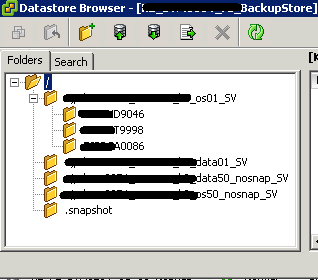
DSB.png 


Configuration of the SVMs junction Paths:

vserver     volume           junction-path

----------- ---------------- -------------

svm1        svm1_root             /

svm1        svm1_backup           /svm1_backup <-- .snapshot visible

svm1        svm1_data01_SV        /svm1_backup/svm1_data01_SV <-- .snapshot not visible

svm1        svm1_data50_nosnap_SV /svm1_backup/svm1_data50_nosnap_SV <-- .snapshot not visible

svm1        svm1_os01_SV          /svm1_backup/svm1_os01_SV <-- .snapshot not visible

svm1        svm1_os50_nosnap_SV   /svm1_backup/svm1_os50_nosnap_SV <-- .snapshot not visible


Volume Options:

vserver    volume                  snapdir-access

----------- ----------------       --------------

svm01      svm01_root              true

svm01      svm01_backup            true

svm01      svm01_data01_SV         true

svm01      svm01_data50_nosnap_SV  true

svm01      svm01_os01_SV           true

svm01      svm01_os50_nosnap_SV    true


Do someone know this behavior or have we forgotten to configure Something.


TIA

Thomas

1 ACCEPTED SOLUTION

brauntisc
6,493 Views

Hi All


I have opened a case at NetApp. This is a normal behavoir. You can only see the .snapshot Directory in the "root" of the NFS export , but you can access

manually by typing .snapshot in any directory. In the Datastorebrowser you can't manually typing . snapshot, so you can only access the .snapshot

in the "root" directory.


regards Thomas

View solution in original post

2 REPLIES 2

brauntisc
6,494 Views

Hi All


I have opened a case at NetApp. This is a normal behavoir. You can only see the .snapshot Directory in the "root" of the NFS export , but you can access

manually by typing .snapshot in any directory. In the Datastorebrowser you can't manually typing . snapshot, so you can only access the .snapshot

in the "root" directory.


regards Thomas

Jsobejana
2,696 Views

can someone post the syntax on the command line please


Public
