This site will enter Read Only mode on July 23 as we prepare to move to a new platform. You will still be able to view content, but posting and replying will be temporarily disabled.
We're excited to launch our new Community experience on July 30 and more information will follow soon.
Stay connected during the transition - Join our Discord community today.
Active IQ Unified Manager Discussions
- Home
- :
- Active IQ and AutoSupport
- :
- Active IQ Unified Manager Discussions
- :
- Re: Unable to share reports in Oncommand Unified manager.
Active IQ Unified Manager Discussions
- Subscribe to RSS Feed
- Mark Topic as New
- Mark Topic as Read
- Float this Topic for Current User
- Bookmark
- Subscribe
- Mute
- Printer Friendly Page
Unable to share reports in Oncommand Unified manager.

- Mark as New
- Bookmark
- Subscribe
- Mute
- Subscribe to RSS Feed
- Permalink
- Report Inappropriate Content
I am not able to get Reports on mail or in local folders in any required format.
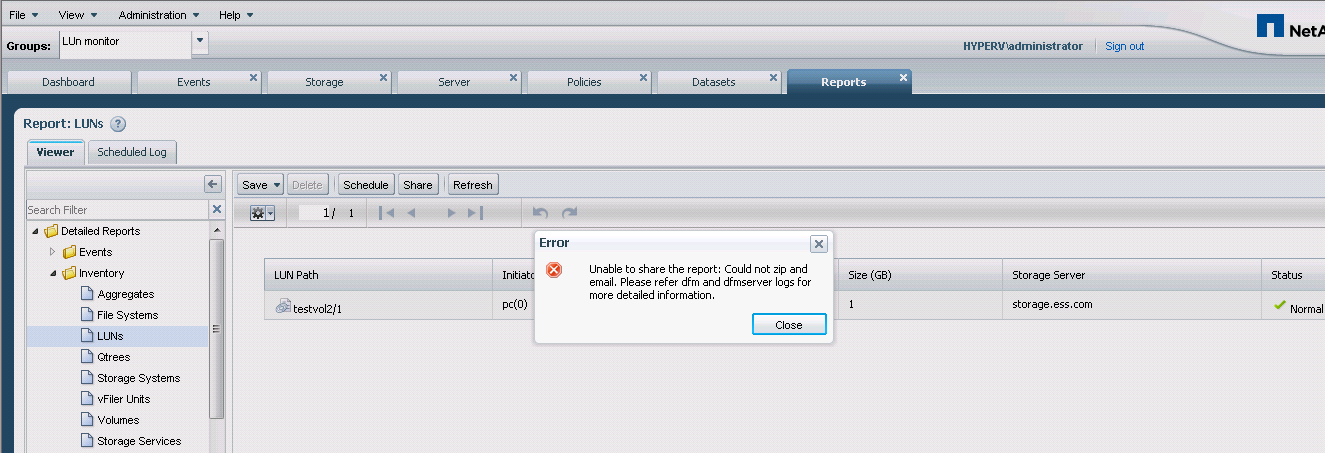
Application pops up the error " unable to share report: could not zip & another rerror.---" Find the screenshot.
Checked all the logs & Local dfm server firewall setting, but still the same problem.
Help to resolve the problem.
Regrards,
Ashish S. I.
Solved! See The Solution


- Mark as New
- Bookmark
- Subscribe
- Mute
- Subscribe to RSS Feed
- Permalink
- Report Inappropriate Content
It seems that you didn't set your SMTP server properly. Go to "Setup Options->Systems->Alarms" and check mail server. Once you set the mail server properly create an alarm and test the alarm. If you are getting email for test alarm that mean your email server configuration is correct.
let us know, If you are getting test alarm email but not able to share the report.
Regards,
Gireesh

- Mark as New
- Bookmark
- Subscribe
- Mute
- Subscribe to RSS Feed
- Permalink
- Report Inappropriate Content
HI,
What is the error in Jetty log when you execute this in the UI?
Also, have you set the smtp server? Could you provide "dfm option list | grep -i smtp" output.
Thanks,
Arun

- Mark as New
- Bookmark
- Subscribe
- Mute
- Subscribe to RSS Feed
- Permalink
- Report Inappropriate Content
Hi Ashish,
The report sharing works only for members of the administrators group. Users without the admin privilege GlobalFullcontrol in OnCommand Unified Manager are unable to share the report.
Can you confirm that you have the proper privileges?
Thanks,
Kevin
- Mark as New
- Bookmark
- Subscribe
- Mute
- Subscribe to RSS Feed
- Permalink
- Report Inappropriate Content
I have admin rights, I am accessing it via the admin privileges.. but still the same...
SMTP is configured as well. the error is like ' unable to share; could not zip & email, check the DFM logs..'& there is no notification..
- Mark as New
- Bookmark
- Subscribe
- Mute
- Subscribe to RSS Feed
- Permalink
- Report Inappropriate Content
It seems that you didn't set your SMTP server properly. Go to "Setup Options->Systems->Alarms" and check mail server. Once you set the mail server properly create an alarm and test the alarm. If you are getting email for test alarm that mean your email server configuration is correct.
let us know, If you are getting test alarm email but not able to share the report.
Regards,
Gireesh
- Mark as New
- Bookmark
- Subscribe
- Mute
- Subscribe to RSS Feed
- Permalink
- Report Inappropriate Content
Hey ,
Thanks Gireesh.
The problem is resolved.
Thanks All