This site will enter Read Only mode on July 23 as we prepare to move to a new platform. You will still be able to view content, but posting and replying will be temporarily disabled.
We're excited to launch our new Community experience on July 30 and more information will follow soon.
Stay connected during the transition - Join our Discord community today.
Active IQ Unified Manager Discussions
- Home
- :
- Active IQ and AutoSupport
- :
- Active IQ Unified Manager Discussions
- :
- Re: What happened to cable and shelf view in ActiveIQ ConfigAdvisor?
Active IQ Unified Manager Discussions
- Subscribe to RSS Feed
- Mark Topic as New
- Mark Topic as Read
- Float this Topic for Current User
- Bookmark
- Subscribe
- Mute
- Printer Friendly Page
What happened to cable and shelf view in ActiveIQ ConfigAdvisor?

- Mark as New
- Bookmark
- Subscribe
- Mute
- Subscribe to RSS Feed
- Permalink
- Report Inappropriate Content
Trying to find the shelf and cable view and I'm having a hard time trying to find it. Was it removed, or am I missing it?
TasP
Solved! See The Solution



- Mark as New
- Bookmark
- Subscribe
- Mute
- Subscribe to RSS Feed
- Permalink
- Report Inappropriate Content
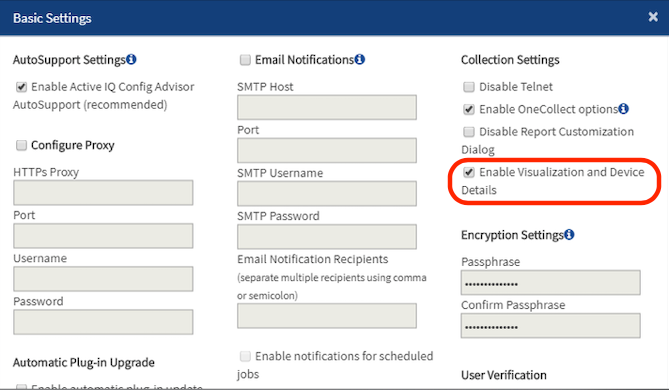
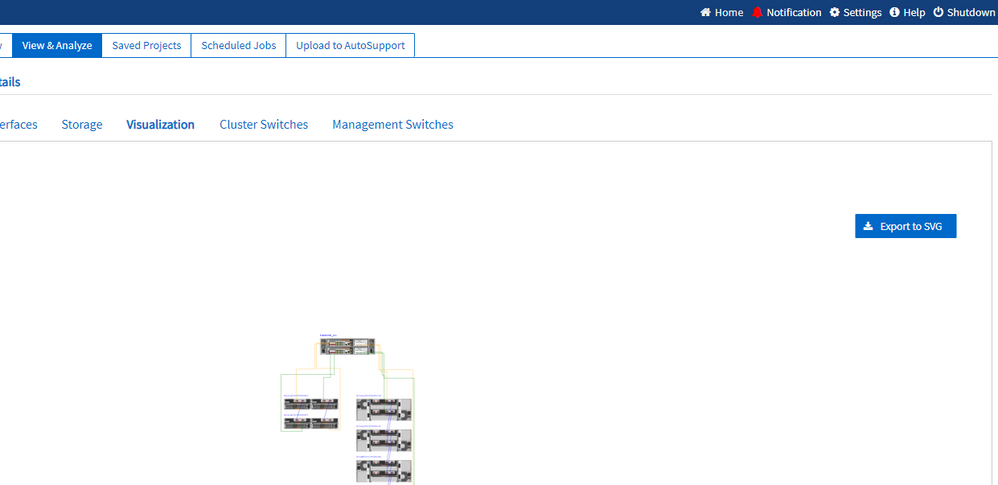
By default, the Visualization and Device Details features are disabled. You can re-enable them by clicking on Settings in the upper-right hand corner of the Config Advisor browser window, and then checking the "Enable Visualization and Device Details" checkbox, and then clicking Save.
You'll have to re-run your collection after that to collect the visualization details.

- Mark as New
- Bookmark
- Subscribe
- Mute
- Subscribe to RSS Feed
- Permalink
- Report Inappropriate Content
Nope, still there! Visualization - Cable Visualization
Please DM or email me the serial numbers/hostnames you're looking for and I'll confirm if you wish
- Mark as New
- Bookmark
- Subscribe
- Mute
- Subscribe to RSS Feed
- Permalink
- Report Inappropriate Content
I think you may be referring to the online version, which is not available to dark sites.
I am referring to the downloadable tool. I cannot find where it may be, in the latest release.
TasP
- Mark as New
- Bookmark
- Subscribe
- Mute
- Subscribe to RSS Feed
- Permalink
- Report Inappropriate Content
Ah, I apologise, yes I am. I will ask someone to confirm - I haven't used the current version for a while.

- Mark as New
- Bookmark
- Subscribe
- Mute
- Subscribe to RSS Feed
- Permalink
- Report Inappropriate Content
You're looking for the "Visualization" or "Configuration" button like this:
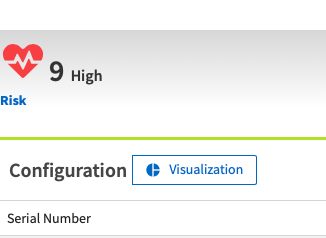
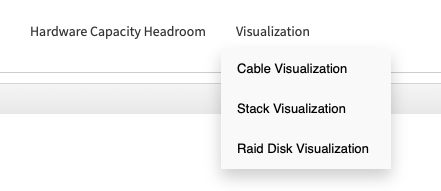
Is that what you're looking for?
- Mark as New
- Bookmark
- Subscribe
- Mute
- Subscribe to RSS Feed
- Permalink
- Report Inappropriate Content
No. I cannot use the online tools, because I am in a dark site. I was referring to the offline downloadable tool.
TasP
- Mark as New
- Bookmark
- Subscribe
- Mute
- Subscribe to RSS Feed
- Permalink
- Report Inappropriate Content
By default, the Visualization and Device Details features are disabled. You can re-enable them by clicking on Settings in the upper-right hand corner of the Config Advisor browser window, and then checking the "Enable Visualization and Device Details" checkbox, and then clicking Save.
You'll have to re-run your collection after that to collect the visualization details.
- Mark as New
- Bookmark
- Subscribe
- Mute
- Subscribe to RSS Feed
- Permalink
- Report Inappropriate Content
Thank you Donny.

- Mark as New
- Bookmark
- Subscribe
- Mute
- Subscribe to RSS Feed
- Permalink
- Report Inappropriate Content
Just downloaded version 6.0.1 and don't see the option in "options" to turn this on??

- Mark as New
- Bookmark
- Subscribe
- Mute
- Subscribe to RSS Feed
- Permalink
- Report Inappropriate Content
Same here, please re-add this feature.
- Mark as New
- Bookmark
- Subscribe
- Mute
- Subscribe to RSS Feed
- Permalink
- Report Inappropriate Content
Sorry about that, Donny is correct however.