
This site will enter Read Only mode on July 23 as we prepare to move to a new platform. You will still be able to view content, but posting and replying will be temporarily disabled.
We're excited to launch our new Community experience on July 30 and more information will follow soon.
Stay connected during the transition - Join our Discord community today.
General Discussion
- Home
- :
- General Discussion & Community Support
- :
- General Discussion
- :
- Snapshot reserve 0 pourcent but space used
General Discussion
- Subscribe to RSS Feed
- Mark Topic as New
- Mark Topic as Read
- Float this Topic for Current User
- Bookmark
- Subscribe
- Mute
- Printer Friendly Page

- Mark as New
- Bookmark
- Subscribe
- Mute
- Subscribe to RSS Feed
- Permalink
- Report Inappropriate Content
Hi,
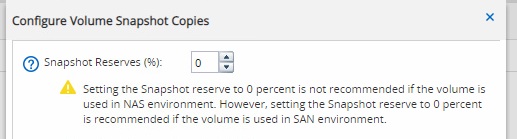
I have noticed that i have volume with a snapshot reserve of 0 pourcent but some space is still used by snapshot ?
How is that possible ?
Best regards,
Solved! See The Solution

- Mark as New
- Bookmark
- Subscribe
- Mute
- Subscribe to RSS Feed
- Permalink
- Report Inappropriate Content
That's exactly what I meant when I said - Could the snapshot used-space you have observed - is basically 'snapshots' in the active-file system space.
Basically:
If snapshot reserve is set to : 0, snapshots will consume active-file system space., these snapshots in the image takes up the volume space. If you do NOT want any snapshots then you must disable the snapshots.
- Mark as New
- Bookmark
- Subscribe
- Mute
- Subscribe to RSS Feed
- Permalink
- Report Inappropriate Content
What is the output for this command for the 'subject' volume?
volume show -volume <volume> -fields snapshot-space-used,snapshot-reserve-available,snapshot-count
Could the snapshot used-space you have observed - is basically 'snapshots' in the active-file system space.
- Mark as New
- Bookmark
- Subscribe
- Mute
- Subscribe to RSS Feed
- Permalink
- Report Inappropriate Content
Look, on my volum from ontap, i see 0 % configured for the snap, but there are snapshot ..

- Mark as New
- Bookmark
- Subscribe
- Mute
- Subscribe to RSS Feed
- Permalink
- Report Inappropriate Content
That's exactly what I meant when I said - Could the snapshot used-space you have observed - is basically 'snapshots' in the active-file system space.
Basically:
If snapshot reserve is set to : 0, snapshots will consume active-file system space., these snapshots in the image takes up the volume space. If you do NOT want any snapshots then you must disable the snapshots.
- Mark as New
- Bookmark
- Subscribe
- Mute
- Subscribe to RSS Feed
- Permalink
- Report Inappropriate Content
Okey thank you

