
This site will enter Read Only mode on July 23 as we prepare to move to a new platform. You will still be able to view content, but posting and replying will be temporarily disabled.
We're excited to launch our new Community experience on July 30 and more information will follow soon.
Stay connected during the transition - Join our Discord community today.
Simulator Discussions
- Home
- :
- Developer Network
- :
- Simulator Discussions
- :
- Re: ONTAP 8.3 Cluster mode simulator : Which IP should I connect to ?
Simulator Discussions
- Subscribe to RSS Feed
- Mark Topic as New
- Mark Topic as Read
- Float this Topic for Current User
- Bookmark
- Subscribe
- Mute
- Printer Friendly Page
ONTAP 8.3 Cluster mode simulator : Which IP should I connect to ?

- Mark as New
- Bookmark
- Subscribe
- Mute
- Subscribe to RSS Feed
- Permalink
- Report Inappropriate Content
I have setup ONTAP 8.3 simultor in cluster mode on ESXi 6.5. Below are the network interface details:
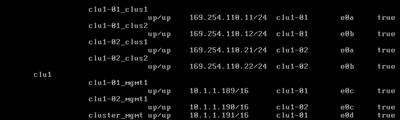
AFAIK, I should connect to cluster_mgmt but when I try to ping it from my laptop, it doesn't work.
What am I missing here ?
Solved! See The Solution

- Mark as New
- Bookmark
- Subscribe
- Mute
- Subscribe to RSS Feed
- Permalink
- Report Inappropriate Content
Ontap let you change any network element as needed. Make sure your network setup is configure correctly before doing any modifications to the mgmt interfaces.
Hope this helps.
Good luck!
- Mark as New
- Bookmark
- Subscribe
- Mute
- Subscribe to RSS Feed
- Permalink
- Report Inappropriate Content
- Mark as New
- Bookmark
- Subscribe
- Mute
- Subscribe to RSS Feed
- Permalink
- Report Inappropriate Content
Thanks for your response.
I executed the command that you gave me.

Now it shows as false.
- Mark as New
- Bookmark
- Subscribe
- Mute
- Subscribe to RSS Feed
- Permalink
- Report Inappropriate Content
try to move it to home port.
network interface revert *
https://docs.netapp.com/ontap-9/topic/com.netapp.doc.dot-cm-cmpr-950/network__interface__revert.html
- Mark as New
- Bookmark
- Subscribe
- Mute
- Subscribe to RSS Feed
- Permalink
- Report Inappropriate Content
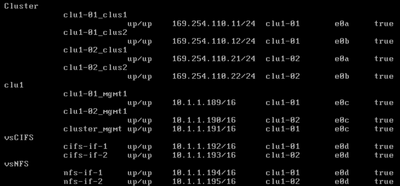
Looks good now. But I am still not able to ping it from my laptop.
- Mark as New
- Bookmark
- Subscribe
- Mute
- Subscribe to RSS Feed
- Permalink
- Report Inappropriate Content
- Mark as New
- Bookmark
- Subscribe
- Mute
- Subscribe to RSS Feed
- Permalink
- Report Inappropriate Content
I am not able to ping 189 and 190 as well . Looks like that the network route has to be modified. I am using VPN. Is it possible to change all the 10.1.* IP's to 10.100.*

I am not able to ping the gateway as well.
Can I change the gateway as well to the one that is reachable via my laptop?
- Mark as New
- Bookmark
- Subscribe
- Mute
- Subscribe to RSS Feed
- Permalink
- Report Inappropriate Content

